Smarter search by text filter
Logged
Is it possible to improve the search by text engine in Capture One?
At the moment it is not possible to enter e.g. a list of files into the search field:
001.jpg 003.jpg 004.jpg
It is not possible to search for specific files with the extension.
By typing 02 the picture 02.jpg is found and this is correct but also 0234.jpg and 020.jpg which is not expected.
This option would be especially useful when we want to paste the list of photo names generated in the third program.
Lightroom supports this type of search and in Capture One it works not very logically, I understand that the search engine tries to guess what I mean, but it could be expanded with additional options. Using filters and single conditions is not part of the game.
-

Grep search would be a huge boon as well.
0 -

There is a specific Select by File Name feature.
https://support.captureone.com/hc/en-us/articles/360002486138-Selecting-images
Does that help?
-1 -
Nope it not work.
Still searching "02" the picture 02.jpg is found and this is correct but also 0234.jpg and 020.jpg which is not expected.
0 -
If you include the file extension and indicate that the extension is to be included (for example, 02.jpg) the "Select" program will only select files that include "02.jpg" in the name.
The option is really intended for selecting a list of files with relatively full names rather than partial names but may still work well enough with partial names for many purposes as long as the file name extension is used to make the search and selection a little more unique.
-1 -
I'm including file extension and unchecking Ignore file extension field, searching is buggy.
Searching for "10.jpg".
Selected files:
10.jpg - expected
0110.jpg - not expected
0210.jpg - not expected
0 -
It is what I would expect from that sort of search - as I listed above.
Personally I prefer to work with more useful file names that offer greater uniqueness and make it easier to avoid the problem you think you have.
0 -
I think this search is wrong.
I understand that the search engine should be "smart" and try to guess what files it is about, but when I use this option, which is called "Filename list", as the name suggests, it should only search for what I am looking for.
There are many examples where this will work wrong, and it doesn't have to be with filenames like I showed before. In the case of files: shirt.jpg, shirt-blue.jpg, shirt-blue-red.jpg will also fail.Renaming files just to be able to work with Capture One is a complete misunderstanding.
Could someone from the Capture One support comment, I don't believe that it should be as it is and nothing can be done about it.
0 -
The file name list was provided so that a photographer whose client provided a list of uniquely named files from a known set of images from a shoot could easily be selected for some purpose - typically processing the shots that the client had selected.
In that situation having usefully named files helps everyone an would potentially continue to help everyone well into the future after the files are archived.
Numbers and a file extension alone are not really very useful to most people.
If you want a specific search (for most databases) you have to be prepared to create the search rules. These might be as simple as making sure that spaces are included at the start and end of the search strings or they might require the use of a specific character or one of a set of specifically chosen characters.
In a very mixed and flexible database with a lot of "free text" it is almost impossible to provide a generic search tool that satisfies all expectations without question and copes with all languages and character set variations.
You could try including a space before you first character in the text string but often spaces are removed as possible errors or have special treatment, as in this case, for use as a file name separator.
The traditional approach to defining restricted text strings has been to used " " quote marks but that would then constrain the use of the same marks in any text fields and therefore may be thought inappropriate for searching IPTC metadata that may contain a lot of text based background information for an image.
By far the best solution - as is evident from all of the user driven development in the import, tethering and output functionality provided in Capture One along with the renaming options - is to use a useful naming system to disambiguate file names.
That might included using leading 00s if you wish to stick with only numeric names. For example 0020.jpg rather than 20.jpg
If you really want someone from Capture One to comment you should use the "Submit a request" option found in the support pages and create a Support Case that will provide you with a personal response.
0 -

Hi,
Thank you for your post.
You can search files from the main menu Select -> Select By -> Filename List and enter the file name(s) in the text box there.
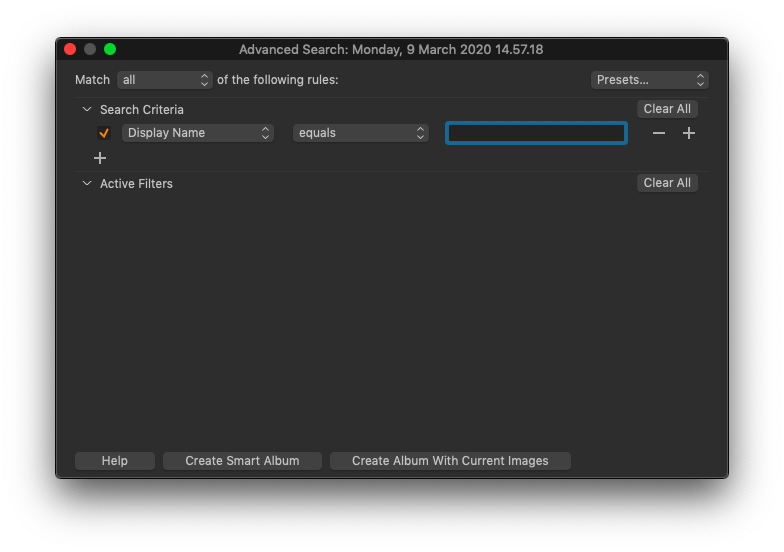
Alternatively, you can look for certain images using the search in the Filters tool. Select Display Name in the Search Criteria and then set "equals". Type in the image name in the text box. The corresponding image(s) will be shown in the Browser.
 0
0 -
Adding individual search criteria does not work when you need to search for several dozen files it's useless.
Filename list search is not working properly.
When I search for "10.jpg".Selected files:
10.jpg - expected
0110.jpg - not expected
0210.jpg - not expectedThe same is with filenames like this: shirt.jpg, shirt-blue.jpg, shirt-blue-red.jpg, and searching for shirt.jpg
It doesn't matter what options I choose or choose to ignore the extension or not. The search engine tries to guess the files too "smart" with the wrong result.
Maybe you need an additional "strict search" checkbox in this window?
I think that by default the "Filename list ..." search engine should work in such a way that it searches exactly what is entered, and the search engine that is available from the magnifying glass icon should search in this "smart" way. At the moment it looks a bit like a bug or a bug in functionality.
0
Post is closed for comments.
Comments
10 comments