Thumbnails being weird after editing

New to Capture One and photo editing. Only done movie editing prior to this, and trying to learn some new things, so this is new to me. I`m having this issue when editing RAW files where the thumbnails are unrecognizable the second I do an edit. Even if I undo the edit, the thumbs go bananas. They will also stay like this after export. Is it something I`m doing wrong, maybe the specs of my PC isn`t good enough? Is it the wrong Raw file? I don`t know. As you can see, images edited as jpg are fine.
Also, the exports are fine once opened, it`s just the thumbnails
I`m running Capture One Pro 20
Fujifilm x-t4
Windows computer
Raw files transferred to computer, then imported into Capture One, maybe that`s where I`m going wrong?
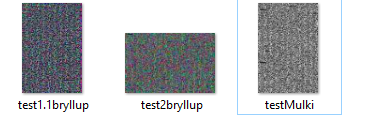
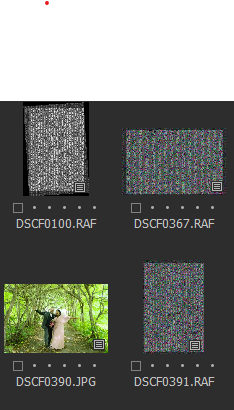
-

Very odd.
2 thoughts.
Are you using a Fuji Film emulation in camera? Is it supported for the camera in question as far as C1 is concerned?
Go into the C1 Preferences tool and in the "General" tab set the "Use Hardware Acceleration" settings to "None" in both cases. Then see what happens if you use the Regenerate option recreate and Thumbnails and Previews.
Any difference?
0 -
Thanks for the reply.
I am not completely sure by what you mean with the emulation. Forgot to mention in the original post that I am using a Fujifilm x-t4, and unless there is a setting in the camera that I need to change out of the box it should work I guess?
Did the second thing you mentioned, but no changes. Still got the crazy previews.
0 -
I figured out what you meant with the film emulation, and that is probably what causes it. Imported some pics that were plain, and those worked no problem, no preview/thumbnail errors so far.
Nonetheless, Capture one states that they support the emulation I used.. So i have no idea
0 -
I'm not a Fuji user but I sort of recall seeing something that suggested that the latest release of the Film Simulations did not apply to all supported camera models. Or maybe that was some of the simulations.
You would also need to be up to date with the C1V20 releases (just mentioned in case you are not yet at the required level.)
If you change the relevant settings in the Base Characteristics tool to one of the supported Simulation for the T4, or a more generic setting unrelated to film simulations, you should be able to get usable thumbnails.
This may help.
https://support.captureone.com/hc/en-us/articles/360002589937-Fujifilm-Film-Simulations
Searching using the community Search facility will also return results from all useful Support sources and might be a means of getting to specifically useful information to help your situation more effectively than my rather generic efforts. You will know which words are of special interest to you.
0 -
Thank you. As of now I have changed all imports to Film Standard, which seems to be working for the most part. Tried some of the others as well, but could not get a consistant result. In the future I will not use the emulations in camera unless I know they are supported, that`s for sure.
Thanks for all your help SFA
0
Post is closed for comments.
Comments
5 comments