What copy all adjustments (include crop) to multiple image

Hi. I'm heave CO 20 build 13.1.2.35
In the previous version, using the arrow icons, I copied ALL settings from one photo to the next. Now this is not possible. "Copy And Apply Adjustments" doesn't remember the options I chose and I have to check the things I need again every time - so I check everything over and over with every change. Why were the previous options removed?
-

Check the settings you have in the Clipboard tool.
0 -
I want to be able to copy all the settings from the photo I'm currently in without any additional selections. Please RESTORE this setting. The current mechanism that makes me select new options every time is unacceptable.
0 -
Did you read the document I linked previously?
Especially part 2 of the answer.
0 -
I don't think anything has changed. It still works as it always did for me (although admittedly that is on a Mac).
There is a setting on the Adjustments Clipboard that may have been changed, perhaps?
Is it possible that the setting shown in my screenshot has somehow been set to none?
Ian
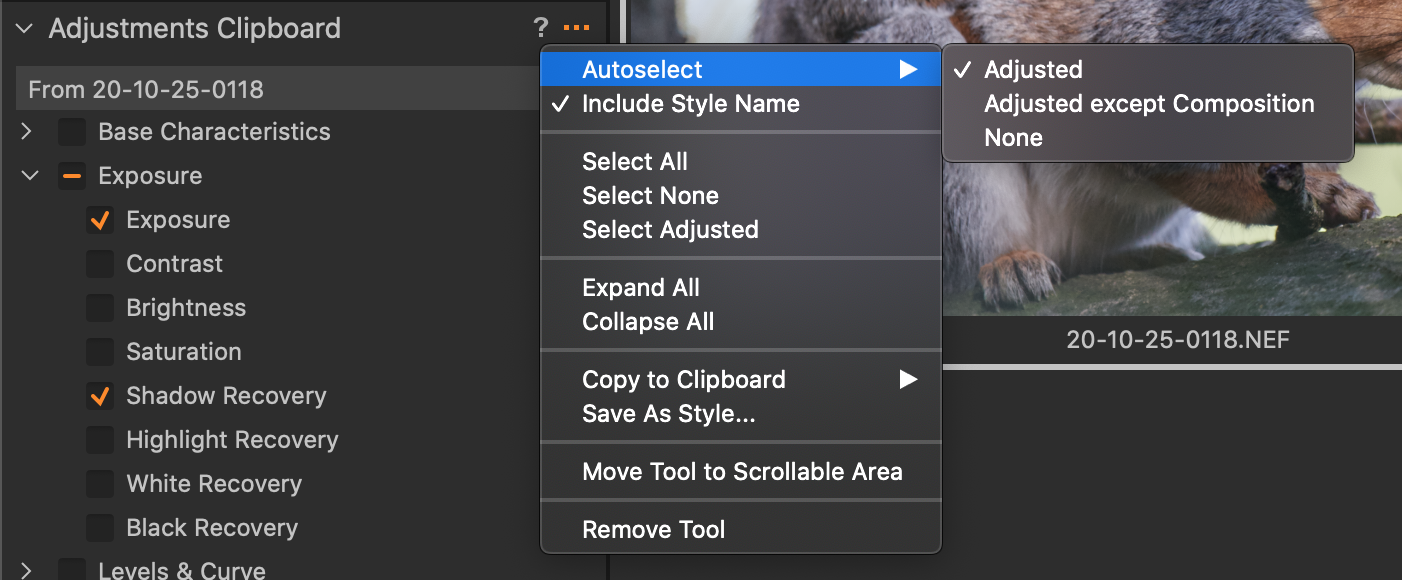 0
0

Post is closed for comments.
Comments
4 comments