Preview loading time issues - sorting through images.

Let me start by saying I would absolutely love to find a solution to this problem. It has been pretty much the sole thing keeping me from switching to Capture One for years now. Since I think version 11? Anyway..
I'm starting to think maybe my workflow is wrong? I don't see how this doesn't annoy the hell out of every photographer that touches the software.
I currently use Lightroom. I hate it but it's fast.
When I import images from a shoot I usually go through a few round of making picks / selects. Let's say I have 700 images from a shoot. I import them, let previews render, then flip through them one by one flagging what I like.
I do this pretty quickly. Sometimes I flip back and forth between four or five images in a row trying to sort out which I like best. Little things usually - exact position of a hand, etc.
I have a Core i7, 32GB ram, a 5700XT, a Samsung 970 1TB drive for my working files, etc. I've tried this on Windows, Mac, AMD, Nvidia, etc. Same result. I even tried this out on a new gaming computer I built for my son with a Samsung 980 PCIe 4.0 NVMe drive. Clocked in at 5500MB/s reads.
Why is the image blurry for just a moment when I move to the next one?! Why does it always look like a super low res image that then magically pops in clearly with a ~250-500ms delay? How do you all sort through your images when you can't quickly scroll through them without the entire stream devolving into a 320x240 pixellated mess?
Sure I can pause after each image for just a second and then it won't do it but then the software doesn't keep up with me.
It's been like 8 years! Why does this still behave this way?
Am I sorting my images wrong? Should I be doing something differently? Any thoughts, advice, or technical solutions would be greatly appreciated.
-

What size default preview file have you set and how does that compare with your native screen resolution?
0 -
I have tried everything.
I usually use a 4k monitor but I've tried this at 1080P native resolutions as well.
I've tried all the preview resolutions - smallest, largest, match to resolution, etc.
Admittedly the problem is *almost* gone if I've set my Mac with SwitchResX to 1080P non-HiDPI mode and rendered 1080P previews. Still there a bit though - perhaps tolerable? At any higher resolutions the problem is really noticeable.
0 -

...yes, use photomechnic then move the raw files to whatever app you like. I would never ever user c1 for culling 700 raw files it is far to slow !
2 -

I ended up buying Photo Mechanic plus just for this :(.
0 -
@CSP - I suppose I could go this route. I do like importing everything into a library or catalog and being able to access it later. I'll look at Photomechanic today and give it a go.
@Anand Sankaran - Yes, 4K displays here as well.
0 -
I just tried the trial of C1 21 and it's definitely a bit faster though!
0 -
Photo Mechanic Plus is a catalog management software built on top of Photo Mechanic. It can catalog and search photos across multiple drives.
I will try C1 21 to see if it fixes it.
0 -
I have a single catalog in PM plus to manage 140k images and it flies.
1 -
@Anand - Does it's tags / ratings sync with C1 somehow?
0 -
for years PM is the fasted way for me to go through a lot of images, you even can start culling during import ! I do not use any library but when I use LR I just select the tagged images and drop them on the LR icon this triggered the import. don't know if this works the same with c1.
0 -
yes can setup PM to see the color tags in c1
0 -
@jonathan yes, it does. They use industry standard meta information. Please see
https://www.youtube.com/watch?v=JeQSob64qlQ
This is a popular combination (Photo mechanic + Capture One). Only downside PM Plus is expensive, I spent my C21 upgrade money there.
0 -
considering the time it saves it is cheap...
0 -
@CSP interesting. I ingest them all into PM (and edit the contact sheet with all the meta information I need for searching). I cull there and right click edit one photo at a time.
I do this because C1 is useless to me, it is not even rendering the preview images in gallery mode. I have to try various preview settings. C1 acknowledged it is a bug but won't fix it.
0 -
@CSP I completely agree. I was even stupid enough to create my own catalog management system / software before I decided Photo Mechanic Plus was worth it for $229.
0 -
Thanks for the link to that video @Anand
0 -
PM is simply in a different league because they need to really address the needs of professionals to stay in business, very different to c1..... after many years I only can say the best about this company.
0 -
watch this https://www.youtube.com/watch?v=JeQSob64qlQ. I´m surpised
0 -
I was testing PM plus before they released it. It was buggy but their developer reached out to me directly and I have been working with him almost daily to figure out kinks and fix. They often release custom builds for me to test. I was so astonished by Kirk's support that I bought the software even before I had my full catalog built.
Kirk said exactly the same to me. They need my usecase to succeed or they will go out of business.
1 -
..YES ! the main problem here is that they think they are smarter than us and don't need to listen because they can always persuade enough hobbyists to buy c1..
0 -
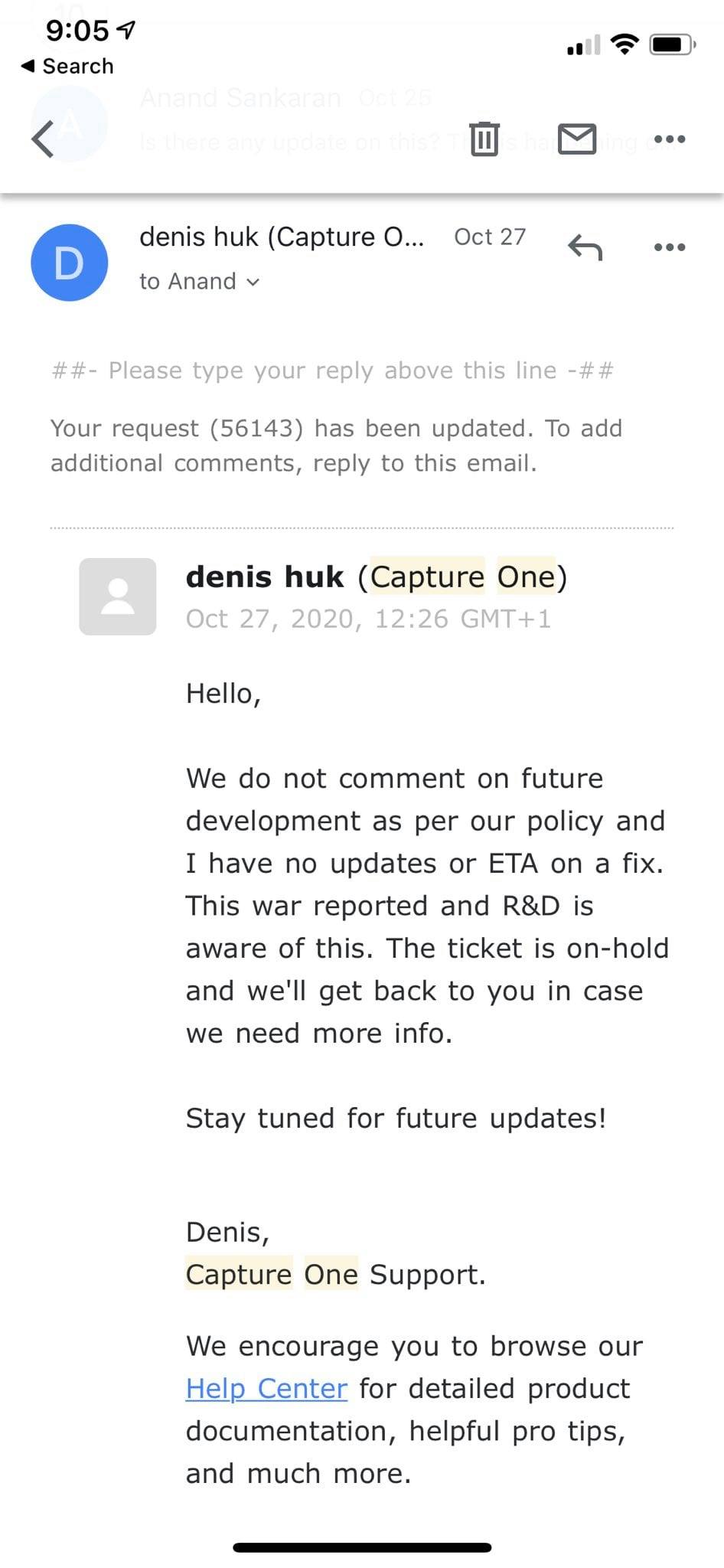
@CSP, this is the response from C1 for my bug. A bug where I can't see preview images when I import photos.
 0
0 -
...the standard response for any bug, but great that they admitted it to be a bug, could be worse..;-)
0 -
Nice.
0
Post is closed for comments.
Comments
23 comments