Read Only...wtf?

Files are on an external drive where project sits. Some are editable others are not. This is completely unacceptable for a photo editing software program. I need a solution immediately. Thank you.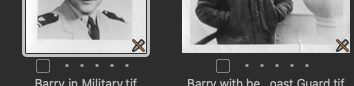
I will add that I read the previous comments related to this issue. I checked the preferences and Enable JPEG Editing is checked. Also files are 9mb and 15mb. I have many other files with the same uneditable status and others that are fine. I don't understand why this happening nor what to do about it. All I do know is that I need to process these files to bring into my film project and this is situation is slowing down my progress. Please help!
-

Files must be at least 512x512 pixels to be edited. Or perhaps it's greater than 512 on a side. Also, files must be in RGB, not grayscale. If your B&W images are in grayscale you'll need to convert them to RGB if you want to edit them in Capture One.
0 -

...could it be that you HD is completely full ?
0 -
HD is not full but I did notice that the ones that had the Read Only icon were greyscale. I've since rescanned those images as RGB and they are now editable. So the greyscale seems to have been the issue. Is this normal behavior? I don't remember Lightroom having this issue.
Thanks for your responses. Really appreciate it.
0 -
Yes, it is a feature of Capture One that it doesn't handle greyscale.
Ian
0 -
This support page: https://support.captureone.com/hc/en-us/articles/360002478277-JPEG-and-TIFF-file-formats
says "However, JPEGs or TIFFs rendered in CMYK or Grayscale cannot be edited in Capture One."
I think the requirement for RGB is listed elsewhere, too, but I couldn't find the page I was thinking of with a quick search.
0 -
Thanks for the support page link, Marco. Very helpful.
0

Post is closed for comments.
Comments
6 comments