C1 keep showing the universal iMac waiting/reading icon.

Hi,
I'm a newcomer to C1.
My C1 is constantly showing the universal reading/waiting animation icon (see red arrow) at the top. Anything I have done wrong or not done right?
Pls advise. TIA.
Michael Lee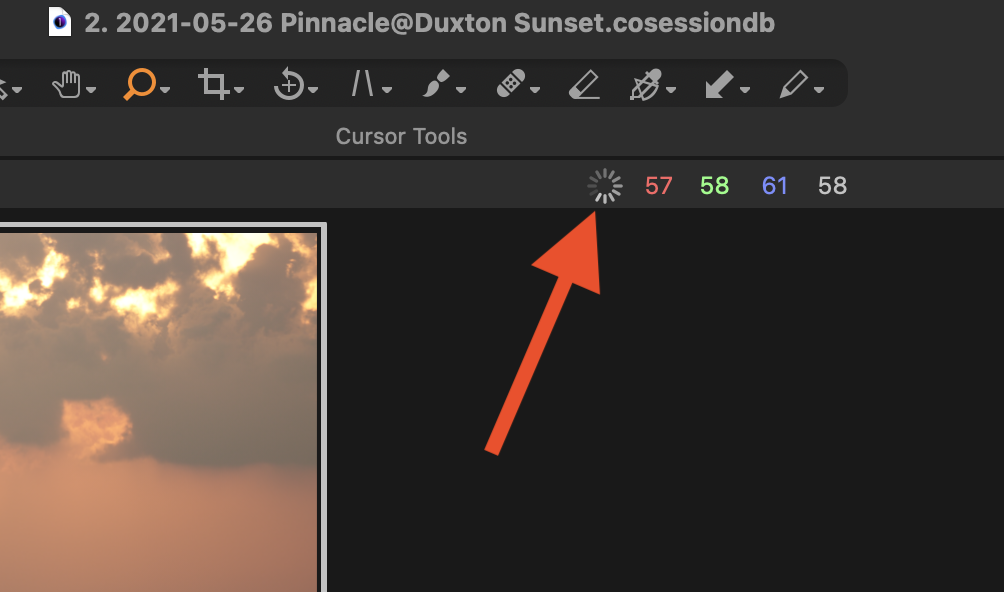
-

Same here :-/
0 -

This is, mostly, a User to User forum.
For a fellow user to be able to offer any assistance some further details are likely to be required.
Alternatively you may find some suggestions in the FAQ articles or by searching the forum contents.
If you wish to get some technical support from the C1 Support Team is it best to use the "Submit a request" feature that can be found on the top line of forum pages (and on other pages in the articles in the FAQ section, often at the bottom of a page.)
0 -
Ok noted with thanks.
0 -

Michael, did you click on it to open the Activity window? Sometimes after an update C1 rebuilds the previews and it will say so in the activity window. If there are a lot of previews to rebuild, it might take quite a while.
0 -

If when you click on wheel it says focusing viewer or something similar I am told it is a known bug that is difficult to reproduce consistently and hence be squashed.
Dave
0 -

I saw the same thing when I upgraded from version 20 to version 21 (14.2). It did not seem to have any effect on performance and hovering on it gave the "focusing viewer" message, whatever that means. After a while, I exited and restarted Capture One and the spinning wheel did not return.
0
Post is closed for comments.
Comments
6 comments