New Export Button

The new version changes the Process tab to an Export button. I have my Process Tab set to PSD full size almost all the time, it is so easy to make adjustment and just hit the process button as I go, this new export button, I actually find really annoying. It just adds an unnecessary step and slows down my workflow
FYI to Capture one Engineers, can we have the process gear back in the toolbar too?
-

Nicolas ....I use c1 too long to believe in miracles ;-)
0 -
"The new Exporter was redesigned to accommodate an easier workflow and use of Location and Naming, which previously were very complex to understand."
haha.. for whom ? the occasionally cat pic developer ?
1 -

"The new Exporter was redesigned to accommodate an easier workflow and use of Location and Naming, which previously were very complex to understand. "
Well, this is valid for amateur using C1 once a week. It does not apply for working pro which use the tool on a daily basis.
Thanks for the information.
5 -

Agreed. Pros need as much power / functionality as possible. Otherwise there is space for a cheaper and lighter featured C1.
2 -
...but the most important selling point to persuade amateurs to buy a software they actually don't need is that C1 is such a pro software.
0 -

Just developers thinking they know best without speaking to working professionals
Feature request to bring it back.
https://support.captureone.com/hc/en-us/community/posts/4404472272273-Bring-back-the-Output-Panel-4 -

Sometime, on set, I have maybe thirty seconds to process 300+ files as low-res jpegs and tiny copyright size jpegs. Then filter for selects, switch recipes and process those files as low-res jpegs into a different selects output folder and as full-res tiffs. THEN pause the queue, set my next capture folder and reset the counter. If there's any time left in that 30 seconds, I start the queue and process until we start shooting.
Sure, some people might use soft proofing. But, as someone who's been using Capture One for more than a decade, I know exactly how my files are going to look upon output; tiffs, jpegs, quickproofs, 300dpi, 72dpi, pixels and quality. Give me a break.
3 -
YOU'RE SO RIGHT...!!! That popup window is such a silly thing to do... It is amazing how the CO team just spoils something that was working perfectly before... this is not the first time that happens... Hope there will be an update the sooner the better taking back the option to have the export adjust as a tab, and see it in an horizontal way instead of that deep digging you have to do now...
1 -

control/D just opens the export dialog & still requires another click to export
0 -
I exported like 6-10 images, and after that, this is what I get as JPG, TIFF, PNG and PSD:
 0
0 -
@charles kasler - "control/D just opens the export dialog & still requires another click to export"
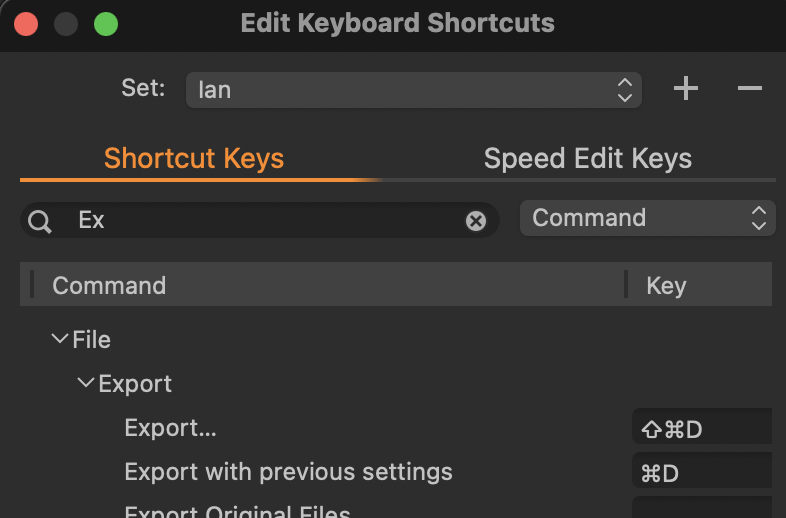
I'm finding (on a Mac, admittedly) that Cmd-D just processes a file with no other clicks required. Perhaps you should look in Edit Keyboard Shortcuts and see what Ctrl-D is assigned to.
Ian
0 -
Thanks Ian. I checked & it's assigned to export but still the same result.
0 -
OK - that explains it. Try assigning it instead to Export with previous settings.
Ian
 0
0 -
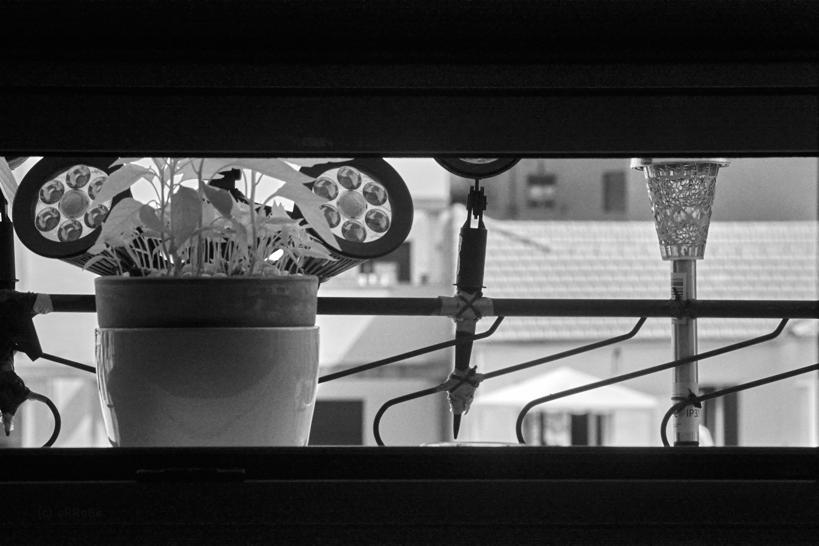
Would be nice if someone from CO staff could explain why this morning I exported from the same shot image #1 and later this evening image #2... make a guess which is which... since the big trouble with Leica Q2 ICC profile never seen something like this...
 0
0 -
Thank you Ian - that worked. I wouldn't have thought of that. At first it said the process recipe wasn't enabled but when I looked, it was. Now it seems OK.
0 -

@csp “ emaile, i do not really know what you are referring to but adobe changed course which means they listen to their user something c1 is also unable... just think of layer handling.”
It was either dumbed-down import or export they introduced upon its users without warning. But you’re right, they listened. Senior management eventually chimed in at the Lr user forum and they reversed course in the next update. Both are things I would appreciate here: C1 staff and management chiming in and explaining decisions, and reversing course where needed. This would be an excellent case for both…
0 -

@Bryce Bennett
Same problem on my side. Can't export my manual order... did you find a solution to that yet?0 -
@rekre: Well, the only fix it to forget about 14.3.0 and downgrade to 14.2...
We guess there will be a fix update during the summer.
0 -
@Nicolas Det
But I guess I can't use my current catalogue then?
0 -
@emile
"C1 staff and management chiming in and explaining decisions, and reversing course where needed. This would be an excellent case for both…“yes this is how things should be and this is also how most customer oriented companies act but communication for c1 has only one direction and they avoid a real dialog with us like the plague. even the giant adobe has no problem with listening and answering so somethings is absolut wrong here. they remind me of nlp trained politicians, never answer a question but always deliver your prepared message even when it is a lie. so will they response in this case ? clearly not ! they did not make this change accidentally and they for sure priced in some collateral damage. taking the needs of all of their user into account is not relevant as long as the money keeps on rolling in. the little loss is also easy compensated with more marketing and as long as no competitor comes up they are save .0 -
@rekre: the upgraded catalog can not be use back in the old version. Unfortunately. However, usually, during the catalog upgrade process, C1 backup it up. Check if the catalog's folder.
Best Luck
0 -
@Nicolas
thank you. Unfortunately that won't help me much since I've finished editing almost a whole wedding since updating. So I'll probably need to reorder the pictures (550) manually :(
And will definitely downgrade after. What a mess!0 -
@rekre:
Sorry to ear that. Fortunately, I had the chance to only "trash" one session.. I could do the export (just a few real estate pictures) with JpegMiniPro.
Cheers
0 -

Well, years back at the Photokina fair in Cologne, I spoke with the people behind Capture One (Phase One then), and they said that they NEVER remove features from the software, just at in new..........!
There must be some new employees now....... :-)
The old Process tab is working absolutely superior and flawless, so why the H... change it???
Regard
Gert Laursen
3

Post is closed for comments.
Comments
55 comments