improving communication

Dear Capture One Team, you write in your statement "We hear you":
We hope that this feedback can evolve into a positive conversation – one that will allow us to better understand how to meet the multiple needs of our community – present and future.
The communication in the community forum is very one-sided.
The Capture One Team, very rarely provides answers and feedback. The forum is full of posts where users write for feedback or help from the team.
The handling of the many feedbacks to the update 14.3. shows this very clearly:
2 weeks nothing was heard from the Capture One Team in the forum. Users have posted their sparse responses from Capture One. Officially, nothing came. Now a great designed answer, which puts the most emphasis on public relation language.
Content and problem solving is only secondary.
The feeling remains of not being heard.
Professional users invest considerable time describing their problems and wishes in great detail. An answer that only contains general phrases and refers to the well known help pages with a standard reference disappoints and annoys.
A positive example is the communication in the forum of Camerabits: Here, every user is taken seriously and receives a direct and substantiated reply to the problem in the shortest possible time, often from the developer himself.
Dear Capture One Team, if you truly want a positive conversation "that allows you to better understand how to meet the diverse needs of the community - today and in the future" - you must change the way you give feedback and responses.
Please address the users and their often very well described problems. Blanket and PR statements or help pages are often less supportive.
I would look forward to a modified better communication here in the forum.
Best regards
Thomas Schneider
-
Official comment

Hi Thomas,
We are sorry that our statement came across as being very corporate because we do listen to you and the other users who were affected by this update. That is why we encourage you to give us your feedback in the forum, where we can collect it and hand it over to the dev/software team, so they can act on it.
Our focus was on bringing forward the message “we hear you and we want to do better” because this is the most important thing we can do right now.
Since our update, we have been listening and gathering feedback from you and the rest of the community, in order to make sure that what we do next is the right move. We will bring you an update on this in the near future.
We are grateful for your loyalty and we appreciate your opinion on the new update.
Again, we are sorry for the inconvenience this had brought to you and your workflow and hope you will continue your Capture One journey with us.
Feel free to submit a request for personal help when any issues arise. -

don´t tell me you are surprised, this is what they are, never been different, a secretive company with an arrogant attidude. their statement is a perfect example of what is wrong, vague in ever aspect, nobody is responsible and nothing substantial is said or announced, a perfect example of marketing BS talk.
1 -
I think you are partially right, but we won't get them on any "round table" if we are rude to them.
It is good that they show now that they noticed users and professional users are upset - and at the same time they probably want to discuss internally (and hopefully also externally to some extent) the options they have. Also, they want to understand our needs better (hence the link and encouragement to the forum).
That's presumably the reason why they are vague in this statement (depending on how you read it) at this point in time.
It would be a welcome novum indeed if they discussed the solution with us before they implement or release it.
1 -
Agree. I suggested something similar a while ago: "A change of company policy as regards communication, forum participation, etc." (the suggestion was quickly hidden away in the "Issues with the new forum" section though).
0 -
from imaging resource
Interview with Capture One’s CEO, Rafael Orta: How Capture One is becoming more agile than ever before
IR: Does that mean that user feedback and suggestions are taken into consideration when planning updates?
RO: Most definitely. As we reveal more and more of our roadmap in the next few weeks, I hope that more people will see themselves represented in the work that we are doing. I'm very proud of what we have achieved in terms of sharing and communicating what we are doing, but I'm not satisfied. There's so much more that we can communicate and you will see a lot more from us.
March 17, 2021
what a clown....
ps.: ...so maybe they listen but it is just not us, commercial photographer which are not nearly as "creative" as their ambassadors and in most cases also too busy to offer workshops or other junk on their websites.
0 -
I searched for "Roadmap" on their site but did not find any.
0 -
hmmm ...does this mean this orta guy is not telling us the truth ?
in some way I´m thankful that they do not have one because so I can keep a little hope that the iPad app is not another let down targeted at insta user and "creatives" which have not discovered that their cameras have viewfinders too.
0 -
The iPad app is clearly just a black hole dedicated to swallowing up any resources that could have been spent on improving Capture One.
0 -

@BeO
"It would be a welcome novum indeed if they discussed the solution with us before they implement or release it."
Indeed.
However, whilst in the past I spent some time managing the activities of a successfully deployed "User Group" for a Business Software Developer. The success only became possible when a few key customers (those who were in effect funding much of the development and therefore influencing core requirements that we would then develop in ways that proved long term flexibility for future directions) were treated to a very personalised service and the next tier of users (smaller wallets) were gathered together at hosted events every 3 or 4 months for progress presentations, general discussions, "road map" presentations and refreshments.
Many would welcome a day out of the office and some travel justification for their company-provided car.
We were talking relatively small numbers of customers (a niche market area at the time), many with largely common requirements. Also quite long development lead times - little or no "agile" development back then.
The software market may change. Human nature not so much.
I cannot imagine that the same degree of success would be possible with thousands of users. And especially without an option for allowing the users to push their needed requirements forward in the list in some way.
The best way to manage that would be to put a price on the development. That usually filters the important "needs" out of the list of "let's ask for this to see if they will take the bait" requests, many of which will likely be irrelevant to the requester within a few months.
Based on relatively structured business process usage (i.e. some degree of consistency of needs across all clients) and the clients funding the developments directly for their own system (with later aggregation of the developments into the core system) we still estimated that 80% of the developments were not used by the customer that commissioned them and the 20% that were used were not exactly used as intended during the specification definition discussions.
Given several tens of thousands of customers and many different levels of photo process experience "needs", I think it would take some rather novel approaches to make a better outcome using a mass involvement approach compared to background analysis of industry trends and existing user actual usage analysis.
A large number of people would need to be committed to such a task if a significant number of users joined in. Care would be needed to ensure that a "balanced" caucus was "around the table" for the benefit of all interests. Things could easily become fractious and expensive. Also very counterproductive.
In recent times "Crowd Funding" has become popular, though the results of the promised product developments have not always matched expectations.
Perhaps a modern version of the old test we used years ago - "Are you prepared to pay for it?" - might be useful to focus thoughts and efforts towards what is most important to most users as far as the wider customer base is concerned.
Some creativity might be required to set up a successful way to establish and optimise such an approach in a way that applied the best aspects of "Crowd Funding" principles to an internal process that may not actually involve users providing additional-to-license-costs funding over time. (Unless they chose to anyway.)
It would also need to avoid "The Madness of Crowds" outcomes that seem to be rather common in human history.
0 -

@SFA
You wrote "I cannot imagine that the same degree of success would be possible with thousands of users."It sounds plausible that it is impossible to satisfy thousands of users and "...several tens of thousands of customers...", however here is a simple rule to follow that would help a lot:
Do not replace efficient workflows with less efficient ones.
If it is felt that a certain group of users could benefit from a different interaction paradigm, fine, add it as an alternative and make it the default, if needed, but do not break efficient workflows.
This happened a number of times recently, e.g., when brushes were re-invented, when the ability to add layers to images was introduced but the ability to replace layers of images was removed, and recently with the export functionality which not only replaced a non-modal workflow with an inferior modal approach, but also removed several pieces of functionality.
It is one thing not to offer something and let users wait for it. It is a completely different matter, and much more frustrating to users, to offer good functionality and efficient workflows, to then take them away.
If that could be avoided, a lot of user dissatisfaction could be avoided.P.S.: In all three cases I listed above, Capture One received feedback during the beta testing phase. It would be very nice if they used that feedback to rethink a planned feature rather than just going ahead with everything unchanged.
I am assuming that beta testing is targetting the removal of show stopping errors only. It would be very good, if it could be used to see whether the "roadmap" is aligned with what users outside a focus group want.1 -
Hi SFA,
Yes. But I was not suggesting to discuss all future developments with the whole community. My intention was to suggest this for the current removal and hopefully re-introduction of the processing tools as single tools. They might want to improve or even consolidate the tools slightly, or they might want to incorporate some of the missing functionality in the huge and awkward exporter window.
As I have written elsewhere a few times, I need small tools, especially the process recipe tool, for quick and easy soft-proofing and exporting, and this tool goes into a tool tab, or is floating, depending on the workspace I use.
Only this gives me a smooth user experience with as less clicks, eye and mouse movements as possible if I switch between profiles, editing tools and profiles again, which I often do. It sounds in "We hear you" that they will re-introduce the old (or similar) small tools which can be added into any tab (and hopefully also floating), but I am not sure really.
cheers
0 -
Hi BeO,
I sympathize with that view and agree with you.
Up to a point.
I'm not sure that previous commenters were seeing this as a one-off interaction related only to the new Export functionality.
I have some issues with the new exporter but not the ones that most people seem to have.
I can only assume that none of those who complain about the loss of the Process Queue got themselves involved with beta testing. Nor read the release notes or any of the preview material before diving into the upgrade and finding their work flow disrupted.
My first impressions of the update were not entirely favourable. I rarely ever used Export, always Process and mostly as a batch with the occasional Ctrl-D for a one-off immediate export. The process queue was something I stopped worrying about when I realised sitting watching it was just wasting my time.
When I updated from a 2012 (Win 7) era system to a 2020 era system (Win 10) a few months ago it became apparent that, for my needs, the faster processing speed available meant the normal process run, for me, finished quite quickly and attempting to "manage" the queue, even if I felt a need to do so, might not be possible.
I can understand that people working in a fast-moving Studio shoot environment with a lot of other people providing workflow demands and disruption might see things differently.
What I realised as I looked into the changes was that the advantages of the fully defined Output recipe were almost exactly what I usually used anyway, but with stronger control over the delivery folders and naming conventions. At least in some cases.
I could see benefits for my purposes. But also 2 removed fields that I use regularly, possibly in ways that were not as originally intended in the design spec.
So I saw some gains and some losses. The changes would not stop my approach but, like the loss of the Process queue as used extensively by others, it was disappointing. Mainly because it was an unnecessary removal as it appeared to be just a "logical" tidy-up based on an original functional specification rather than a real use case. I would have to change my naming conventions to make manual edits of names easier or dive into an awkward edit in a long name string.
The Process queue is, I suspect, a slightly different decision.
Partly because the re-design is being branded as Export rather than "Process". I assume that has something to do with trying to persuade people of the benefits of the recipe approach when historically they are at C1 from places that only offer "Export". If one wishes to aggregate to sets of code that are, in effect, doing the same things I suppose only one name can be permitted.
The other consideration might simply be that the Export never had a manageable queue and with the batch processing speed being enhanced - potentially by a lot when all the pros have moved to Macs with M1 technology - the batch may be processed in the "blink of an eye" and so make the queue management somewhat difficult unless it was to be slowed down. ;)
Indeed it seemed to me that the new approach started the output sooner than the earlier Batch process. The setup time for the original batch before any output was created (especially for a large batch) could be quite long.
If one really gets to grips with the "recipe" side of things the entire workflow, possibly in all use case situations, might well be enhanced. However, it's a leap of faith to reach that conclusion if one is currently invested in an existing self-developed process (or, possibly worse, running someone else's "perfect" workflow).
For example, how many Proof Profiles do you regularly need?
If you had 90% of your likely most required proof profiles (perhaps all of those you know you will use) pre-defined in Recipes, how difficult would it be to change the proof profile to see it with all of the required recipe settings in place? The right type of output sharpening for viewing at the right distance at the right size, etc?
Is there a case for offering multiple approaches in the "Enterprise" version (formerly known as the Studio" version .) The main use case failure I have seen described would seem to best fit the market at which that option is targetted.
Let's see what they come up with.
In the forums and elsewhere we seem to have a collection of requirements for the designers and developers to consider. It will be interesting to see what comes of it. Also how C1 measures the subsequent satisfaction levels across the entire user base.
0 -

I agree with 100%.
C1 communication mechanism should be better especially for feature requests. This is the only official mechanism exist for submitting feature request. I had many times told unfortunately this mechanism is like on way path with dead end where we don't see what happens to the request. Reason is that all requests doesn't need to get implemented but at least need to get feed back out the request life cycle. Instead we see "completed" tag with default statement.
I would like to see Request Id for tracking purpose may generated from what ever the Project Management Tool they use with status like Submitted, In Review, Reviewed, Rejected, Considered, Tagged for Development, Implemented etc.. Unfortunately it doesn't happen...
Below screenshot is from Photo Mechanic Feature request which is inline with what I felt...
https://docs.camerabits.com/support/discussions/forums/48000071283/page/1?url_locale=
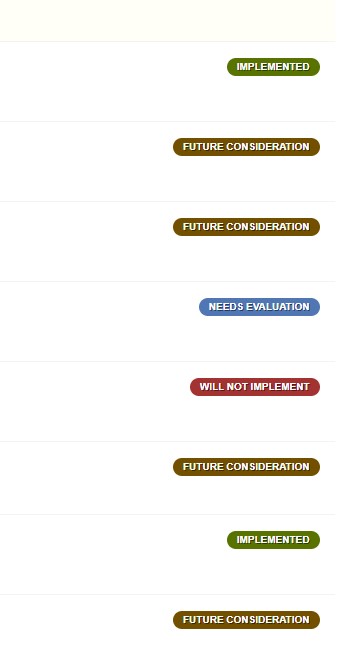 0
0 -
when a company is interested in good customer relations they normally know what to do. camerabits is in every aspect the opposite of c1. they are serving a demanding pro community with an excellent software and support and this without marketing BS and self aggrandising.
0 -
If Capture One is listening, the problem appears to be that the company only reacts to what it's hearing in rare, individual cases like this one where the negative response has been of a sufficient magnitude. Generally, there isn't much indication that any listening is taking place. Apart from the copy & paste replies the company is mostly absent in the forums. It doesn't have to be this way.
1 -
this has always been their attitude but never before have their stupid changes effected so many (pro) user but even now they react as we are some idiots which can be simply manipulated with slimy marketing BS.
0 -

Having just shelled out for CaptureOne this is an interesting conversation to find.
The two tickets opened during my trial period were closed with alacrity. The subsequent three tickets have languished unanswered for two weeks. Perhaps it is their noted high volume of requests coupled with Scandinavian summers notorious for long vacations. The mind certainly wanders to prioritization, whether new users (revenue) are taken over existing user base, or new features over helping users. My issue preventing use of the software should be triaged Highest priority, but that's a professional opinion of a software program manager.
It would seem that CaptureOne has a perception problem, one that does not (yet) affect sales and revenue. Rectifying this often takes changes in perspective and culture, activities that are very much top down; we can only hope that leaders pick up on this before it weakens the company. Or viewed another way, could they be even more successful with an adjustment in their approach?
1 -
@Kevin Kirk
You wrote "Or viewed another way, could they be even more successful with an adjustment in their approach?".
Here is why I believe they would be more successful with an adjustment in their approach.
- By not replacing good workflows with worse ones, they would avoid aggravating users, i.e., avoid potentially losing users and losing word of mouth advocates.
- By listening more to useful suggestions from actual users, rather than what appears to be a rather confined focus group, they would not only stop shrinking but actually increase the number of C1 advocates and thus increase word of mouth sales.
Personally, I was a strong advocate for C1 for a long time, telling everyone who wanted or did not want to hear it, how much better C1 is than Lightroom.
I no longer recommend C1 to anyone because I don't want to be the person who makes someone else commit to a software that appeals at first but by a process of gradual "improvements" is no longer worth a recommendation.
I am concerned about the future of C1, if C1 GUI designers apparently do not understand that it is a problem if
- Browser zoom (thumbnail size) shortcuts do not work properly. This a problem that is severely aggravated when one changes the standard Windows scale factor.
- A change in the placement of "add layer" and "delete layer" UI elements reduces the number of layers which are selectable at once.
- Moving the masking options from their natural place in the Layers tool to the Viewer toolbar, unnecessarily forces one to involve (i.e., repeatedly open and close) the Viewer toolbar.
At least if pointed to these issues, they should be addressed by anyone who takes GUI design seriously and acknowledges that for some users reducing clutter in the UI (i.e., have the ability to leave the Browser and Viewer toolbars closed), reducing mouse movement, and maximising the utility of available screen space are important.
For me a crucial event was when 13.1.0162 introduced a new "brushes as tools" metaphor, making it suddenly impossible to only use two shortcuts to swap between brushing and erasing, independently of the layer kind. This step was very similar to the most recent one -- attempting to make exporting more intuitive and losing functionality and good workflows in the process -- and unfortunately the negative consequences of that step were never completely addressed (only partially in a subsequent update). My respective request to allow the previous efficient workflow and/or to at least allow temporary eraser brush selection was never followed up, even though the latter suggestion was once commented on as being a great idea by the C1 product manager. Support for that request seems low, but it was also somewhat distributed over a number of similar requests.
The downsides of the new approach do not become apparent at all in small, David Grover-style demonstration edits, but are very real for users who employ multiple layers, frequently revisit them during editing, and use an editing console (which has a limited amount of buttons to assign to shortcuts).
In short, if Capture One managed to simplify the use of C1 (not for me, I'm fine but for their casual user demographic) without dumbing down the UI (style brushes are a great example of being successful at that, whereas the recent exporting redesign and the "brushes as tools" design are negative examples) and adopted non-contentious suggestions that would hurt absolutely nobody but significantly improved the experience of some users then they would get my full support again and I would actively endorse C1 again.
0 -
Hi all!
Following community feedback about the redesigned exporter, we are happy to announce that we are introducing the possibility to add the new exporter tools in the main UI. It will also be possible to pause and resume an export. Cross-recipe-naming and cross-recipe-sub-folders will also return.
These updates will be included in Capture One 21 (14.4) - launching at the end of September.
As we move forward, we are committed to ensuring our software develops in a way that includes the functionality critical to the workflow of many professional photographers.
Please look through our updated statement: https://learn.captureone.com/blog-posts/were-listening/
2 -
Maryna,
- Can the Export Recipes tool (and the others) be a floating tool or only be added to a tool tab?
- Can I change the profile for softproofing in the Viewer by just selecting a profile in the floating Export Recipes tool?
Thanks
BeO0 -
@Maryna
This is excellent!I'm particularly thrilled about the return of cross-recipe-naming and cross-recipe-sub-folders.
Thank you!!!
0


Post is closed for comments.
Comments
21 comments