License Key for Trial Version

Ok, I downloaded and installed the trial version last week. When I tried to launch the software, it wanted a license key. I got no key, either in email (yes, I checked the spam folder) or on the screen when trying to launch the software. I submitted a form on the C1 web site , advising I need a key. No response. The support pages offer no support at all. So, I thought I'd try this forum. Maybe someone from C1 will see this post and assist me. It would be of some help if C1 would advise the user that a key will be necessary to use the trial version, and maybe even let the user know how to get the darn thing.
-
Official comment
Just to clarify for anyone visiting this thread a year on: you no longer need a license key for a trial.
All you need is a Capture One account with a valid email address.
See more info here: https://support.captureone.com/hc/en-us/articles/360003989297-How-do-I-activate-my-Capture-One-trial-
-
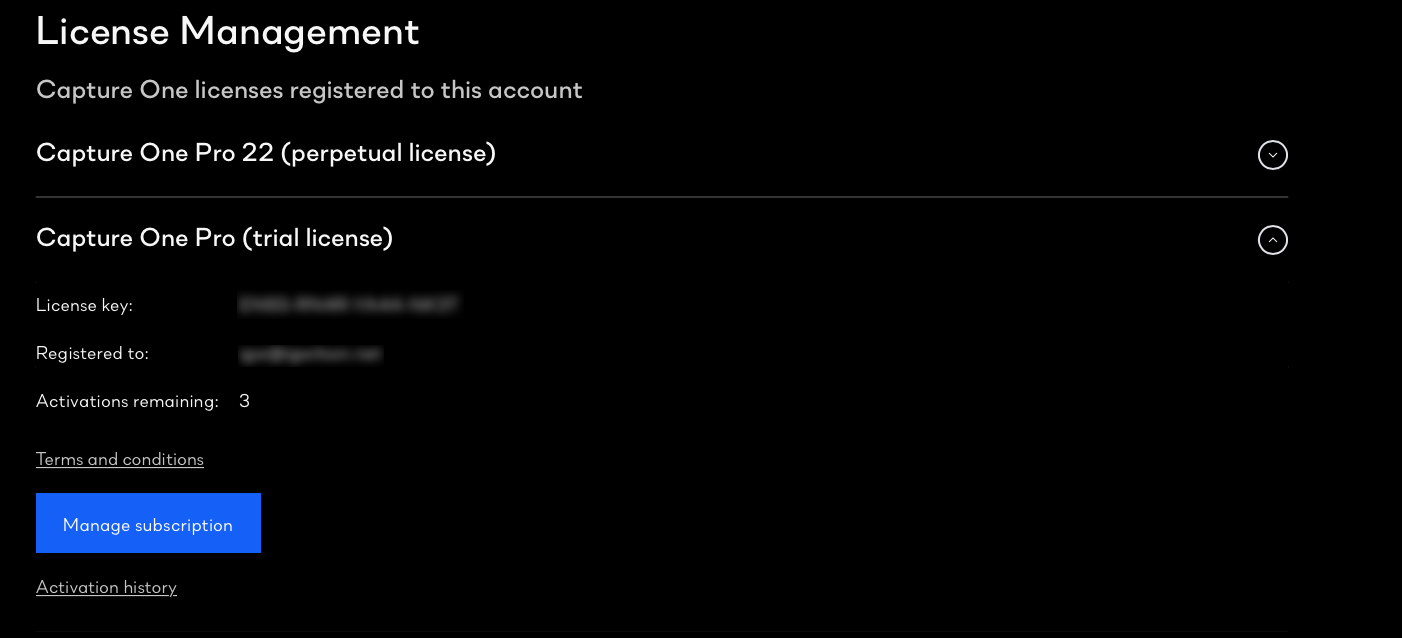
You do need a key for the trial version, and you should have got one. If you log on to your account at the Capture One website, and go to Manage Licenses, do you see a licence key listed for the trial, like this...
Ian
0 -

License key not working for me:
Oops, this registration key is invalid. Please try again or get in touch with our support team.
The above image is not showing the actual screen, which is missing a button "Manage subscription". I tried already a lot, nothing seems to work, so please HELP.
Gerard
0 -
I have a license-key, a registration-key is generated in the "Capture One activation"-screen, I am missing the activation-key. Generate the activation-key in the website is not working: "Oops, this registration key is invalid. Please try again or get in touch with our support team."
Gerard
0 -
C1 support contact is here:
0 -

Gerards,
What is your license key for? Which version of Capture One?
0


Post is closed for comments.
Comments
6 comments