Migrating to new PC

HI, HAVE LOOKED AT SOME OF THE POSTS ON THIS TOPIC BUT STILL NEED A HAND.
I thought by setting up my account on the new laptop (Surface Pro), I would be able to input my license number and it would copy everything across. Seems that is not the case, or at least I could not see how I could put in my license number. Any help in Janet & John still non-technical language would be much appreciated.
Thanks.
-

Tim,
I think you are thinking in mobile phone philosophy mode whereby Apple or Google or whoever likes to store your data for you as part of the"service" they offer to tie you in to their world.
Here you are in personal control of each and every installation you undertake and the only vendor related activities you have are via access to your Capture One user account and its License Management options.
This article may help.
If you plan to use C1 on 2 computers the considerations for setting up the new computer are the same as moving from one computer to another -but without removing anything from the original computer.
Keeping both systems synchronised, should you need to do so, has basically the same considerations as are covered in the article.
0 -
Thanks. I looked at the link and tried to follow the instructions. All went well until I got to step 3: "
"3. Install Capture One on another computer and activate it using the license key for the corresponding product variant."
How do you install Cap One without buying a new copy? Or am I meant to load the files I copied on to the external drive? I tried doing the offline activation but that required a registration code and I have no idea what that was. I entered the 16 digit licence key but to no effect. So no idea where to go next!
0 -
WIth maybe the exception of the free "Express" edition you can install and activate C1 on two computers with the same license key (but may only run one at a time, see license agreements).
You can check out the number of free activations in your account, Manage Licenses, you also can deactivate active C1 installs/computers.
Activation means on startup of C1, enter your lic key and other information/profile, email. What is the exact issue you are facing?
0 -
Is the 16 digit lic key the same as a registration key? I tried to get 'Registration key' but got no response from the button. Secondly, how do I get C1 on to the second computer without repurchasing? I understand about two activations etc. but not where/how to get C1. Do I just upload the files I copied on to the external drive? No doubt I am being particularly stupid but could do with some more specific instructions. Thanks.
0 -
Tim,
Yes the activation key is the same as the Licence key.
Among several way to get the key, one is to log in to your Capture One account and go to your Order history where it should be visible. You can copy and past from there into the Activation window when the time comes.
Licence Management can also be accessed online for activation and de-activation purposes.
To get C1 on another device you could either use an existing download file from your current machine if you ket the last one you downloaded (assuming that was also for a Windows based computer not a Mac) or use the Download window for the Capture One website and Download another file to your new machine. No purchase required.
If you download a new file be sure that it is the right file for the version for which you have a license. E.G. If you have a licence for Version 21 download the latest available V21 release.
Run the installation process.
When you start C1 for the first time you will be asked for an activation key. Use your existing key for that activation.
For you data - your catalogues, image files and so on - you would normally copy them from the old machine or an external drive if that was where you have stored them. You could, perhaps, simply leave them on the external drive and work with them there.
There are some other files that you may wish to copy from the old machine. The previously suggested link discusses those as well.
If your old machine is still working there is no reason to remove anything from it unless you are getting rid of it in some way. Many users will have license keys that provide for 2 activations on different machines as BeO mentioned above.
0 -
Thanks SFA.
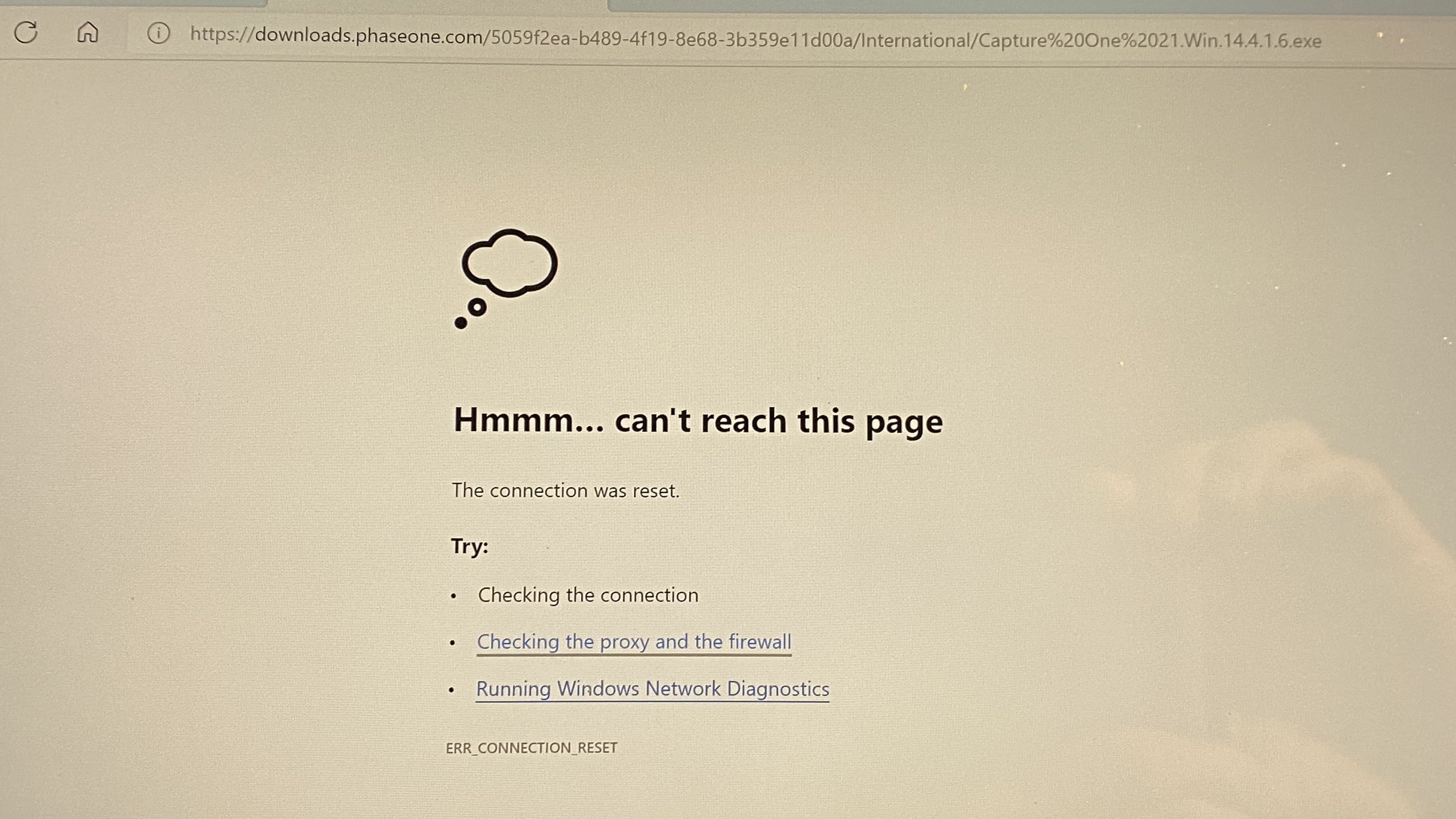
Two steps forward, one step back. I logged into account, no problem. I went to Order history and got the screen shown in 2458 attached. Clicked on “Download latest version…”, which took me first pic attached – 2457. I had an Internet connection. Tried it several times and got same result.
Any idea?
 0
0 -
Tim,
I cannot explain the "oops" message but temporary internet connection gaps may be the cause.
Try this one.
Make sure is it sees that the Surface is Windows not Mac, and then download from there.
I assume that the Surface does not have any odd potential for incompatibility that might prevent the download or running the installation.
That said I have seen a few strange things in the forum over the past few days and even a first attempt to post this reply resulted in an "oops" message.
0 -
Thanks for your patience SFA. Just tried again several times over course of last two hours. Same result. Each time, whichever route in I take, it says the connection to 'downloads.phaseone.com' is "not secure". There is no problem with Internet access, I tested that - got on to BBC and to my Cap One account without a problem. There is something more fundamental here. This is a brand new PC out the box (am writing from old one). Any suggestions? Am desperate to get it loaded to process some photos.
Thanks
Tim
0 -
Tim,
I would guess maybe a Windows or its Edge Browser setting - but i have no idea where to suggest that you look.
Another possibility might be some anti-malware software that came with your Surface or via your Internet provider, having a bad day or simply not liking something that it sees about the Capture One site for some reason.
Is the Surface running Windows 10 or Windows 11?
0 -
I tend to agree and have been wandering around in Settings, looking for the firewall settings. Couldn’t find a thing. Part
Of problem is that the Surface Pro is running Windows 11 and it clearly
Does not like phase.one downloads.com
Bit lost on what to do next.
Tim0 -

Hi Tim.
(You should remove that screen shot showing your licence key
or better yet blur out the key and re-upload.
As is it's just asking to be used by someone else.)
The C1 download link should read as:
https://www.captureone.com/en/account/download
There shouldn't be any reference to Phaseone.com as shown in your screen shot.
Any reference to Phaseone in a C1 link might suggest the link is out of date. "Your Orders" screen shot above does not look like the current black and white themed account pages either.
Maybe try clearing you browser cache.
Could you clarify what version of C1 you were running on the old computer?0 -
Good spot gb.
I missed that one.
The link should indeed be to a Capture One page not a Phase page as far as I can tell from the links in my own account. Presumably that is a Fastspring generated link.
Tim,
The link I included in my previous post (and also provided by gb) should take you directly to the Capture One download site. You should be able to download the latest V21 release from there and then use the license key to activate it when installed.
As gb has pointed out, it's probably not a good a idea to "publish" the key in full on the forum.
0 -
Thanks both. Good point about publishing my licence key. Tried to delete and couldn't; don't know how to blur. Secondly, when I go to 'Download' whether via link sent or under my own direction, the result is the same: the Cap One page comes up very briefly - it flashes in effect and is then replaced by phase downloads. No idea why. I don't know what phase is about. I have Fujifilm camera. I am running Windows 11 and someone suggested to me that maybe Cap One has not yet adjusted its drivers to cater for Windows 11. Is that possible?
Thanks
Tim
0 -
Tim, log out of your C1 account
and try to download the trial C1 version here:
https://www.captureone.com/en/explore-features?gclid=EAIaIQobChMIjPjtla-k9AIVHJNmAh312QkDEAAYASAAEgJmGvD_BwE
Activate the trial with your current v21 license key not the trial license key.
The trial version will become the full Fujifilm version when
you activate it with your current v21 license key.If you still cannot download, try installing/using another browser
and also not signing into your C1 account.0 -
Hi GB
Just tried this. Checked I was logged out on original PC. Assume if I am logged out there, I am logged out full stop. Went to download trial and exactly same thing happened, it took me 'downloads.phaseone.com...'
I presume this further reinforces the theory that this is a PC/Windows 11 issue? Haven't tried another browser yet as only currently have Edge on the new machine, but good thought.
T.
0 -
OK, I have downloaded Chrome. Could not use the link you sent because forwarded to my Gmail account but couldn't receive email on new machine - Office not yet on it. Went in conventional route and signed into account. Tried to upload latest version via Chrome and had exactly the same problem with downloads.phaseone... Beginning to lose the will to live on this. Next, I tried to get the trial version and got same result.
PLEASE HELP.
0 -
I think logging into you account is the problem.
Somehow your account is locked to the old CaptureOne/PhaseOne account website.
You should submit the problem to C1 via the 'submit a request' form at the top right
of this page or here (same thing):
https://support.captureone.com/hc/en-us/requests/newDo you have another email address to use?
If so, try signing out of your C1 account again and go to the download C1 trial page.
When they ask for you to create an account enter a different email/password to create a new account.
Download the trial, install and try to activate with your true Fujifilm license key, password and email.0 -
I am beginning to lose the will to live. I believe I signed out of C1 - it wasn't recognising me, so can't have been signed in. I set up a new account in the girlfriend's name and created password, but nothing happened when I clicked on 'Sign up'. Nada. Niente. Nichts. Tried several times. The theory was good about another account, I get the logic but I seem foiled on every turn. I bought this PC primarily for photo processing and invested in 16GB of RAM to really get it performing, but this is so painful and there is no end in sight.
I also registered a question on the link, but sure how that is going to help.
Given that I will have to upgrade for C1 2022, might it simply be easier to pay to switch to Lightroom?
Tim
0 -
I sympathize. :)
Do you have another computer to download C1 to a USB device using girlfriend's account?
Lightroom + Photoshop is great value.
Maybe subscribe for a month while C1 is possibly worked out?
0 -
Hi GB
Yesterday, I spent a lot of time trying to set up the new account on my new PC in the GF's name. Each time I put details in, it would not let me submit. I presume this is a Windows 11 issue. This morning, I set it up on her i-Pad, used same email address and password and bingo, no problems. C1 sent the email to verify; license key there and all good to go. I didn't actually download it on to the i-Pad but established that I could do so. Again, this is presumably one more step in proof of concept that the problem lies with the C1-Windows 11 interface. And from where I am sitting, it appears there is no immediate fix - albeit that technologically I am an inept idiot and a living example of the PICNIC principle.
I'll look into the Lightroom/Photoshop offer. I will also try to empty memory/cache on new PC to see if I can set up account for GF again. Thanks for the patience.
Tim
0 -
Have now set GF account but still cannot download to new PC. Same problem. Have not yet downloaded to an external drive but going to do that next - downloading trial from old PC with Windows 10 and trying to upload to new PC, if the download worked. Been doing this for a week now. Had intended to upgrade to C1 2022 but presumably I am going to have the same problems with that.
T.
0 -
Hang in there. :)
I'm sure you will get it installed via a portable drive/other computer.
The test will be whether it accepts your Fujifilm version activation details.0 -

Afraid this is not working. Every time I go into C1 it recognises my account, which prevents me from getting the free trial. I have no other device to download the software on to and while I do have an external drive, that isn't much help without a new/different machine. So, I give up. My old tablet is unable to cope with C1 and my new one, brought for the purpose (£2k!) with 16 GB of RAM, refuses to play ball. Seems to me it is a Windows 11 / C1 issue. If you have any other options, please let me know. For reference I have set up Office, WhatsApp, OneDrive and plenty more besides on the new machine today almost without a hitch. Are you not having these problems with other C1 users who have moved over to Windows 11?
Tim
0 -
Try clearing your MS Edge browsing data and history.
This will clear data for all sites so you will have to re-sign into them afterwards too.
Log out of old C1 account.
Open Microsoft Edge and select-
Settings and more > Settings > Privacy, search, and services.
-
Under Clear browsing data, select Choose what to clear.
-
Under Time range, choose "All Time".
-
Make sure all four boxes, are ticked and then select Clear now.
- See if you can login to current C1 site.
0 -
-
Morning GB. Followed directions precisely, cleared everything in Edge, re-signed into C1, tried to download the free trial and got same blocked result. Back to the drawing board.
T.
0 -
Tim, run through the clearing process again
and then try with your girl friend's account details.0 -
Trouble is, I have cleared history and browsing data several times but each time I go back into C1, it seems to recognise me! I don't get the option to set up a new account - either in my name or the GF's. Even when I was able to do that, it made no difference. What am I doing wrong in terms of C1 not recognising me when I go in?
T.
0 -
Try turning off "Sync" in MS Edge settings:
Settings - Sync - Personal - Turn off Sync.
Then clear cache and history as before.
Make sure you are not logged in to C1 account.
Copy this link into the Edge address bar:
https://www.captureone.com/en/account/enter-email
Try to sign into C1 with GF's account details.(Edited)
0 -
Tim,
If it is recognising you that may suggest some of the Capture One cookies have been discovered and it may be interesting to remove those from the MS Edge discoveries.
That said I have a problem with my attempts to log on to a banking site today - Bad Address claimed for the "Login" link button on the bank's web site. Right clicking the link and opening with a "Private" browser window works fine but I have never needed to do that before.
It might be worth trying something similar (if it is possible) for connecting to the C1 server?
0

Post is closed for comments.
Comments
29 comments