DJI Mavic 3 DNG Files - Please Add Support

Please add support for DJI Mavic 3 DNG files.
Both Apple and Adobe Camera Raw support them already.
They cannot be opened in Capture One 21 nor in Capture One 22.
-

yes please !
2 -

Yes. I was hoping it would come with 22 and it hasn't. You can't stitch panoramas unless they are raw files so it's really not helpful.
2 -
Exactly! I ran into that as well (can't stitch a panorama from the Mavic 3 if it's jpeg).
But mostly I want to be able to convert my Mavic 3 raw DNG files in Capture One for my clients and myself!
1 -

I am very disappointed too. DNG from MAVIC 3 files do not recognise in C21 but in adobe its ok.
1 -
I feel the same! Please support the Mavic 3 raw files sooner than later!!
1 -

C1, any idea on when this functionality will be available? It's been 2 months now...
2 -
Yes pls DO something
this is the only reason that I upgraded in 22.
1 -
To Capture 1, it would be nice to get a response to our queries. I assume you are working on this, an update would be appreciated. Thanks
1 -
The best workaround (if you MUST use C1) can be found below.
https://support.captureone.com/hc/en-us/community/posts/4411061529873/comments/4413752179601
However, as soon as you change the 'make' in metadeta from Hasselblad to DJI, it strips all of the lens metadata from the file and they become virtually unusable. The lens profile in this instance is an absolute necessity. So far, the best way to edit them is to do so in Lightroom (or any Adobe product). Hopefully, C1 will get over themselves and decide to support Hasselblad before we decide we like Lightroom better. Super annoying.
1 -
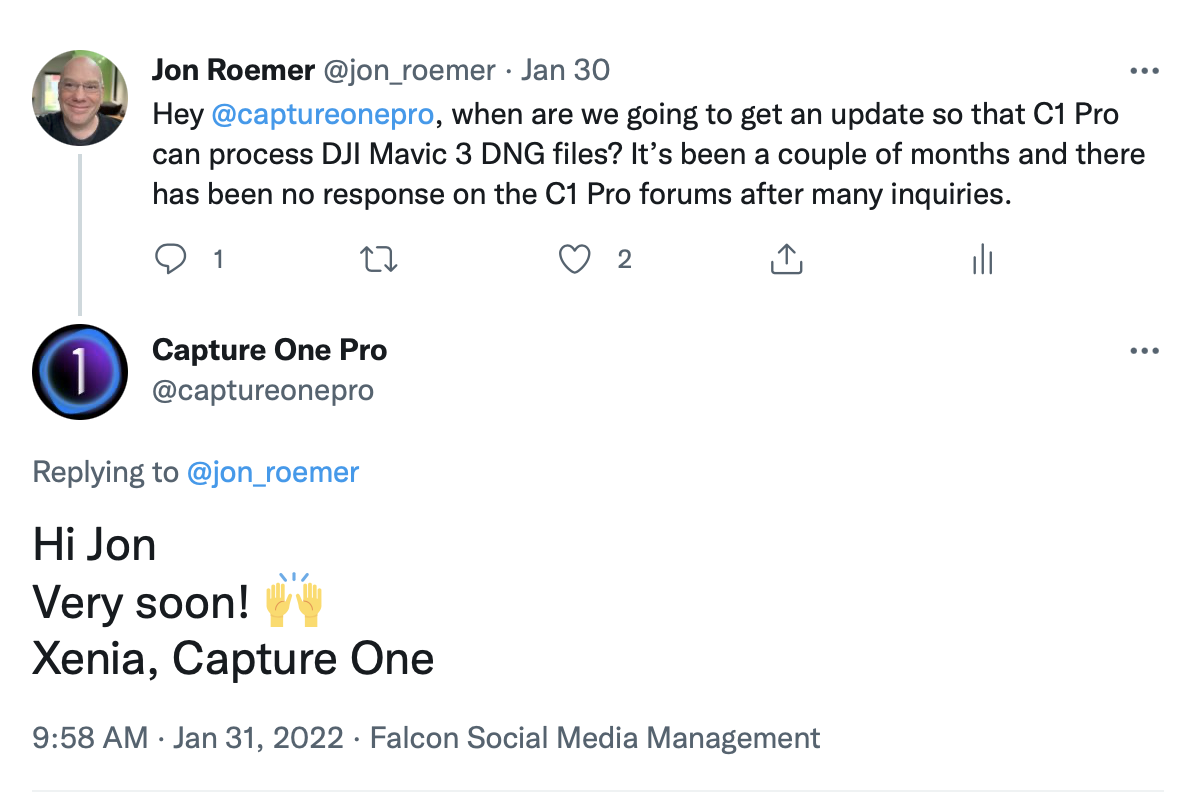
I just heard from Capture One via Twitter - update with support for Mavic 3 is coming, "very soon!"
https://twitter.com/captureonepro/status/1488164853319712771?s=20&t=563bwh7DrEjKC0qJ24hXUA
 0
0 -
Excellent News!!
1 -
It’s here - Mavic 3 support, v15.1.0
https://support.captureone.com/hc/en-us/articles/4404910726173-Capture-One-22-15-1-0-release-notes
New Camera Support
- DJI Mavic 3 (Native DNG support)
0 -
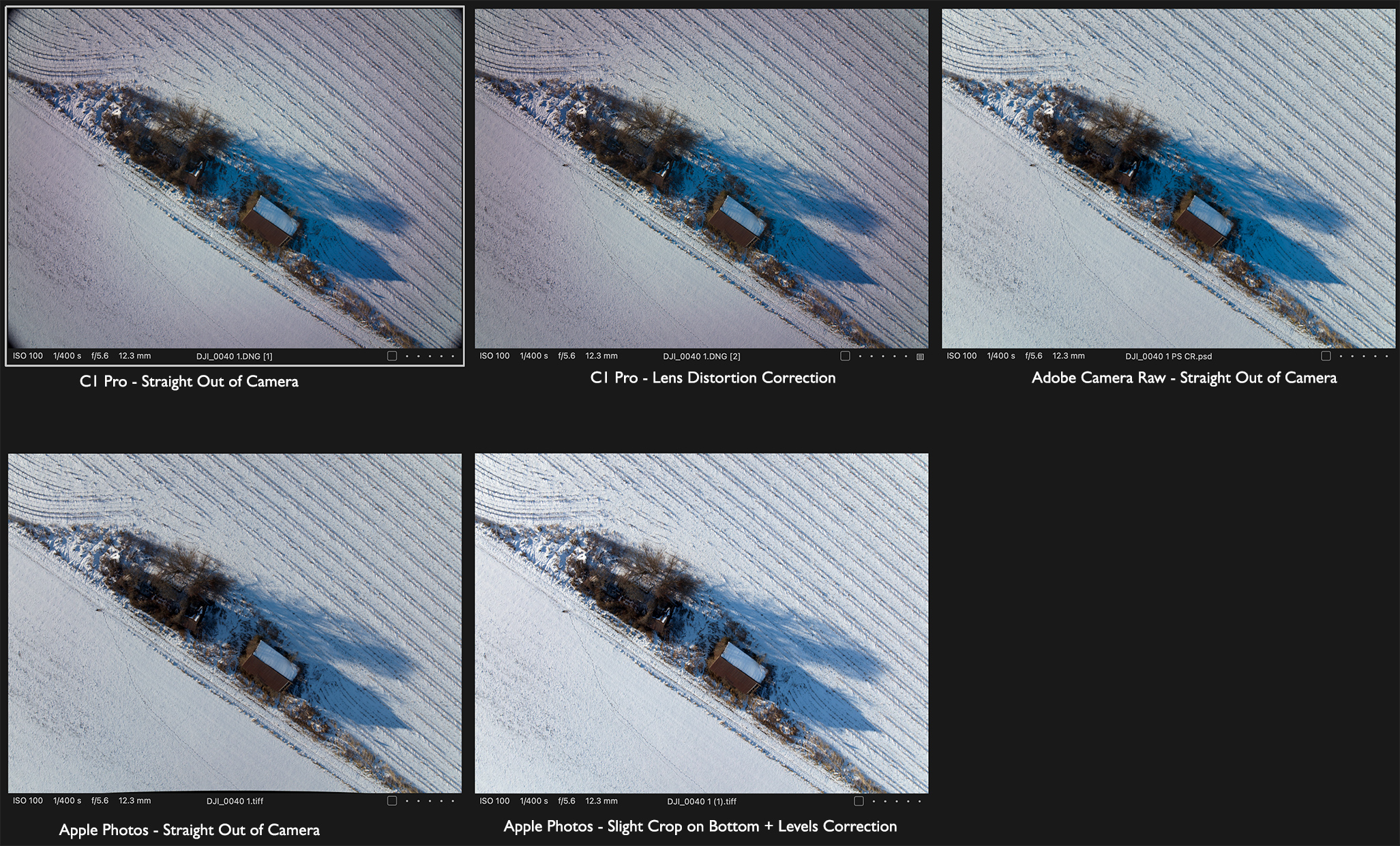
Like the Mavic 2 Pro DNG files, when the Mavic 3 files open in C1 Pro they need some significant work. Lens distortion correction, etc. Opening the same files in Adobe Camera Raw and in Apple Photos seems to bypass those issues. I'm not seeing distortion issues for either of those convertors (Apple needs a slight crop on the bottom of the frame). But in C1 Pro I am seeing significant color issues which may be hard or impossible to correct.
This appears as a color vignette with a green cast in the center encircled by a magenta cast, and then shifting back to green towards the outer edges.
This is probably easier to see if you have something like snow or water in the frame. See attached sample.
It doesn't matter if the C1 Pro lens profile is set to Manufacturer or Generic. It's still there.
I have also seen the problem with both the standard UV filter and the DJI ND 8. So, it's not a filter issue. I have not seen the problem with Mavic 3 video footage.
I need to run some tests of DNG vs in-camera Jpegs but given that Camera Raw and Apple Photos seem to correct for this out of the gate, I'm guessing that it's lens profile or lack thereof issue on C1 Pro's part.
 2
2 -
This isn't "support", C1! You literally just provided a workaround for the "Make" = Hasselblad issue mentioned in another thread (posted above). So either Hasselblad is refusing to provide the lens profile or C1 is refusing to integrate it. In either case, these files are totally unusable within Capture One.
So again...is there any idea on when Mavic 3s will be *fully* supported? If not, just say so---it's a workflow issue.
1 -
I shot both jpegs and raw yesterday to test the C1 workflow. The raw files seem to have no adjustments (or little) made to correct for vignetting and distortion. If you can apply the corrections to the raws that the jpegs receive (out of the box) I think the problem will be solved.
0 -
Hello Capture One, Any chance of getting a response that you're working on this issue?
1 -
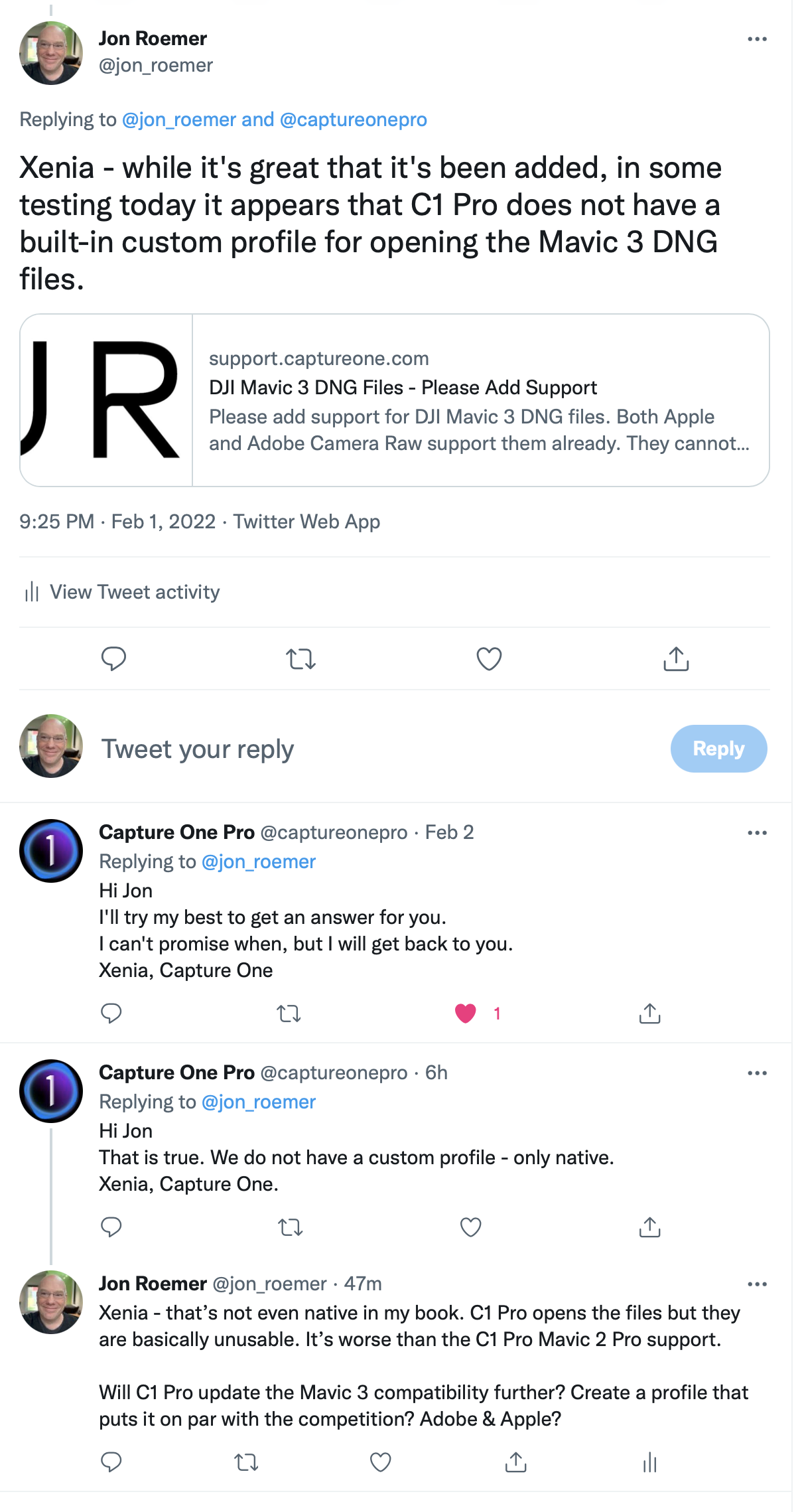
I've pressed them on Twitter since they seem be more responsive there but so far it's not encouraging.
 3
3 -
The latest update to Capture One 22 (with Capture One Live) has the update for Mavic 3 and it works.
-1 -
Read the thread above, it's been noted that's it available, and you'll see that while it does open the files there are issues. More issues than I had in the past with Mavic 2 Pro DNG files.
1 -
Hello Capture One, It's been seven months now and I'm really in need of C1 to not just recognize the Mavic 3 files but correct for the distortion and vignetting that the dng files exhibit. DJI's jpegs are significantly better and should be used as a model for your efforts. Unfortunately, jpegs by definition don't allow for the degree of highlight and shadow recovery that many subjects require. Please let us know how and when you'll be resolving this issue. Many thanks!
1 -
oh yes please !!
0 -
Ditto to Jim's comment and Benoit's seconding,
It's been seven months now and I'm really in need of C1 to not just recognize the Mavic 3 files but correct for the distortion and vignetting that the dng files exhibit. DJI's jpegs are significantly better and should be used as a model for your efforts. Unfortunately, jpegs by definition don't allow for the degree of highlight and shadow recovery that many subjects require. Please let us know how and when you'll be resolving this issue. Many thanks!
We need much better support with a custom profile for the dng files from the Mavic 3.
1 -

I just purchased a DJI Mini 3 pro, having the same issues with the DNG files from the mini as everyone else is having with their Mavic 3's. I also have the 1st Mavic Pro that as the same issues with Capture One's DNG processing but not as bad as my mini 3 DNG's.
Pulled out an old windows 7 computer last night with Photoshop 6 and Adobe Camera RAW 9.1.1. Put a few Mini 3 pro DNG's through it, Perfect! no vignetting or distortion, green colour cast gone, couple of minutes adjusting shadows and highlights, job done!
Interesting to see if my old Photoshop has the same success with Mavic 3 DNG's
20 year old software out performing Capture One. Better off redirecting their efforts back to basics of raw processing than that dismal HDR / Panorama upgrade in 22.
1 -
- is there any evolution in capture one 23 ?
1 -
The recent firmware update from DJI for the Mavic 3
has improved the color issues considerably. The lens distortion in the raw files hasn't been addressed. I went through C1's long list of lense corrections and settled on the Olympus M.Zuiko Digital 17mm 1:2.8 Pancake correction, the raw files now look very similar to the jpegs. I also use the Film Extra Shadow curve. I haven't upgraded to C1 23 so I don't know if the issue has been addressed. It's not listed as an improvement though.
1
Post is closed for comments.
Comments
25 comments