V22 Updating Instructions and Keyword recovery

Well I could be described as "Scunnered," which is as far removed from hygge as one can get in Scotland without being really pi55ed off with updating to the new C1 V22.
Basically I followed the instructions, disabling the old version, uninstalling it and installing a clean install. Previously I usually just installed the new version over the old one and life happy continued...but not now.
One issue is I have now lost my Import routine, I'll figure that one out the real problem is, my keyword library that I built up over the past year has been lost.
Is there any way of backing the library up to prevent this happening again?
I still have the last user.config stored and renamed in the C:\Users\zzzzz\AppData\Local\Capture_One\CaptureOne.exe_StrongName_y3yh4brhpfi14u41fltdrpfruizxirsn file.
-

Wallace,
Was there any specific reason for you to choose the "clean install" option this time around? Some previous problem you were hoping to resolve? If so it may still have been justified. However, looking at what is saved in the Windows Appdata files area these days I would always leave that (or at least most of it) untouched under any circumstances.
The Import routine stuff you mention is probably the stuff buried in the user.config file. It may be simpler and safer to just recreate it depending on which C1 version you were running previously.
Is the KW library for catalog or do you use sessions?
There are 2 aspects to KW libraries.
C1 will, in effect, create use a dynamic library based on the entries it finds saved in the edits of images within the edit information held in the catalog or the Settings files of a Session along with all of the other edits. If the file has been pre-keyworded by another application there may also be KW's discovered within the file (rare if it is a RAW file) or on a sidecar file that can be synchronised to Capture One.
If you have curated an independent KW library (or libraries) and imported them to C1 BUT not used all of the possible contents then, presumably, there is a copy of the Library that could be re-imported to re-introduce the entries not so far used. The dynamic contents should retain the "used" entries and thus make it possible to export them as the basis of a new saved library.
If you have any system backups that saved the Appdata folders you will probably find most of what you need there. All of it if the backup was very recent!
0 -
For some reason I found myself at this page...
https://support.captureone.com/hc/en-us/articles/360014172697
... and I read "Once Capture One 22 is released, please follow the steps below to ensure your upgrade installs smoothly."
Then I find myself at this page
https://support.captureone.com/hc/en-us/articles/360002402377-How-to-uninstall-Capture-One-
As far as keywords go, I seemed to have recovered some of the keywords from this years catalogue and a few unwanted and messy ones from the time that I first ran C1. I could live with that, HOWEVER
An entire category of keywords with many child and grand-child keywords had now disappeared from the Keyword Library, the thought of rebuilding is not a happy one.0 -
I'\m on a Mac, not Windows. But my keyword libraries are stored as shown here.
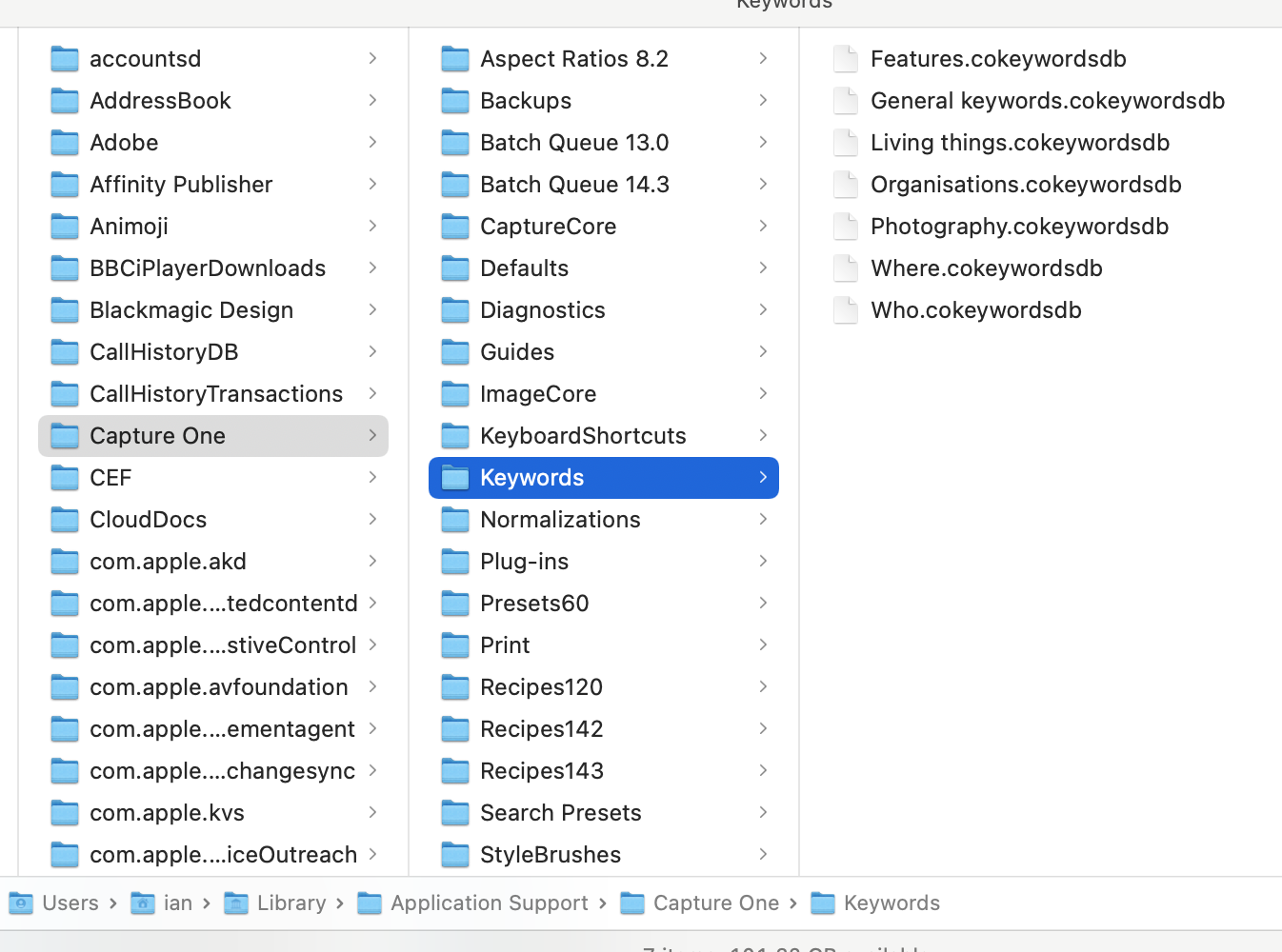
I believe on Windows, you should have something similar in the AppData folder. Is that still there or did it get uninstalled? And if the latter, can you perhaps restore it to the appropriate location from a system backup?
Ian
0 -
I discovered a good and much more understandable guide for the Capture One keywording here.
https://imagealchemist.net/using-keywords-in-capture-one/Having found the Keywords file as above (thanks Ian), I managed to import the remnants of my Keywords into Excel as a text file.
So now I have an independant working back up.0

Post is closed for comments.
Comments
4 comments