Capture one 22 freeze !!!!!

Even worth than Capture one 21 !!!
Just to read a folder with 22 images only, it takes 12 seconds !!!
Incredible...
It was instantaneous with version 21..
What should i do ???
Bests regards
JF
Windows 11 / 32Go RAM / SSD / open CL discatated or activated it s the same
-
.....always the same ! i verified the catalog, checked my SSD, put my catalog on another SSD, changed the location of my pictures....reinstalled C1 22..Always the same.
Each time i open my archieve catalog, i have to wait at least 1 MINUTE to be able to work with an album..
Nobody has the same issue ????
I have to say, it didn t happen with CA 21 !!
Don t know what to do..
C1 22 shoud have improved things with windows....euhhhhhhh
JF 0
0 -
The archive catalog is made with which version?
Does the activities window show anything?
0 -
Do you see something unusual or suspicious in the application.log file which might give you a hint?
C:\Users\your user name\AppData\Local\CaptureOne\Logs
(please don't paste the complete log file here)
0 -
The archive catalog is made with C1 21
THIS is the last log file ;-)Anything bizarre ?
Bests regardsJF
0 -
Hi JF,
C1 is not finished yet, I see
Loading collection 'RED'
but no line of confirmation that this loading is complete. Maybe you wait a little longer e.g. 5 minutes before uploading the log file again.
The catalog has many collections
Number of collections loaded for the document is: 2646
probably many of them are folders, and XMP syncing will be done on application start as well as on application close, to my knowlegde.
XMP Sync is set to : FullSync
I suggest you switch off Full Sync in the preferences and try again.
https://support.captureone.com/hc/en-us/articles/360002544898-Metadata-in-XMP-sidecar-files
If the issue still persist, upload a new log file and I try to have another look.
0 -
Thank you very much for your answer...Anyway it worked very well with the X1 21 !
I'll switch off the XMP Sync to try..
I'll upload a new LOG afterwards...JF
0 -
is the LOG files after having launched C1 ! to be able to "read" my smart album RED from 2021, it took 5 minutes !!!
Now i desactivate the XMP synchronisation and we'll see...
0 -
is the LOGS after having stopped the synchronisation...it s the same...
I noted anyway something : I've a Pictures SSD with 70k photographies....C1 2022 takes a very long time to "read" my files...It begins in 2001, then slowly till 2021 in each folder (portraits, landscapes etc....)
When this "reading" is OK, then the pictures can be worked...
With other software, this reading is instantaneous...and with C1 21, it was the same...
JF0 -
A probleme with my pictures SSD ???
But i cannot understant why there was no probleme before...0 -
One difference I see in the log files is that you have a lot less (237 instead of 173k) of the below messages, which I assumed to be related to xmp sync:
Search Man]{APPL } | Cannot find field for category type: adjusted representing value (type of value: ). We will not be able to decrement the counter
The 173 thousand messages span almost 5 minutes. But I wonder why you still have 237 messages even though auto sync is disabled.
Still, I think Full Sync should be avoided.
---------
I also wonder why your log file does not contain the message when a collection loading is finished. I have version 20, and it tells me:
[2021-12-30 09:58:37.712][000][ID:001, Main]{APPL } | RequestPopulateContents is called for 'Birds'.
[2021-12-30 09:58:37.712][000][ID:046, [Collectio]{PSIST} | Loading collection 'Birds'
[2021-12-30 09:58:44.071][358][ID:046, [Collectio]{SESPS} | Loading collection finished. Document Type: Catalog. Collection Name: 'Birds'. Collection items count = 795. Time taken: 6344 ms.So, either the log file in version 22 just doesn't have this line anymore, or your C1 is still running and doing something and will log this message later.
My collection Birds is a smart album too.
Maybe look later into the log file (30 minutes later?)
---------
70k images:
I don't see in the log that you clicked one of the folders you mention (portraits, landscapes etc....), nor do I see you clicked "All images".
To put this into perspective, a catalog with 8k images takes about 1 minuted to load after I click on All Images without filter, with C1 v20, on a similar fast computer like yours.
I have also tested v21 a while ago but did not notice a big performance boost, so I wonder why you have had a much better performance with v21 than you have with v22, 5 minutes for a smart album in a 70k image catalog sounds reasonable. Maybe you still have a v21 log file (or on top of the orignial application.log)?
0 -
A probleme with my pictures SSD ???
But i cannot understant why there was no probleme before...What do you mean?
0 -
Thank you for your answer...I'll disactivate the xmp anyway and synchronize manually (ctrl S)...OK !
Concerning "all images", i always never click 😂 it takes 5 hours to "read everithing !!!
Unfortunatly, i've no other logs, i desinstalled C1 21 revo ; nothing left...What concerning my pictures SSD, i wondered why C1 takes so much time to "read" the hard drive..
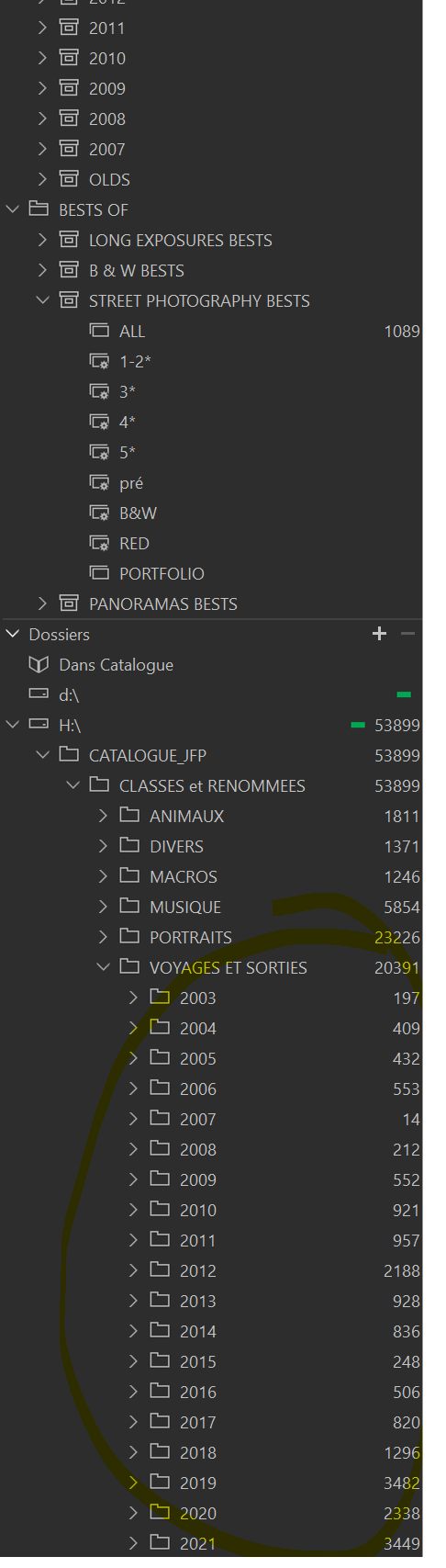
For exemple in the H/SSD below, at the begininng, before C1 finshed to "read" the structure and go in VOYAGES from 2001 to 2021 (takes time), i cannot work...
Not sure it happened with version 2021....PS version 21 is wonderfull with the smart brushes and the quick shortcuts^^ / wouldn t be able to work without today 🤣
 0
0 -
Do you emebd your xmp ??
0 -
THIS
is a log after 1h clicks on differents smarts albums, culling pictures.....0 -
I'll have a look into the log file later.
XMP: I don't actually use xmp files, I only tested it a while back. For what do you need or use it? Only to have a backup of your metadata in a sidecar file (in case C1 catalog will crush) or do you actually exchange metadata with other applications?
What concerning my pictures SSD, i wondered why C1 takes so much time to "read" the hard drive..
For exemple in the H/SSD below, at the begininng, before C1 finshed to "read" the structure and go in VOYAGES from 2001 to 2021 (takes time), i cannot work...
Not sure it happened with version 2021....I remember when I used C1 v8 with original images on my NAS that C1 checked for every image if it is online or offline, and this was very slow, it didn't matter if the NAS was on or off. So I guess C1 is doing a lot of file and folder related checks in the background, but I cannot answer your question.
It seems though that you reached or exceeded the limit in terms of number of images and number of collections (over 2000) to efficiently work with C1. Maybe v22 has problems which v21 did not have, in this case C1 will maybe fix it.
Can you re-install v21 (I think you can install v21 and v22 in parallel, but don't run them at the same time)? To see if v21 is really better?
I think the catalog did not change for the v22 upgrade (unlike in earlier upgrades) so you should be able to work with your catalog and v21.If I were you I would think about splitting the big catalog into smaller ones.
0 -
I forgot: Any advise I give hopefully does not introduce more issues than you have now, pls. don't hold me responsible for it.. :-)
Another question: E: and H: are internal SSDs or externally connected?
0 -
Regarding your latest log file:
- C1 has activated xmp Full Sync again
- I see 51 images / messages with potential xmp issues (search "XMP and RAW listener") but I don't know what these really mean
- I see a couple of Style errors (in every log file from today), e.g.
Failed loading style: Filename C:\Program Files\Capture One\Capture One 22\Presets60\Camera Focus\ISO A2.copreset [Exception: McXMLReadingException: Empty Style Tag
I see you loaded 35 collections, the number of images and the time in milliseconds.
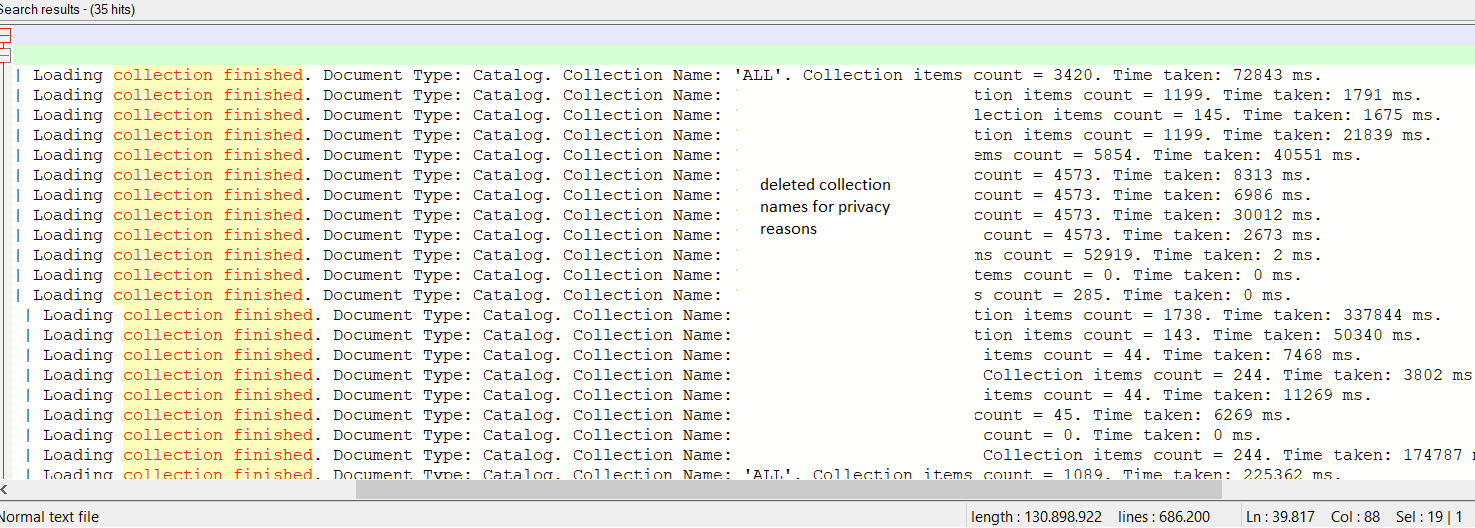 It would be interesting to compare the times with v21.
I think I cannot give any more advise regarding performance, other than trying v21 and split the big catalog.
If you want to look for yourself into the log file I recommend to download Notepad++
Regards
BeO0 -
Thank you so much !! i'll try to reinstall C1 21 at the end of the afternoon...I'll come back with the logs afterwards^^ And yes, i sometimes use other softs like ON1 or DXO where i'have other collections 🤣
To answer an another question :
My pictures SSD is H:// , synchronized with my cloud
My catalog is on E://, synchronized with my cloud too (so i can work offline on my laptop)The same styles are installed on all my computers ( manual copies ) i don t know what this style "camera focus" means...never saw before...
I'll come back with the 21 version 😂
Many thanks
JF0 -
Hello !! In confirm the fact that there is no problem with the version 21 !
No problem at the begining, my SSD picture harddisk is read very nicelly and no problemo with my smart albums or folder..a few seconds to open them !amaziiiiing 😂
JF0 -
....Then i opened C1 version 2022 and the same as this morning...5 mn to open my RED smart album 2021 !!
Definitly a problem lol..i'll ask for a refund 😁
JF0 -
Glad you figured it out.
This might also be interesting for you:
https://support.captureone.com/hc/en-us/community/posts/4413303496977-C1-22-still-slow-loadng
0 -
I don t speak so good english but i think that i'm not alone...We didn t even spoke about HDR of course...Without deghosting options, it s very poor...I should have waited before upgrading..We'll see if they are going to refund me....Anyway, it s not acceptable that the announced speed improvment was a lie......!!!!!!
Thank you anyway for your answer and the time you took with me....
Best regards
JF0 -
You're welcome. Your English is very good, if you ask me. Certainly much better than my French.
Best regards,
BeO0

Post is closed for comments.
Comments
23 comments