Capture One 22 where is the watermark tool?

Greetings running Capture One 22 where is the text-based water mark tool as shown here:
Adding a text-based watermark – Capture One
Thanks!
Dave
-

You can find it in the Export tab. There you can choose between Text and Picture.
1 -
I have looked multiple times at my export tab and for me, it is not there.
Strange too that every tech note that I can find results in options in export that I do not have or cannot find.
I am not sure how I can miss any of that but seems very strange. May need to reach out to the official support but thanks for the reply!
Take care
Dave
0 -

Here is where it is on my system.
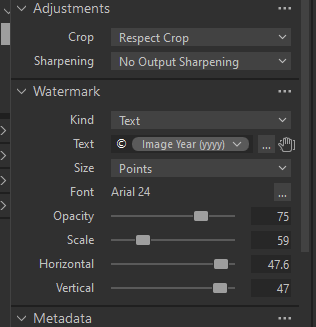
Are you sure the Watermark settings aren't closed?
1 -
Also, make sure the "Show all options" is checked.
 2
2 -
Thanks Heinz Lenhardt Thanks for the note
Jeff Gottloeb - Magical thanks for the screen share and YES that is what it was in regards to Show all options - I did not even know that was there, bit small and great advice for others trying to find the extra options. But YES that was it, thanks so much!
Dave
0 -

None of these are solutions for finding the Watermark tool in version 23.
0 -
... but he asked about version 22.
However, if you hit the export button in version 23, or in version 16.3, then the tool can again be found if you check the show all options box. Or you can add an Export too tab to the default workspace, and find the watermark tool there as well.
Ian
0 -
I stand corrected. My mistake. I have been looking for this tool for the better part of an hour. Minor frustration had set in. I will continue my search. Thank you!
0

Post is closed for comments.
Comments
8 comments