Soft and blurry images from the same tiff file

When looking at the exact same tiff file in lightroom and C1, the C1 image is extemely blurry. The tiff file was exported from lightroom back into lightoom and that tiff file is accessed in a session folder in C1. Every parameter is set to zero in both lightroom and C1 and no sharpening applied, I'm just viewing the embedded tiff file. My monitor is 2560 x 1440 and the cache is set to 2560. I've also tried lower, but no difference in appearance. I could understand if the files were being importing with vary default settings, but this is not the case. This is also present with my nikon d810 raw files without any sharpening applied on import. I'm running windows 10 and capture 20 and lightroom 6. I love C1s ease of use and feature set, but this is really frustarating.
Regards,
Andre
-

I have somehow the same issue, the thumbnails are sharp but the previewed image is completely not sharp (this screenshot is from C1 21 but I have the with C1 20).
Also after quitting the application it is still running in the background with quite some CPU usage and cannot be opened again until I kill this background process.
I'm on Windows 10.0.19042.

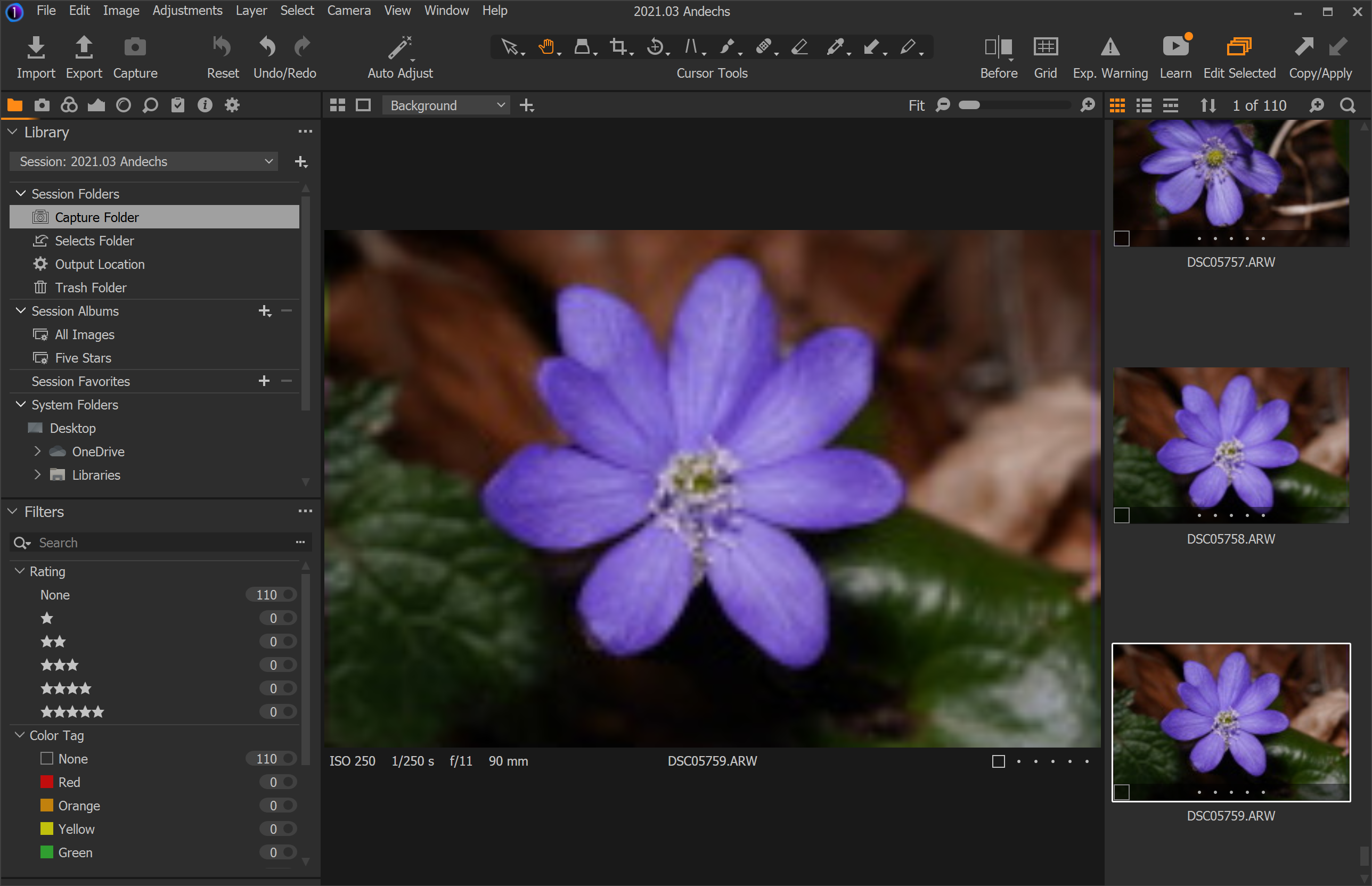 0
0 -

- Set the Paper Size to match the size of the slide, in this case 5×7.
- Set the Print Quality (also known as the resolution) to 600 x 600 dots per inch.
- Set the Color Printing Mode to True Color (24bpp).
0 -
Hi Melissa,
I'm not sure I understand your recommendation. Our issue is happening when editing the files and your 3 points are related to the export process.
0 -

Arthur,
I think the post by "Melissa" is probably a spam post - based on the embedded link.
No surprise that it has no relationship with your problem.
My guess, for your problem, is that you need to check the status of the "Use Hardware acceleration" value in the "Preferences" settings. And maybe the Log File that relates to how C1 checks and creates the processing code that runs with whatever GPU facilities you have in your system. If the processing is being directed to a GOU and that is not performing optimally you might simply be seeing an incompletely processed state of the image displayed on the screen.
CaptureOne.Exe is the main execution program. It will normally disappear from the system (as a running process identified by Windows) a few seconds after C1 disappears from the screen. However, if you are using Catalogs and backup facilities it may take a little longer.
If for any reason it hangs up it will continue to run as you describe.
Try shutting down the PC and then restart it a few times WITHOUT opening C1. That should give Windows a chance to tidy up any old orphaned work and temp files. Then start C1 to see if anything has changed.
If not the next steps are a little technical in PC terms. Nothing too difficult but it is worth asking now whether you would feel comfortable doing a small amount of checking "under the hood" or would prefer to avoid it completely under any circumstances.
1 -
Hi,
Thank you for your answer. Yeah, I figured out that Melissa's post looked fishy but I had to reply to keep this post alive ;-).
I tried to uninstall C1 and clear all the possible caches (following this article https://support.captureone.com/hc/en-us/articles/360002402377-How-to-uninstall-Capture-One-#h_01F12NY5VYERHA19G888NPKNY4) but the issue persists with HW acceleration enabled.
I'm now disabling the hardware acceleration on a fresh install and it seems to work (no more hang, blur or dangling process on exit) but there is definitely a noticeable change, zooming on an image and moving it has some annoying latency, a few ms of blur/pixelated until it gets sharp again that did not appear when the HW acceleration was on. I'm using a 4K screen with a DisplayLink and an intel integrated GPU so it's not the best HW ever but well it usually works for not too demanding video games or any daily use.
As soon as I reenable the HW acceleration the photos are blurry again after a simple zoom in.
I'm a Software Engineer so I'm definitely not afraid of going under the hood and exploring more possibilities to get a better experience as I used to have some weeks ago ;-).
I attached the logs to a ticket (#87638 as I cannot post zip files here) and the system information when running with HW acceleration ON. I let it run a bit with the HW acceleration fully optimized by C1 and exited the application normally and killed the remaining processes after a minute.
0 -

Have you tried zooming in on the image to 100% and then zooming out again?
Dave
0 -
Arthur,
Have a look at the Log files at this location.
C:\Users\[User Name]\AppData\Local\CaptureOne\Logs
In particular the ImageCoreOCL.log file but in general the ImageCore files may be useful.
It sounds like your Intel built in Software GPU is being assessed as potentially usable. Older Intel CPUs did not offer enough GPU processing to make it useful but recent versions seem to be viable. My i7 10875 in a Dell notebook matches some of the best performance numbers I saw reported back about 5 or 6 years ago. However, the Quadro T2000 has a significantly better potential performance assessment.
With my older notebook running Win 7 and a relatively ancient i7 CPU the Intel option would be identified and rejected. However for some time I used to have a problem whereby the system would attempt to check for config changes, re-assess the GPU device availability and attempt to set up the Intel device prior to assessment. It started to fail the kernel build process after about 93%, probably due to an INtel driver anomaly at an update point from Dell, but that would hang the whole process and device 1, the Nvidia GPU, would not complete.
So Hardware acceleration failed and was turned off.
Rerunning the assessment would usually spot the failed and rejected Device 0 Intel kernel build and move on to the Nvidia which would then complete in a few seconds.
With the new machine I do not have this problem although the initial setup for the Intel software driver and kernel seems extremely slow compared to the Nvidia driver/kernel. (It was the same on the older machine.)
I would guess that running a 4k screen might be a bit of a push for your Intel built in software GPU but that you may not notice that so much with Games that are likely developed to make use of what they can grab in terms of processing power in a much more interactive and micromanaged way than Capture One would need to be in most cases.
However, that is speculation. All I can suggest is to take a look at the log files to see if they offer any clues about where there may be problems to assess.
1 -
Ok somehow after uninstalling and reinstalling the Intel video drivers it started to work again as it used to be.
0 -
I have the same problem but on Mac....
Does anybody has a solution??
It's very annoying
0 -
I solved it by reducing the size/ scale of my text. I changed it from 125% to the recommended 100%.
0
Post is closed for comments.
Comments
10 comments