A new keystone tool
Implemented
Updated April 5 2022 (with the release of version 15.2.0).
The previous malfunctioning has now been fixed, and some of the limitations have been removed (the visibility of lines and adjustment points has been improved; default vertical keystone amount has been changed to 100; auto-keystone has been added). Though the most acute limitation, the lack of independent adjustment points – see 1) below – is yet to be addressed.
This is an attempt to summarize in one place the requested features for an improved keystone tool.
1) Independent horizontal and vertical adjustment points (four independent lines, rather than four lines locked in a four-sided figure; eight adjustment points in all). (See these: 1, 2, 3, 4 and 5.)
2) The option to only place three lines (six adjustment points). This would be useful in a cases where one of the axes only has one line you can use for alignment. (See this topic.)
3) Retain adjustment point positions after the application is closed (see this).
4) Loupe showing the exact position of adjustment points while you drag and place them.
5) Option to move an entire line between two adjustment points (as opposed to one adjustment point at a time) (see this, for instance).
6) Maximize crop when using auto-keystone (see this: unnecessary cropping).
-

Further to my comments on DXO Photolab 4/5 - if you own the NIK filters they can be integrated seamlessly into Photolab as can Viewpoint and Filmpack. I still occasionally have to roundtrip to PS or Affinity Photo for composites, blend modes or pixel editing, however, that is becoming much less often. There will always be something I need another app for, however, I use C1 as my hub. I recently was put into a situation to assist in editing a number of partially edited LR files. LR had become foreign to me and I had to relearn much of it. I took the opportunity of editing those same images over in C1and in my very humble opinion and aged eyes I much preferred the final results in C1.
0 -

I bought dxo for the same reason but now it has become my primarily used converter in the last months, I very much like the image quality and think it is superior in this regard compared to c1 and not only for NR.
0 -
Thomas
As I became painfully aware a while back, there is no perfect editing software. I have a hate on for Adobe, however, I still pay the Adobe tithe for PS. There are times I just can't do what I need to do as quick or accurately as PS - unfortunately. Affinity Photo was a good purchase and definitely for me the Photolab 4 made a ton of sense and has been a godsend even though I only use a very few of it's tools.
As a side note Luminar and On1 just introduced their latest and greatest as all in one apps and plugins - even for C1. So I downloaded trials and spent many hours comparing and testing - Luminar, On1, Topaz, LR, PS and C1. If I was just starting out and needed good editing software, again in my very humble opinion, I would go for On1 Photoraw 2022 or DXO Photolab 5 and Affinity Photo for the pixel editor. Since I am committed to C1, my focus was on noise reduction and resizing for large prints and to a lesser extent sharpening.
DXO won the noise reduction slightly over Topaz Denoise. I may get hate mail, however, the others didn't cut it.
Topaz Gigapixel AI definitely won the resizing when using my Sony 24 & 42 mgp files. PS was last - very quick but way, way over sharpened.
Even though Topaz Sharpen AI is quite good, my trusty C1 with my Sony and Fuji files still does an outstanding job once I figured all the nuances and again what my aged eyes liked. I smile about today's fascination with eye cutting sharpness and then using a film preset for a style. That's a whole other topic.
I need to print very large images so noise and resizing are extremely important. So my Photolab 4 and Gigapixel AI purchases are definitely paying for themselves.
So much for my brain dump.
0 -
very true there is no perfect software. my main criteria is how easy and fast do I get the results I want. c1 has an impressive list of tools offering a lot of control but very poor effectivness. even a simple tasks like adding a gradient to a sky for example takes far more time with all those fancy masking tools in c1 than with adobe or dxo and you can not even apply it to a bunch of similar images or just think of keystone corrections........
0 -
Interesting.
Have tried copy/apply tool where you copy any adjustments, metadata, layers, etc from one image to any number of other images. I do it all the time. Obviously, if the copied to image is different from the copied from image some things might not match.
Hmm, I can mask a complex sky in a few seconds with the magic brush, evenore accurately and within 15 to 20 seconds with the luma range. Then I can apply any adjustments to that mask including a gradient or almost any other adjustment. I can also do this on a separate layer then also create a new layer, copy the mask from the other layer, rasterize it and inbert it and now have everything else perfectly masked. Probably in under 15 to 20 seconds.
Of I might not be understanding what you are attempting to do.0 -
Sorry for my sloppy typing
0 -
lets say you have a bunch shots from a building with some slightly different viewpoints and you need to prepare some layout versions. in c1 you can use for example the color tool to build a mask and apply some corrections but without a gradient or you can apply a gradient with a luminance mask but luminance alone does not work as it is very likely that the building has parts within the same luminance range as the sky so it needs some manual correction for every single image. in arc or lr you simply select the sky color and apply the gradient and if necessary you can even use the luminance range to improve it. but as this masks are based on color you can simply copy them to similar images. this is impossible in c1. in my view they made a big mistake with the magic bush ( a amateur friendly approach) and not offering a color range tool from a productivity standpoint. than add the auto keystone correction which works rather well in arc / lr and the difference in time needed is not just a few minutes....
0 -
While Capture One has a number of other weak points, the primary problem, for my use, is the keystone tool. I don't expect Capture One to be able to compete with other software in all regards, and though it would be nice if its keystone tool was more advanced than those of the competition, I wouldn't hold it against the company (well, a little perhaps) that this isn't their main priority. What I do find to be a problem is that the keystone tool doesn't work as it should and, apparently, never has, at least not for non-Phase One cameras. And ten years, or however much it is, of not working as it should, and the company having no apparent intention of fixing it, is something other than it being very basic and limited, which in itself is annoying enough. (And I'm not even asking for an auto keystone function.)
0 -
CSP
I guess I don't understand quite what you are doing as I just used the magic brush to select six windows on a building. The windows fames and siding on the building were a different color than the windows and the reflections. However, the reflections included some of the same colors as the building. Worked almost perfectly - I had to tap the brush in just window corners for a perfect mask. Then applied a gradient to all these individual masks. Under a minute.
I then tried the same image and used the color editor (advanced mode), selected the color range I wanted to mask with the eye dropper, in this case the building and the window frames. Checked "View selected color range" and that greyed out non-selected areas and then did a small tweak in the color selection wheel to make sure the selection was accurate, clicked the ... (three dots) on the upper rt of the dialogue box and clicked "Create masked layer from selection". That automatically created a new layer with the mask. Done. Less than a minute for a perfect selection. I assume you have used this as it has been part of the C1 color editor for a number of years.
Thomas
I agree with you 100% on the keystone tool and would love to have it reworked and vastly improved but I am not holding my breath. As the old saying goes "Don't throw the baby out with the bath water" - I am hanging tight to C1 as I have used and use LR, PS, Affinity, DXO and a host of other specialty tools - for my editing style and workflow there is nothing that compares to C1 - caveat - as long as I have my specialty tools. It might not be the correct software for others.
0 -
@bob
my point ist that the tools work ok with a single image but when you have more than one to process things start to get very cumbersome as you can not copy the color based or magic brush mask to similar images but you can do it with the color range mask created with adobe software and now with the new dxo 5 too. but more important you can not combine a color based masks with a gradient, the soon to be released ARC/LR version will take this even further, similar things can also now be accomplished with the line control tool in PL5.
for me this is just one example of not understanding professional needs, they add goofy gimmicks like speed edit but ignore to improve core functions which would speed up processing massively like an auto keystone or a color range mask tool. not every pro is a wedding photographer which only needs basic functions.
everything indicates that they are on a path to tune c1 to attract more hobbyists and so it is clear that a working or improved keystone tool does not have high priority. it is totally absurd that you have to use an extra software to just accomplish a basic task like perspective correction with a so called "pro" software.
0 -
Photolab's automatic keystone adjustment is pretty good (in some cases, not all):
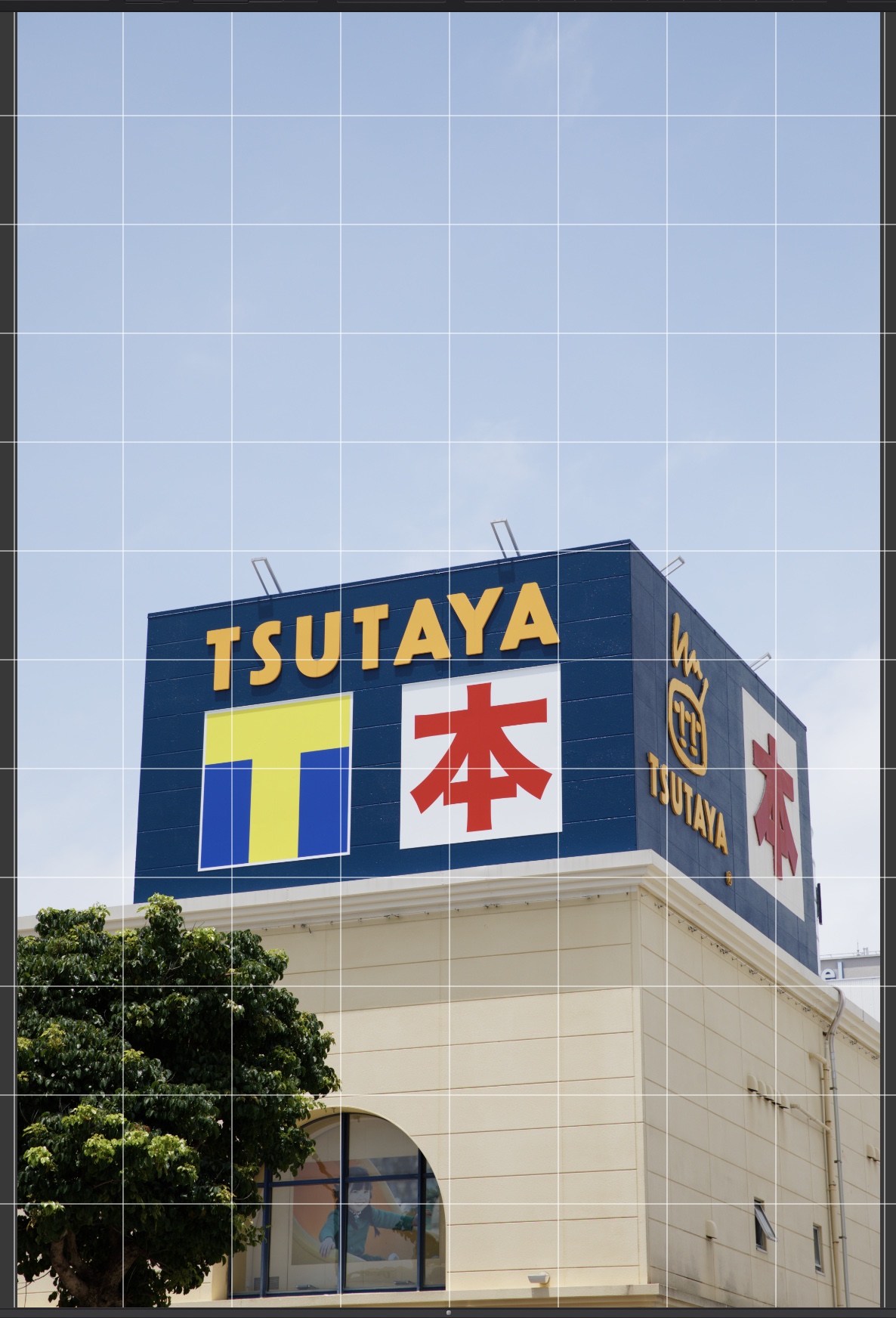
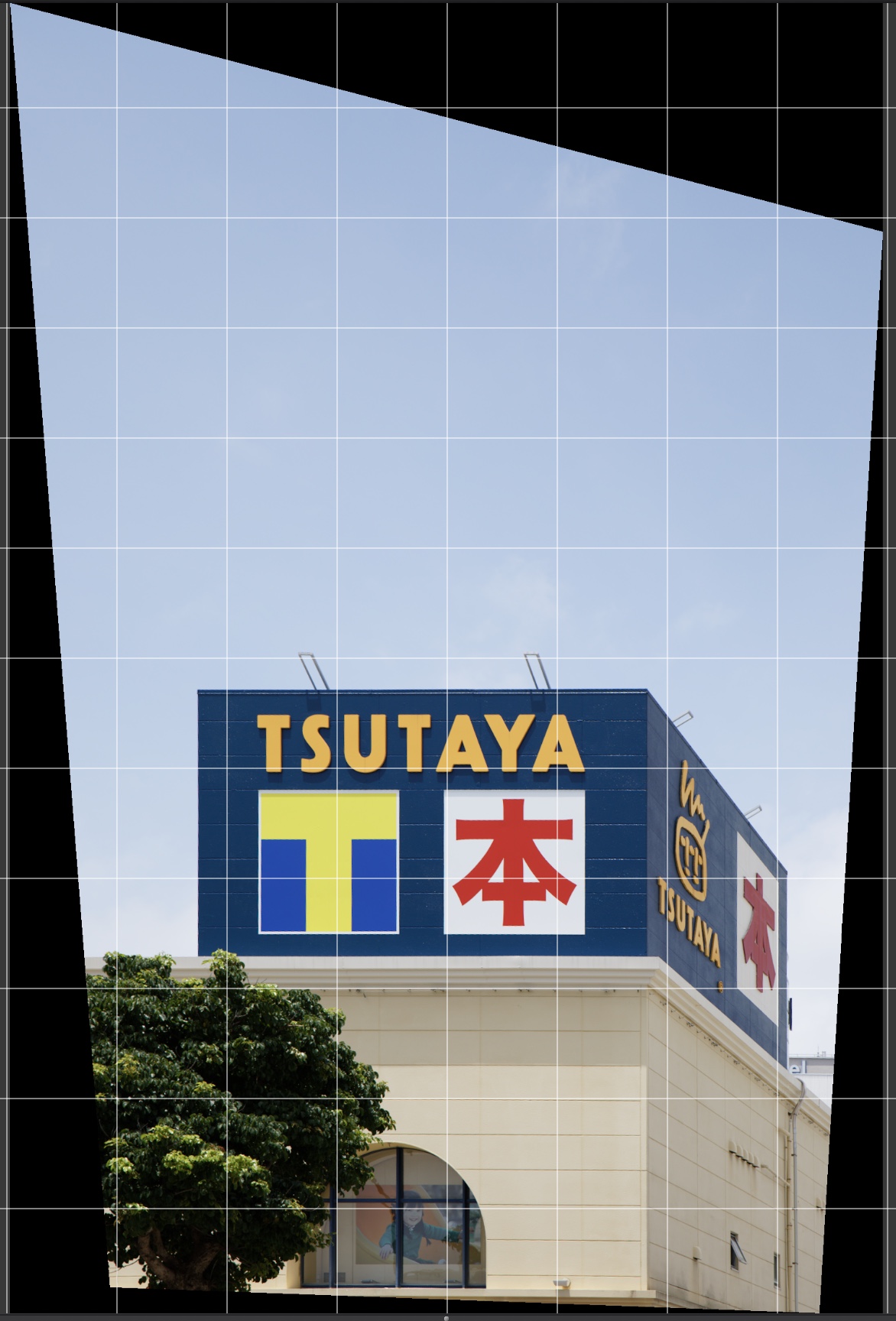
Some extreme cases too:
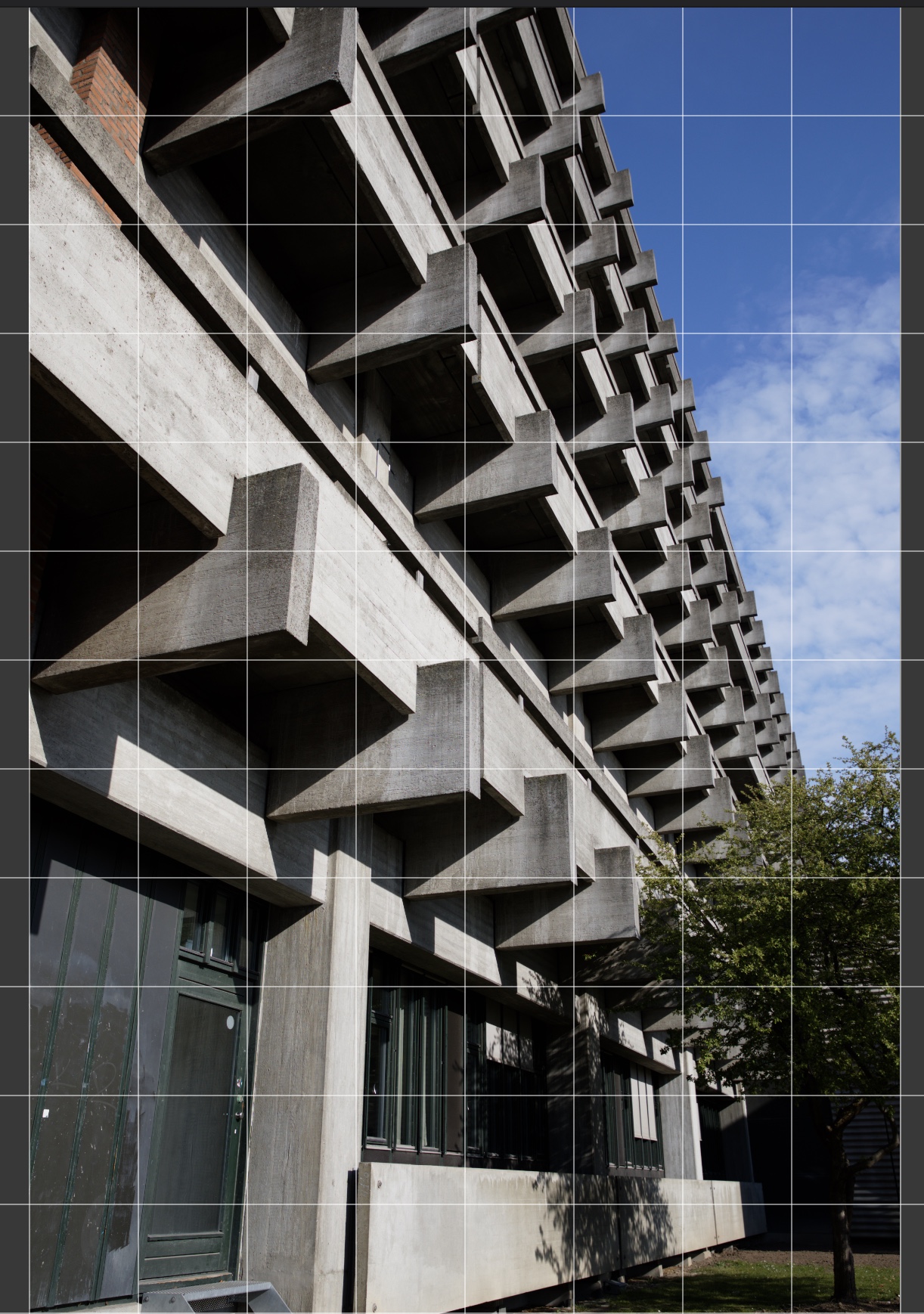
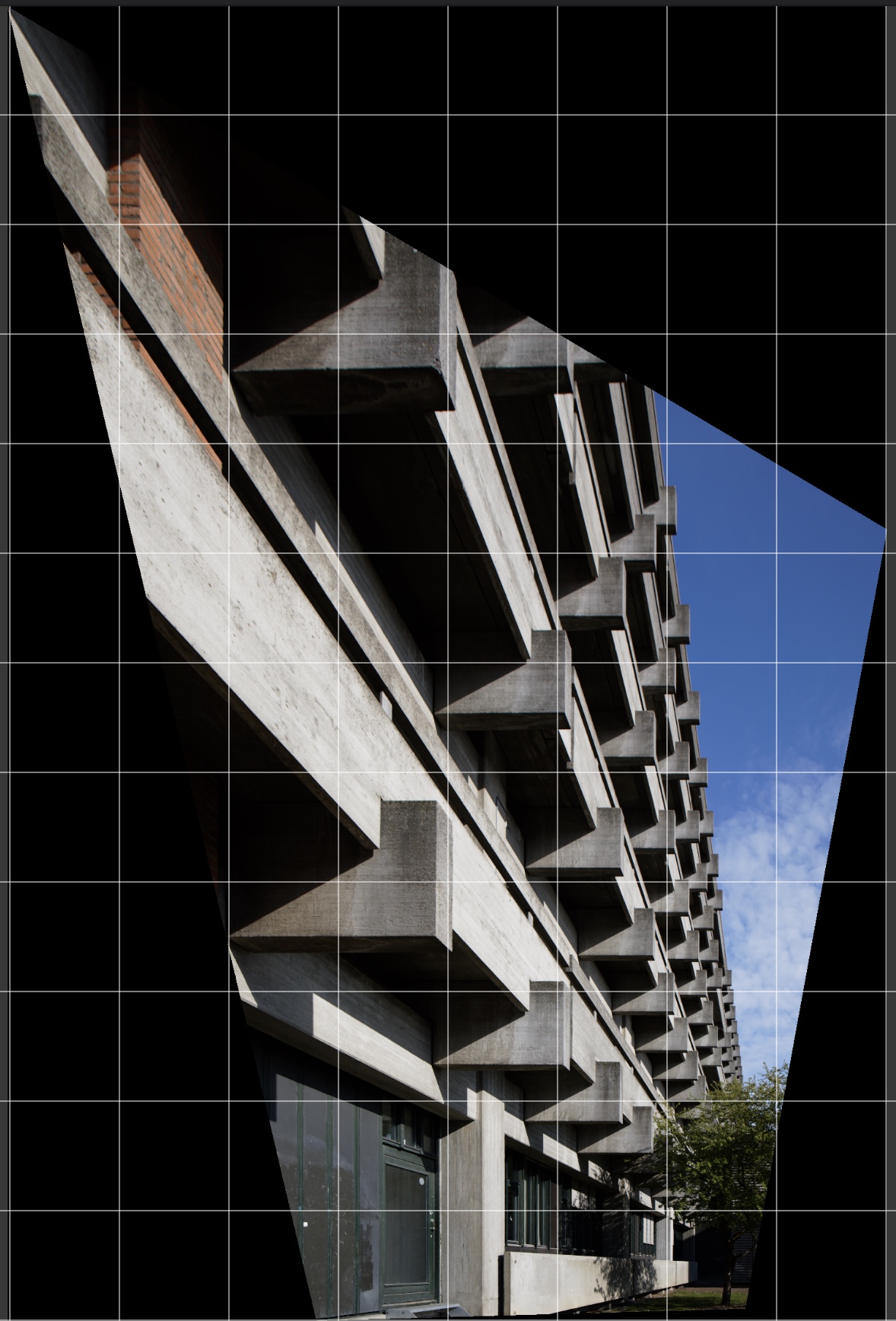 0
0 -

Thomas,
To your eyes are those the good cases or the bad cases?
Has the second example building got some extreme optical problems in the bottom right-hand corner of the uncorrected version or is the original architecture different to what one might be expecting?
0 -
They're just examples of how it works, which in my opinion is reasonable. They're not perfect, and I wouldn't use auto adjustment myself as it always seems to be a bit off. The verticals here are close to parallel, which is the whole point (and I don't want to get into yet another discussion of whether parallels should be vertical).
1 -
as with most auto applied correction they are never 100% dead on but even when they fail they bring you often close and in the end you still save a lot of time compared to c1. I often need to prepare a lot of images for layout purposes and this feature is totally helpful. even when I work carefully on location it seems my camera levelling tool is not accurate and small corrections are needed.
0 -
Thomas,
I was mainly wondering about the effects of any Lens Correction applied prior to Keystone correction. Or the results of the automated corrections applied if no lens correction has been applied.
As always, such beauty as there may be is in the eye of the beholder (as the saying goes).
0 -
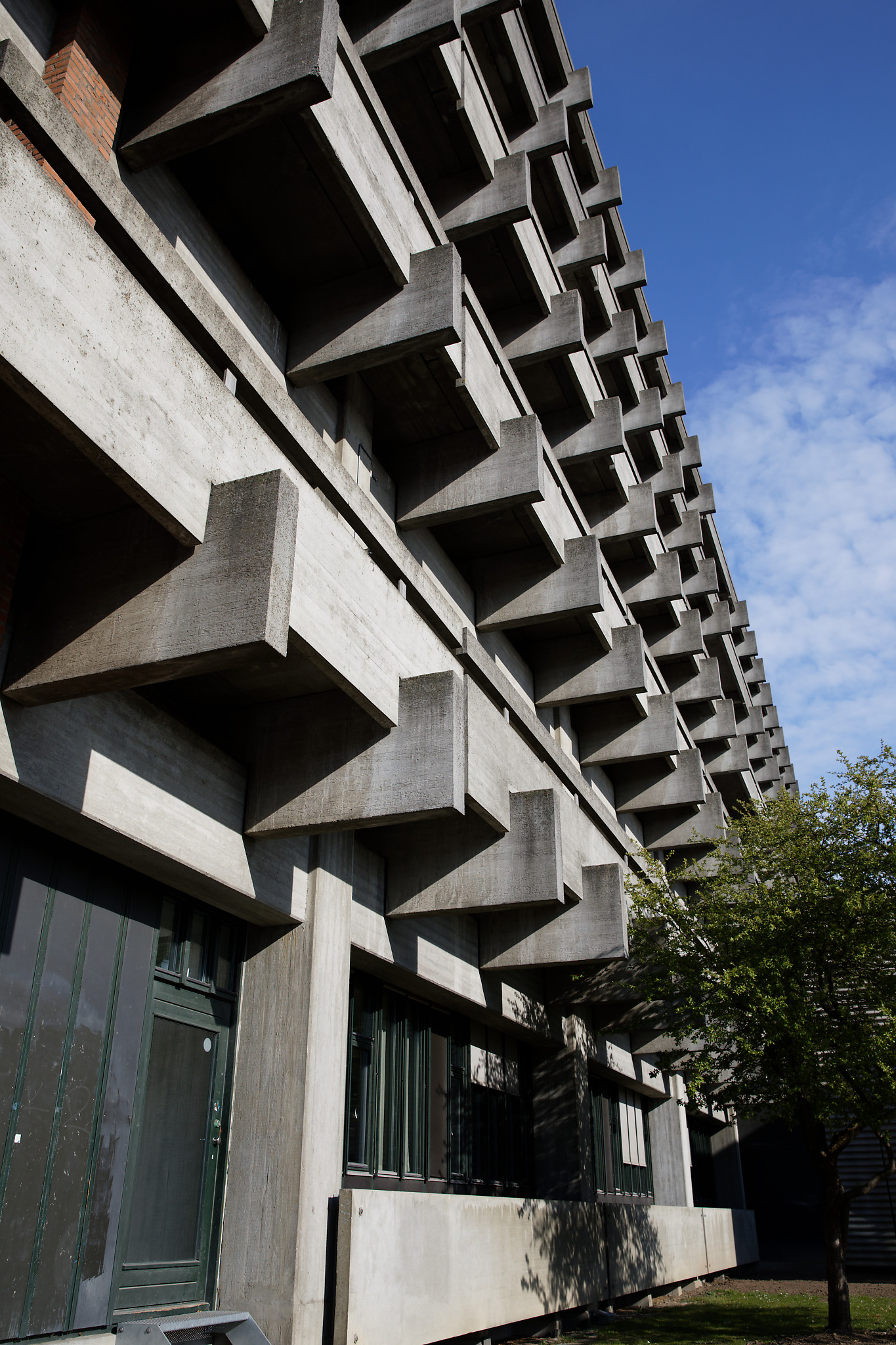
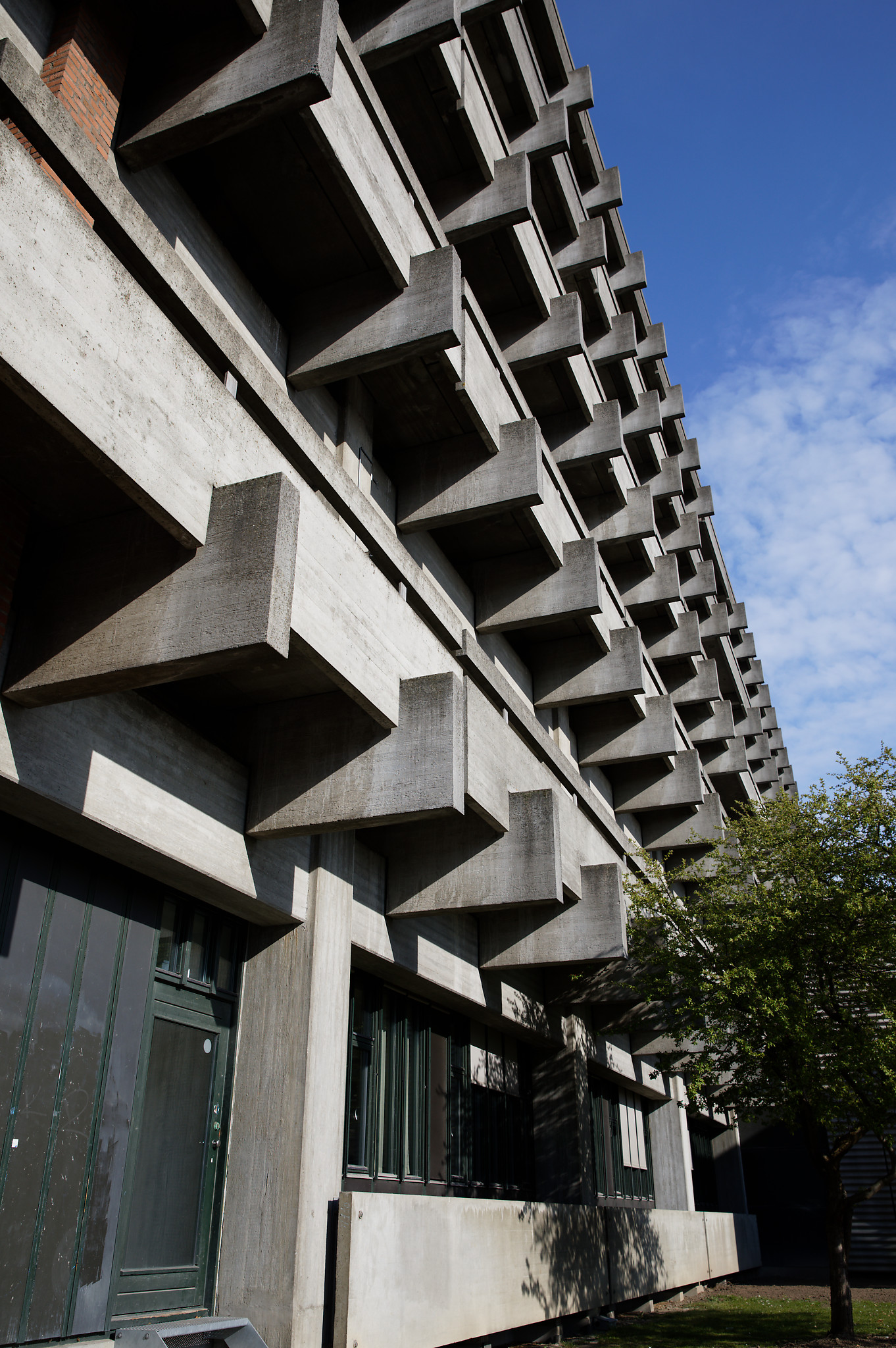
Oh, sorry, I missed that. The angles and proportions are distorted because of the perspective. (28mm; Canon EF 24-70mm f/2.8L II USM.) Obviously not a good photo and only used for testing.
Here it is with no correction:
And with lens correction:
 0
0 -
Well, of there are any differences there they are very subtle.
To my eye there is something very odd going on at the bottom of the image.
In some ways it reminds me a little of my Samyang 14mm f2.8. (The original, all-manual version of the lens) which has some "moustache" type distortion that would be more or less impossible to correct even if we assume that all copies of the lens gave exactly the same results. (From memory at the time the lens was released, various testing sites suggested that there was some significant variability in results from different lenses.)
I bought it anyway on the basis that it was cheap enough and I was not too worried about possibly slightly challenged images for the intended purpose. Also, on and APS-H or APS-C sensor the effects would likely be less than for full-frame. And so it turned out.
On the plus side, it can be very sharp throughout a large DoF.
So for a subject similar to your example above I would probably expect a similar result but have no expectation of being to make verticals vertical ( and certainly not horizontals, horizontal) without resorting to some sort of MESH based Warping tool and a compromise (to the way I normally like to see things) for the results. Of course that is a lens correction challenge rather than a Keystone challenge.
0 -

Hi all. Let me quickly introduce myself. I work as Product Manager with Capture One, and I'm currently trying to get an understanding of the scope of issues with the Keystone tool as it is today. Thank you for your elaborate discussions and contributions to this thread. It helps a lot!
While I cannot yet say anything about what will be done, or when, I can share that your problems with the tool are being investigated. Before we can settle on the scope and timing for a potential upgrade of the tool, we first need to deeply understand the problems in order to solve them in the best way possible.
If you feel like some points have not been made in the thread so far, please add more comments with your problem descriptions and I will be notified.3 -

@Alexander Flemming
Hi there Alexander,
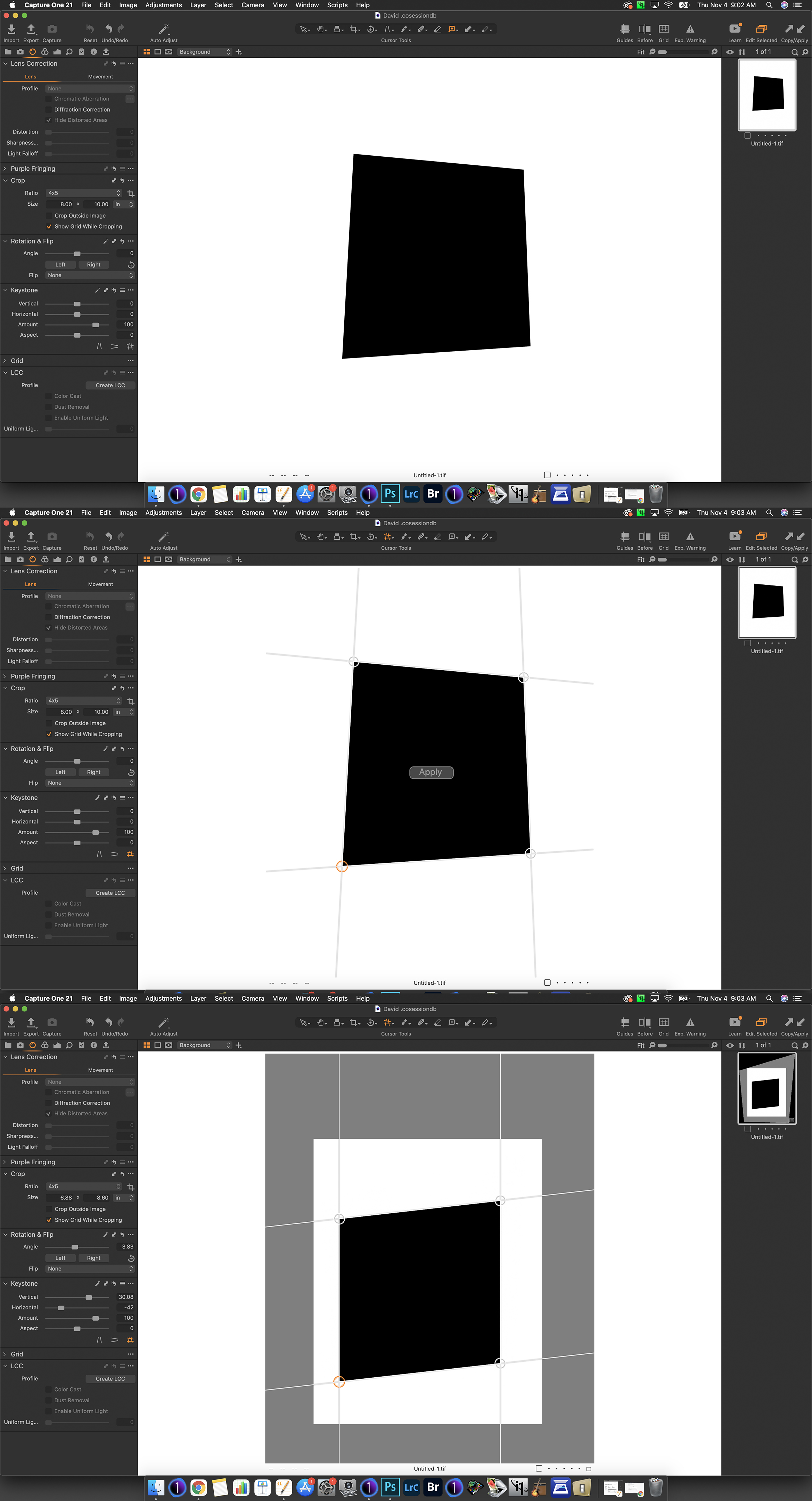
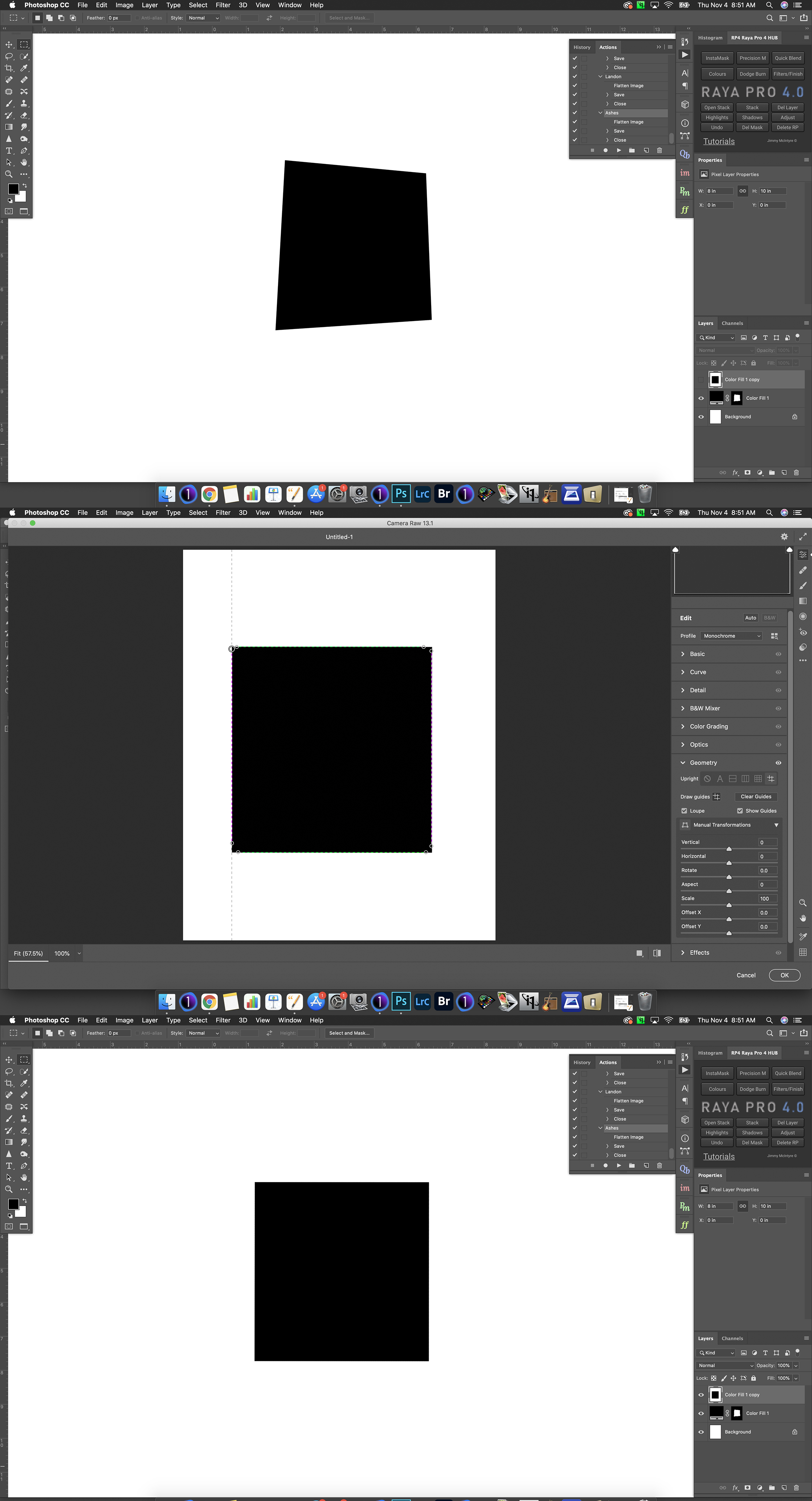
Thank you for reaching out, your attention is much appreciated here. This thread is certainly long with thoroughly documented issues concerning the Keystone Tool. Perhaps it's a bit overkill, but just to be clear, I'd like to share a few screenshots that illustrate the problem with the current Keystone Tool, and how it could be improved to reach the effect that it is designed to achieve. The example below–– a perfect square, tweaked into an irregular square (for illustration) then corrected back with both Capture One's Keystone tool and Adobe Camera Raw's transform tool. In ACR and many other programs, we can transform on independent axes to achieve an accurate perspective. Thank you again for your time and very much so looking forward to an updated Keystone Tool.
 1
1 -
As the keystone tool has been my primary problem with Capture One since I started using it, I too am glad to see that it will get some attention, and to see the issues with it acknowledged.
1 -
don´t get too exited, a posting carefully vague worded for such a fundamental issue which is easy to reproduced and well documented is not really much after such a long time.
a reasonable company, well probably every other software company I deal with would just say whether or not they can reproduce the problem and when a solution will be available.
-1 -
Here's an example of an image that is very close to having parallel lines and right angles from the outset, but comes out worse when keystone adjustment is applied.
Before:
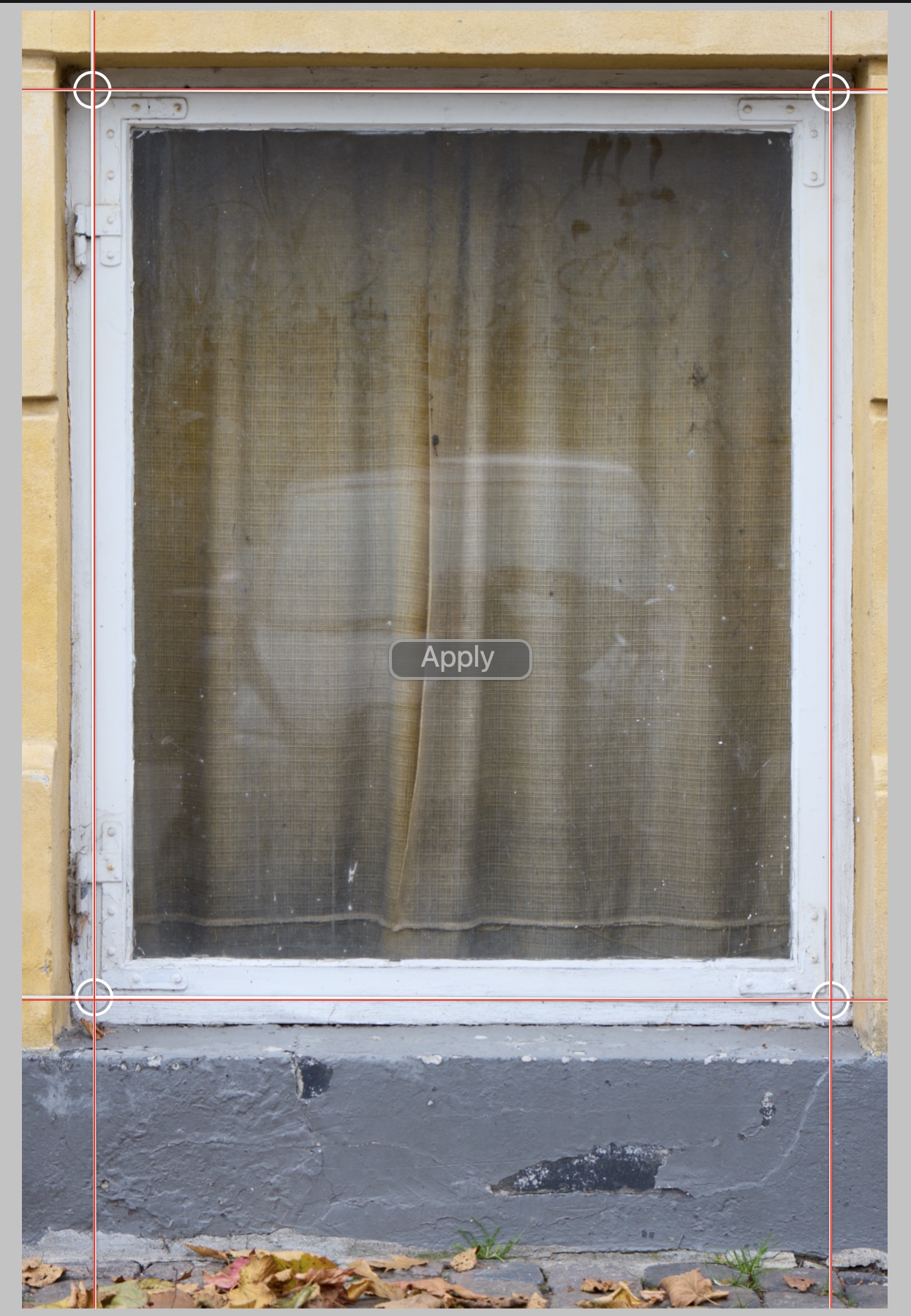
After:
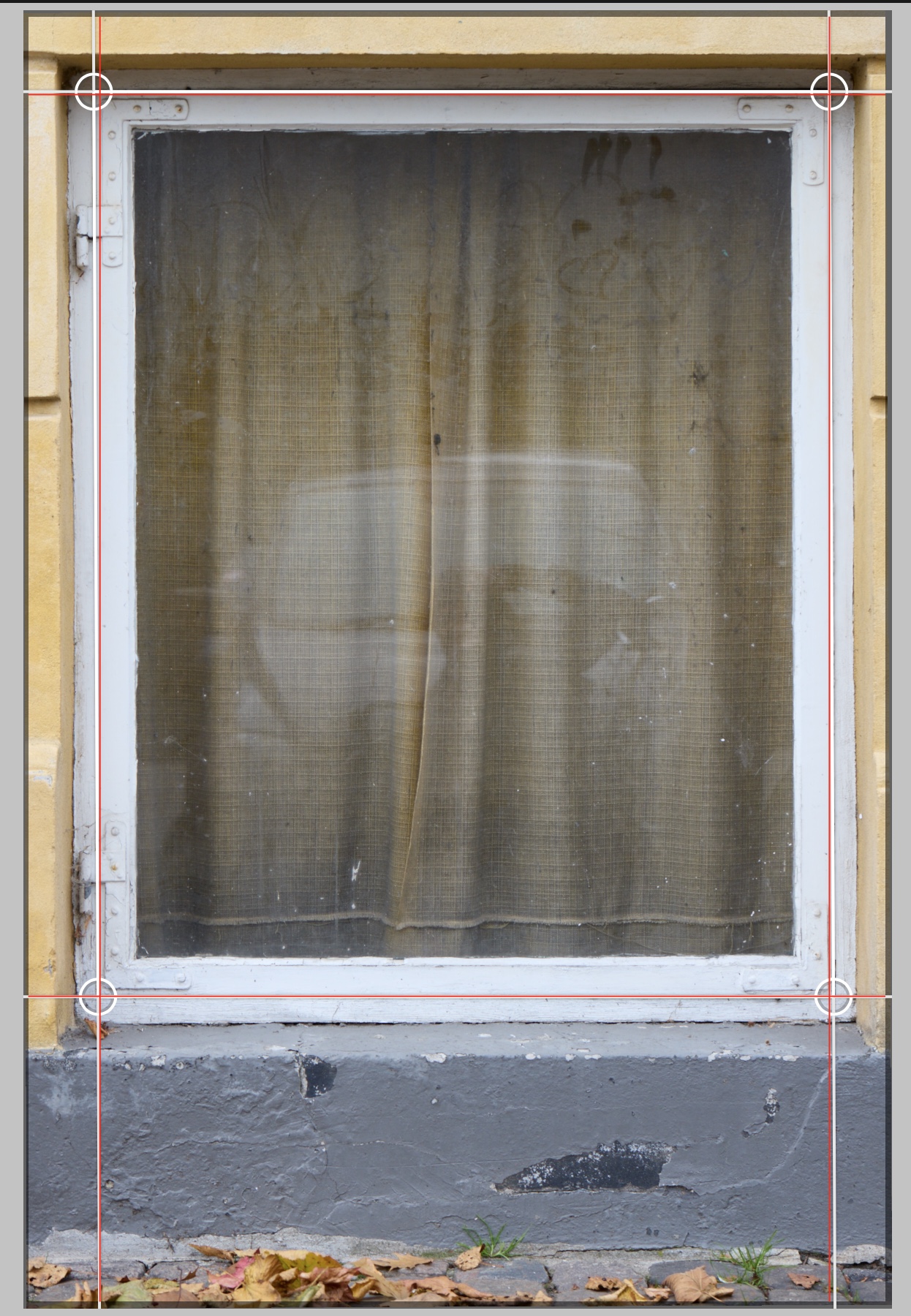 1
1 -
guess we all know now very well what mr.flemming calls "our problem" with the keystone tool. if they are not able to replicate it by themselves in a reasonable time frame they should think of hiring you ;-)
0 -

I welcome very warmly the message from @Alexander Flemming and I also received a personal answer to my support case going that way. Our voice have been heard and now let's work now together to have a powerful and useable keystone tool Capture One (and we) deserve.
The problem has been fully described in previous posts and throughout this post. So I just add my voice to what has been said and described.
I want to thank Thomas Kyhn for summarizing the various posts and keeping the topic alive.We look forward to Alexander Flemming to hear from you and to discover the long awaited developments of this tool.
0 -
great ! so did they also reveal how many years it will take them to fix it ? 2 weeks passed and not even a whisper if they can confirm the problem we described is not really encouraging or user friendly.....
-1 -
@CSP You might have misunderstood my comment in here. It was indeed a confirmation of the problems. When I say that we need to understand the scope, that is to make sure that we are not solving something we shouldn't be, and that we get the most out of the development we are going to put into it.
If you'd like to contribute with something constructive to the case, I'd be happy to schedule a call with you like I did with Thomas Kyhn. Let me know that's something you're interested in.
1 -
@Alexander Flemming Ok thanks, but....
that is to make sure that we are not solving something we shouldn't be,
hm, really ? this tool is fundamentally flawed and this is your problem ? others are able to confirm a bug or issues of this dimension within days you can´t even say that you are able to reproduce what we showed ?
anyway, what I would like to add is don’t just look at architecture work when rethinking this tool I do sometimes for technical reasons split the correction with a view camera and the software adjustment for stills or I have used it for reproductions of painting on location which are too large to transport and even working very carefully it is often need to make some corrections in software, this also saves a lot of time to be honest.0 -
@CSP Let me confirm, once and for all, that the problem you're seeing is a real problem. I thought my previous comment would be enough, but I'll repeat it for you. It doesn't work like it's supposed to. We can fix that, and call it a day, or we can look into if we should be doing more to this tool to give users like you a better overall experience. Before I throw even just a single developer at this, I need to make sure all corners are covered and there are no unanswered questions to what we want to solve. We are working on plenty of other things in the application, every single day. This is why I'm scheduling calls with users, and why I'm participating in the discussion here.
I'll take your response as a no to participate in this process - other than commenting in this forum. That's okay.
0 -
Initial post updated with the release of version 15.2.0.
As pointed out there, the previous malfunctioning has now been fixed, and some of the limitations have been removed:
* the visibility of lines and adjustment points has been improved;
* the default vertical keystone amount has been changed to 100;
* auto-keystone has been added.Though the most acute limitation (apart from the previous malfunction), the lack of independent adjustment points, is yet to be addressed. And it's still not possible to place three lines (six adjustment points), adjustment point positions still aren't saved when the application is closed, and there's still no loupe function.
0 -
Ahh, at least a tiny reason to consider an upgrade for years ;-) ... now lets wait for the next upgrade offer ....
0
Post is closed for comments.
Comments
145 comments