
After de-mosaicing the RAW files, Capture One automatically selects the recommended default ICC color profile and applies an appropriate tone curve setting for all RAW image files from recognized camera models. These color and tone settings define the overall look for the camera or digital back.
The processing engine can also have an effect on the resultant image. Although the engine is upgraded for each new version of Capture One that does not necessarily mean that the color rendering has changed. While all subsequently imported images will be rendered with the new engine, if some of the new tools in the latest version rely on the new engine, then you may not be able to use them on the previously imported and adjusted images without updating them. In general, it is not recommended, especially when they have been processed or exported to a final file. However, when there is a need to do so, it is suggested that you clone the earlier images and re-render them with the new engine.
When updating to a new version, you will not be prompted to update your existing images but you will be asked to migrate the database of any older Catalogs or Sessions that you open. Although this has no impact on image quality, you will benefit from any advances made to the reliability and performance of the management system.
If you are using Capture One Cultural Heritage, the Base Characteristics tool has an additional Mode drop-down menu and specialized Cultural Heritage ICC Profiles. For the Base Characteristics tool in Capture One CH version click here.
Generic vs. ProStandard & Ecommerce ICC profiles
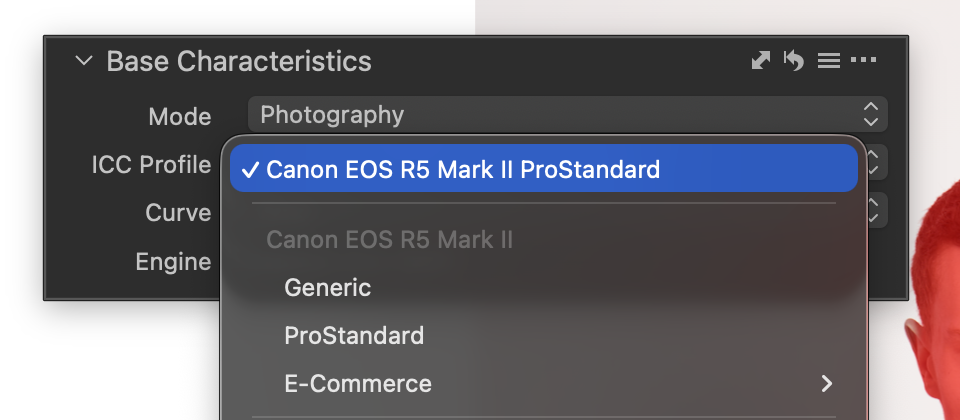
The Base Characteristics tool offers Generic, ProStandard, and Ecommerce ICC profiles. Despite the name, the Generic profile is created by Capture One specifically for each supported camera, providing a reliable baseline rendering rather than a one‑size‑fits‑all profile. ProStandard profiles are also camera‑specific and are designed to better preserve hues across color gradients, with lighter tones represented using more pure and consistent colors.
Ecommerce profiles are optimized for product imagery, aiming for clean, neutral color reproduction and consistent results across large image sets. See here for more details: E-commerce ICC profiles (Studio)
Selecting an alternative ICC profile
Selecting an alternative tone curve
Saving as new default settings
Overview of the process engines
Re-render previously adjusted images using the latest engine
Re-render using a legacy engine
<< Keystone correction | Selecting an alternative ICC profile >>
Comments
0 comments
Please sign in to leave a comment.