A new keystone tool
Implemented
Updated April 5 2022 (with the release of version 15.2.0).
The previous malfunctioning has now been fixed, and some of the limitations have been removed (the visibility of lines and adjustment points has been improved; default vertical keystone amount has been changed to 100; auto-keystone has been added). Though the most acute limitation, the lack of independent adjustment points – see 1) below – is yet to be addressed.
This is an attempt to summarize in one place the requested features for an improved keystone tool.
1) Independent horizontal and vertical adjustment points (four independent lines, rather than four lines locked in a four-sided figure; eight adjustment points in all). (See these: 1, 2, 3, 4 and 5.)
2) The option to only place three lines (six adjustment points). This would be useful in a cases where one of the axes only has one line you can use for alignment. (See this topic.)
3) Retain adjustment point positions after the application is closed (see this).
4) Loupe showing the exact position of adjustment points while you drag and place them.
5) Option to move an entire line between two adjustment points (as opposed to one adjustment point at a time) (see this, for instance).
6) Maximize crop when using auto-keystone (see this: unnecessary cropping).
-

Thomas,
Arbitrary values are exactly that. Arbitrary, but usually chosen to best represent a specific circumstance based on a rational of some sort where such might apply. (As opposed to some randomly selected value as the basis for a scientific calculation, for example)
However, I note that the Documentation shows screen illustrations with the percentage adjustment value set to 100 by default.
Opening the Keystone Tool and using it retains a 100 default.
Using the horizontal only guidelines produces a 100 result as default.
Using both horizontal and vertical adjustments show a 100 result in the Keystone tool after the adjustments have been "Applied".
The only thing to reset to 80 is use of the Vertical Guide bars in stand alone mode.
Note that my comments apply to Version 20 and as far as I recall, version 21 has proved to be no different.
And as you may gather from my earlier comments, I don't have a problem with that as a starting point since 100 on verticals almost always seems to produce rather unpleasant (to my eyes) distorted and top-heavy results for typical architectural adjustments or any sort of image with a fairly wide-angle lens and an upward-pointing position.
There as some photographic genres that might welcome such selective enlargements if used creatively but top-heavy buildings, as my eyes see them, are not best served by that distortion as a default. In my opinion.
I have no problem with parallel verticals in architecture but not at the cost of distorted doors and windows where the size of such features show be the same in the entire vertical plane (and horizontal) plane, but are not.
Moreover, when we look at building from afar we may well interpret them as having vertical verticals and horizontal horizontals at distances that are suitable for such assumptions. But if using a wide lens to get a shot from a less than perfect shooting position and retaining that viewing position in the image then something somewhere will need to be distorted since that is not the way a viewer in the same position would actually see the structure.
One of the more interesting effects of interior architecture - of the cheap type that often involves real estate agents - is trying to guess before attending the location being illustrated, just how small a room really is when compared to the impression the presenter is trying to deliver. The joys of digital correction of wide-angle lenses.
I was pleased to see this subject discussed in a Youtube video yesterday. Much to my surprise, the points about the possible influences of lenses and the correction they require together with the need for a good true horizontal reference (or perhaps vertical for some architectural shots) came up.
As did the differentiation between Keystone correction of photographic attributes compared to pixel based manipulation of graphics.
It comes down to picking the right tool for the job rather than trying to seek a single tool for all jobs.
Maybe AI will come up with the single tool ... but then it may not need people at all.
0 -
@SFA
"The only thing to reset to 80 is use of the Vertical Guide bars in stand alone mode."
Yes, that's what I've said the whole time. See 5) in the initial post.
You appear to repeatedly refer to one specific use case in which you find buildings to be "top-heavy", etc., rather than consider the range of uses this tool is typically put to.
Also, you appear oblivious to the fact that the keystone tool is often used for subtle adjustments to photos with verticals that are already very close to parallel. Here, too, 80% makes no sense.
0 -

@SFA
You're wasting your breath. The point being made in this thread, along with several other threads over the past few years, is that within C1 we should have the ability to turn a trapezoid into a perfect rectangle. Arbitrary or not, it doesn't matter. End of story. It can be done in numerous other softwares including rudimentary iOS apps. We want independent axis transform capacities.
2 -

Also, you appear oblivious to the fact that the keystone tool is often used for subtle adjustments to photos with verticals that are already very close to parallel. Here, too, 80% makes no sense.he would know this
everybody actually shooting and using this tools knows this and this is why every other important software has a default of 100%, software should not make creative decisions.
2 -

Well my subscription finally ended and I did not renew. I made it very clear in the 'why are you cancelling' thing that its because of the keystone tool, lack of developers in the forum, and focus on new features over fixing existing ones.
3 -
I fully agree with you Katrina. No updates for me unless they start listening and get their basics in order ...
4 -

@Timo Bierbaum
"No updates for me unless they start listening and get their basics in order ..."
Same here. I don't need HDR / panorama-stitching support. Might be nice to have occasionally, but for me personally it is much more important that the existing functionality is
a) correct (does what it is supposed to do), and
b) easy to use (supports productive workflows rather than making one jump through hoops because UI design elements need to be uncovered before they can be used (e.g., mask settings in the Viewer toolbar which I normally have closed), UI design elements take too much space ("+/-" add/delete layer icons requiring their own row, wasting space), or brush selection mechanics favour beginners who use very few (unnamed) layers rather than enthusiasts who want to be able to efficiently revisit many layers and/or quickly change between regular brushing and erasing for advanced mask creation.2 -
Yet another non-reply from support about the keystone malfunction issue (after sending several examples including screenshots and .eip files):
"We do get similar feedback from time to time and I have logged your comments and suggestions in the R&D keystone tool thread."
2 -

"No updates for me unless they start listening and get their basics in order ..."
"Same here. I don't need HDR / panorama-stitching support."Panorama stitching is actually an old and forgotten fonction of C1 that is coming back... :-)
@Thomas Kyhn
"We do get similar feedback from time to time"... I guess I am part of the "time to time".
Let's make those feedback from time to time to all the time, and I convinced they will finally hear our voice (let's be optimistic ;-P)2 -
is anyone surprised ? a broken and outdated keystone tool is not important enough to make them listen. the promises made with the export panel disaster forgotten, never thought this was more than marketing BS anyway. this company will not change and when it is for sure too late for me because I need a woking tool today. HDR and pano would have been cool 10 years ago but who needs HDR today ? when 22 brings nothing else useful for my work I´m done after using c1 since version 3.7.
0 -
One more reply.
After having previously acknowledged that the keystone tool didn't work correctly, they have now taken the stance that unexpected results are, in fact, "expected behavior", which "requires a design change and not a fix".
And as "[t]his is not an easy task and doesn't get a lot of priority", it seems very unlikely that we'll see any changes here any time soon.
...
I'll just add my reply here too:
"If this behaviour is indeed intended, can you tell me what, exactly, is to be expected from the keystone tool?
Usually, what is expected of keystone correction is right angles and parallel verticals/horizontals, at least for the adjusted lines. Sometimes this is what you get with Capture One's keystone tool, but often it's not. Sometimes you get parallel verticals and horizontals, but not right angles, sometimes you get neither. If these variations are intended, it's difficult to imagine what sort of use you could possibly have had in mind for this tool. Is it the case that it works as expected (right angles and parallel verticals/horizontals) with Phase One cameras, but not with other cameras?
Whatever the case may be, you've had more than ten years to fix this tool, so the fact that it isn't an easy task is indeed a poor excuse for not having done so."
0 -
"this is not an easy task and doesn't get a lot of priority"
When I was a teenager, I had that kind of answers too….0 -
Leo, who tells you the C1 devs are people beyond their teens? :)
Like many others I read in this thread, I won't be rushing to throw more money at CaptureOne. Different reasons, but the new features are too overpriced and the stability of the app itself is questionable. Nothing good to write about an app with 14 major releases...
0 -
maybe there is a bigger plan and this is how they make working with c1 exciting ?
unbelievable coming from a company which brags so much about being soooo professional seems they have no clue anymore what this means.
0 -
Its worth noting that Rawtherapee v5.8 had no keystone tool to speak of - and the upcoming 5.9 has one with arbitrary control points and auto adjustment that works, for me, at least as well as the one in LR. And that software is made by volunteers for free. Any reasoning C1 gives about having to rewrite the tool going to take a long time or it being some huge hassle is just an excuse based on C1 seemingly being run by their marketing department prioritizing new users over retaining existing ones.
1 -
I assume that if the keystone tool works with Phase One cameras, that partly explains why they don't care to fix it. Though you should think that even if the keystone tool works with Phase One cameras there would be quite of few Phase One users who, after ten years with this very limited tool, would appreciate an update.
0 -
i assume that everybody who needs a reliable tool already uses adobe or dxo so they think everything is ok as they do not get a lot of complains - catch 22
0 -
I just gave the new DxO PhotoLab 5 a try. Its keystone tool works fine and has none of the issues of Capture One's. Here's an example:
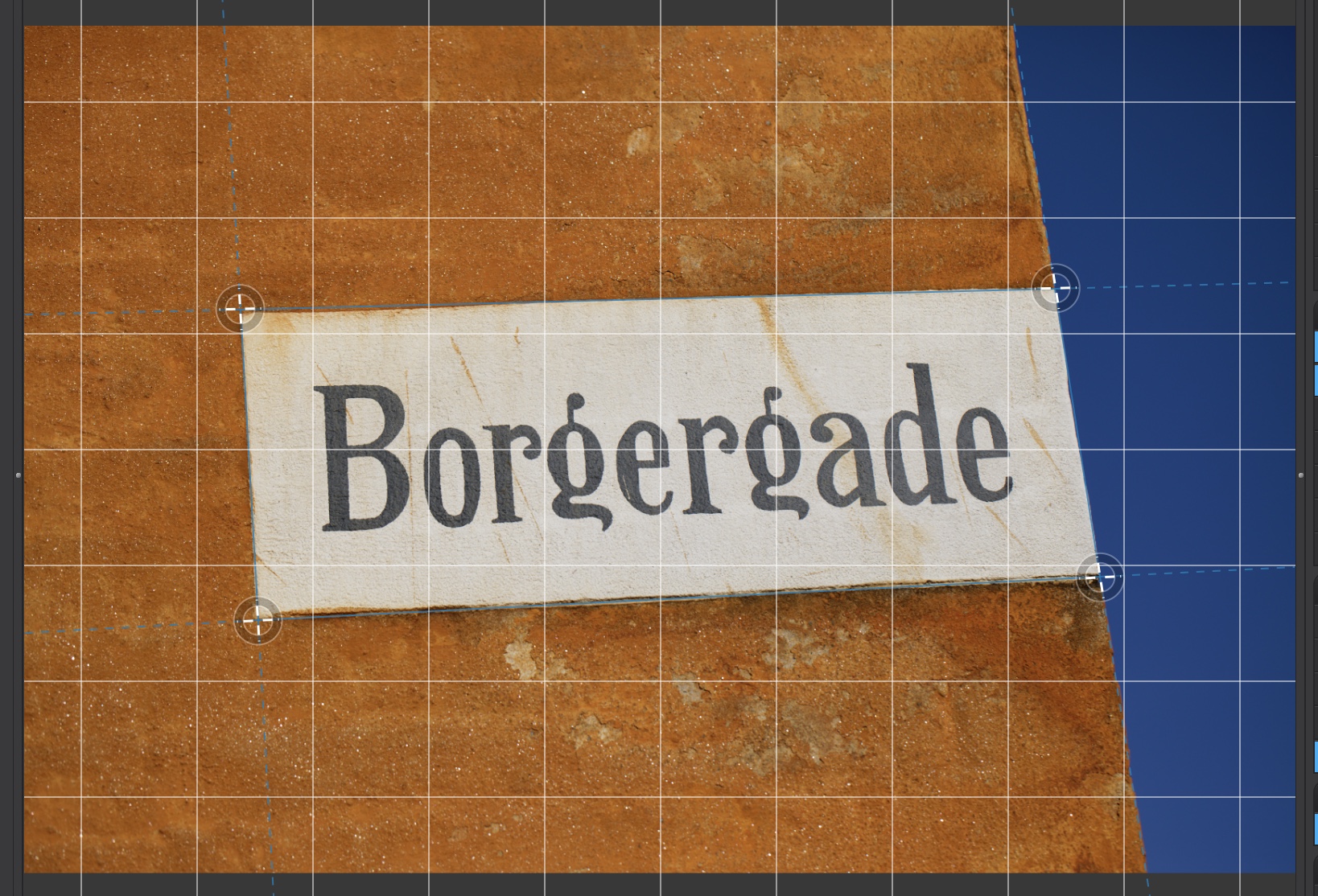
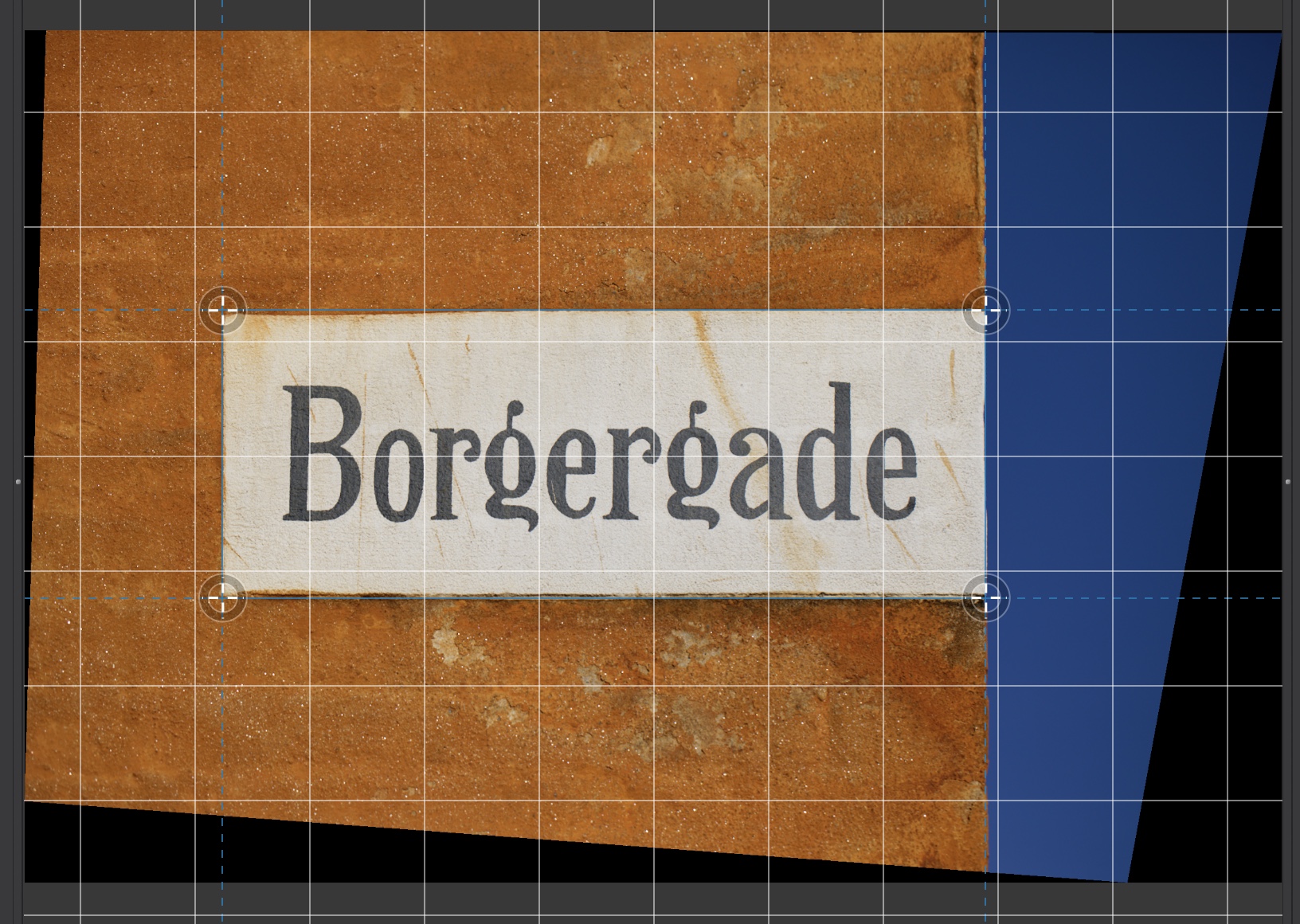
And the same photo adjusted in Capture One:
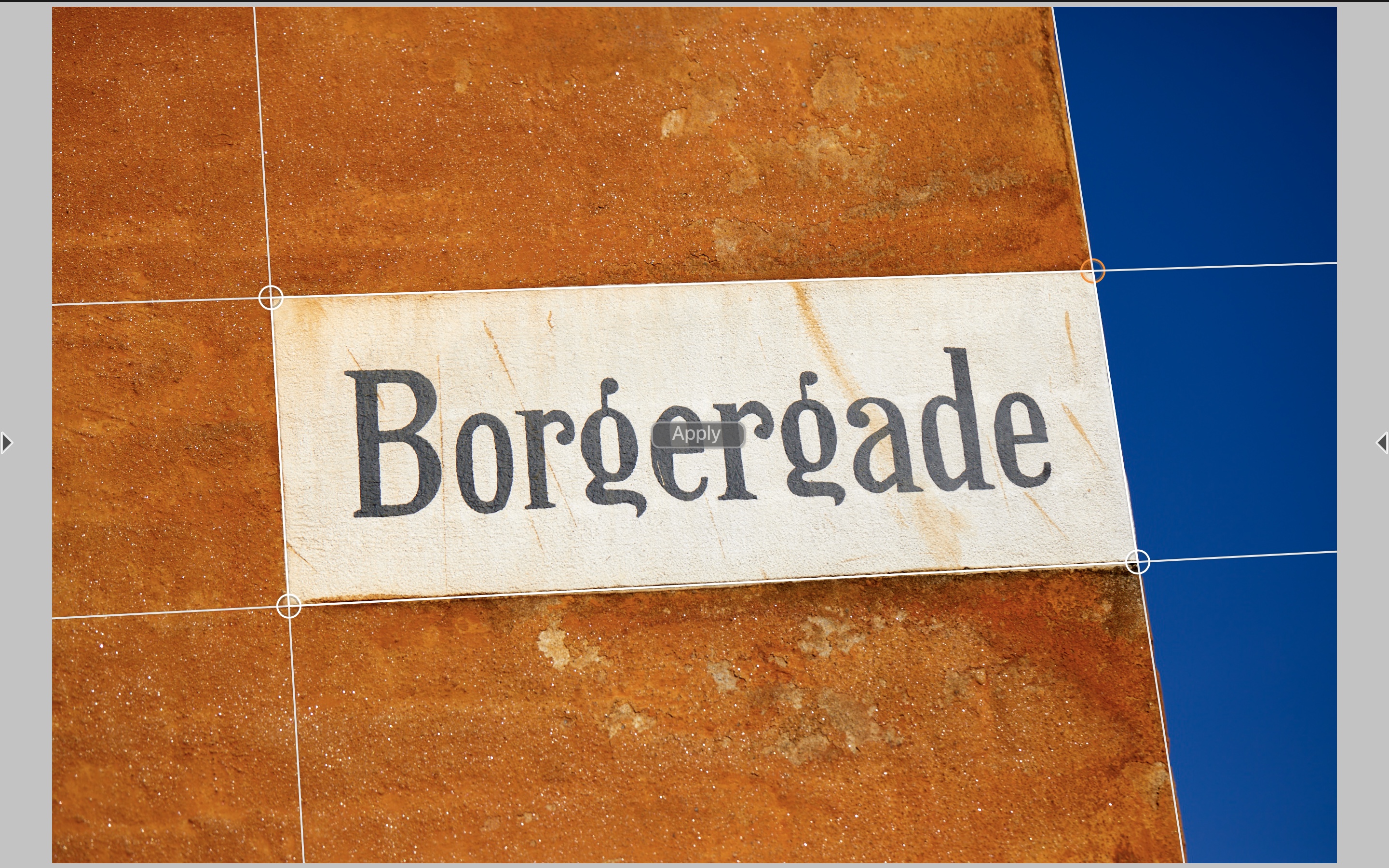
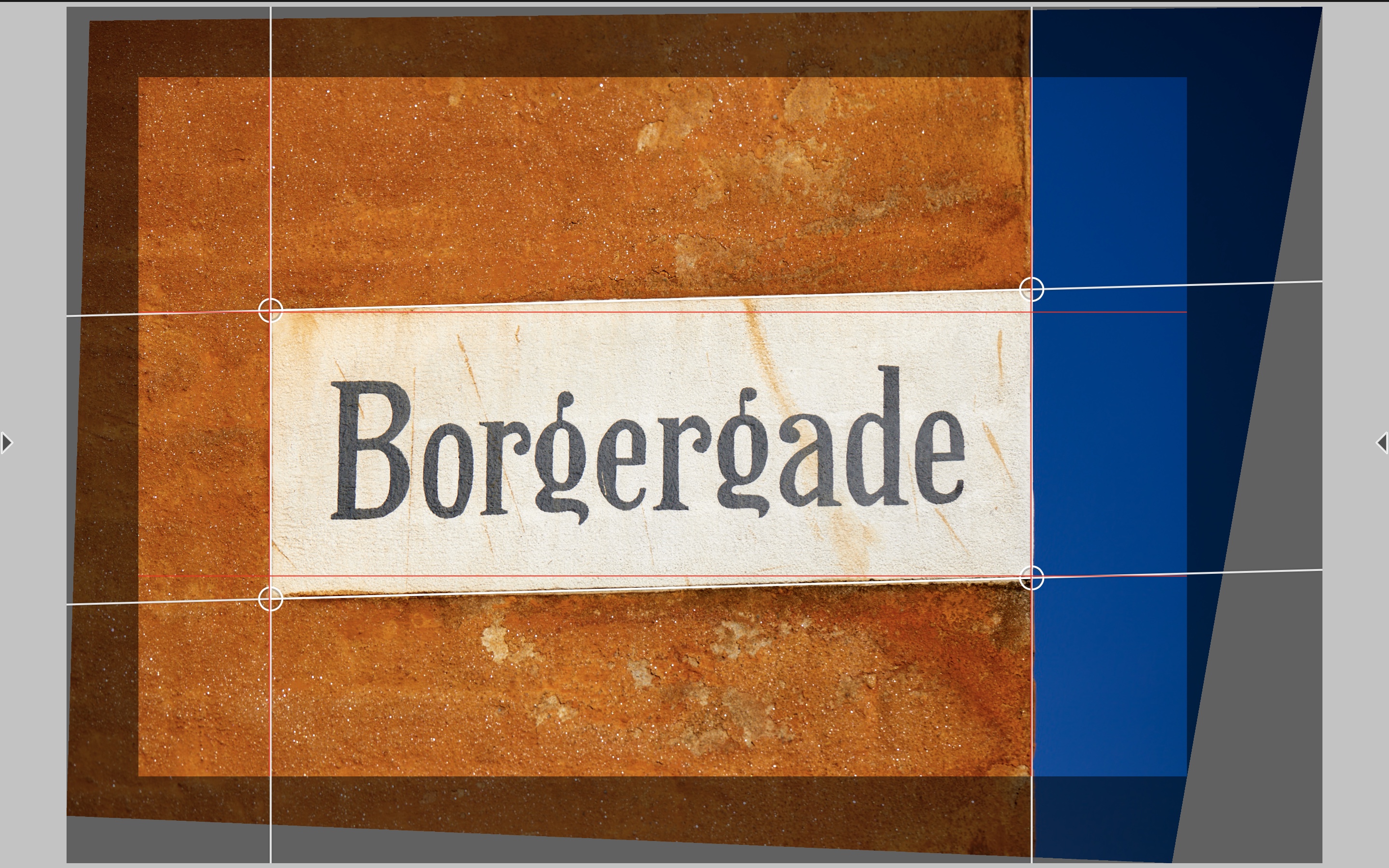 0
0 -
That's the way it should work ...
Any experience with the ON1 Tools? They just have an introductory offer for 5 PlugIns .... Does anyone know if keystone adjustments are part of one of the PlugIns?0 -
I haven't tried any ON1 software. There's a DxO PhotoLab 5 offer too. It seems that PhotoLab 5 works with Lightroom and Photoshop too, but not with Capture One. Some sort of nondestructive keystone workaround/plugin for Capture One would have been useful, now that Capture One, the company, isn't doing anything to solve this issue.
0 -
That's why I'm looking at ON1 ... they offer all their PlugIns also for C1 and Affinity and the bunch of Adobe blackmail SW - but as I said, not sure if a keystone function is part of one of their PlugIns ...
0 -
Unfortunately, it doesn't look like their professional plugin series includes a keystone tool.
0 -
I would recommend you try / get the dxo viewpoint 3 plugin ( which is an extra and not included in dxo PhotoLab btw ) and it can be used with c1.
(also playing with dxo 5 the new control line tool is really fantastic )
0 -
I've tried ViewPoint 3 and it only works destructively, at least with Capture One.
0 -
Still better than non-destructive - not-working :-)
0 -
0
-

Re DXO Photolab 4 or 5
Assuming you have both DXO Photolab 4 or 5 and C1. Launch DXO and select the customize module. In C1 - either sessions or catalog - drag your image from C1 to DXO and do your keystone, noise reduction, etc. and then export back to C1 as a DNG to the original folder. Works perfectly and is relatively quick.
A couple of notes - you should send the unedited file across to DXO as any edits will be lost in the drag and drop. Also you can do your lens, volume, profile corrections, etc in DXO as C1 will read them.
When exported back to sessions in C1 your image will be in the same folder and ready for further adjustments. In catalog mode you will have to sync the folder and import the file. I have set up keystroke shortcuts for the synchronize and import since I use the catalog mode.
I am on a Win 10 system, however, I assume the Mac works the same or better.
0 -
...and you do not need to learn a new app even when it is a mistake in case of PL ;-)
0 -
I originally bought DXO Photolab 4 for the awesome Prime noise reduction - now they have Deep Prime. I discovered that exporting back as a DNG works perfectly and I then started experimenting with other options in DXO. It may not be quite as slick as the LR/DXO or LR/PS roundtrips, however, it is very close and as you say - I don't need to learn a new app and I don't .give up all the years of edits and work I have done in C1.
It is a horrible experience starting over with your edits as I originally did from LR to C1 back in C1 v7.
0 -
Exporting DNG files from Photolab to use in Capture One would indeed be an option. I'm just not sure about paying (currently) 165 euro for a non-nondestructive workaround for a Capture One tool that doesn't work. I'll give this method a try though while I have the demo.
0
Post is closed for comments.
Comments
145 comments