Improved DAM: Capture One's database/catalogue needs an update

A subject that is brought up regularly, one of Capture One's weakest spots: its database/handling of catalogues. (See this and this, for instance.)
Perhaps it would be a good idea to summarize in once place the issues users experience with Capture One in this area.
1) Unresponsiveness/sluggishness, e.g. when searching/filtering and when editing metadata/keywords. (See this and this.)
2) Better performance with large catalogues.
3) Keywords:
- search for specific keywords – e.g. "cat", without also including keywords that contain the letters "cat" such as "cathedral" and "caterpillar" (see this below and this)
- suggested keywords
- hierarchical keywords
- sorting
- option to exclude specific keywords on export
4) Option to name variants (so that they can be distinguished in the browser).
5) Configurable metadata tags (see item 1 here).
6) Synchronization of metadata and adjustments between catalogue and sidecar files (.cos and .comask) (see this post).
7) Option to add/edit GPS metadata (see this).
8) Option to add notes to photos (see this and this).
9) Patterned search (see item 5 here).
10) Option to lock edits (see this).
11) Show offline/missing files.
12) Show stored file paths for offline/missing image files (see this).
NB: If other users have something to add to this, please leave comments, and I'll add further issues/information to this post.
-
What I find most annoying is the clunkiness of finding things. I use hierarchical keywords extensively, especially for identifying wildlife subjects, but also other subjects. Adding keywords is OK, but retrieving images later is more of a problem.
- Searching can be a nightmare - if you search for images with the keyword "cat" you also get images with the keyword "cathedral" or "caterpillar" for example.
- The keywords in the filters tool don't appear in the same order as they do in the keywording tool. So I have for instance a keyword library called living things, with sections for Animals, Birds. Insects, Plants, etc. But in the Filter tool, they don't appear next to each other - Birds are separated from Animals by all sorts of other things beginning with A and B. - See screenshot.
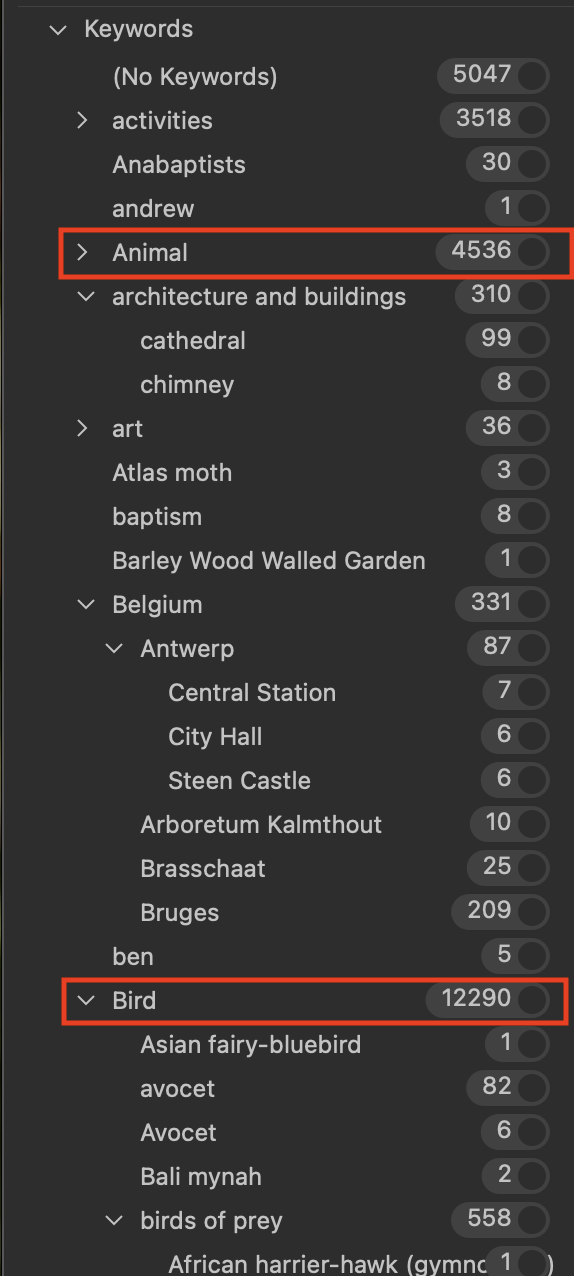
- Back when I started the practice of keywording, I was using Media Pro. It had the big advantage that you could add keywords, and find images with those keywords, in the same place. But in Capture One you add them in one place, and find them in another, where they don't even appear in the same order.
- To give another example, I have another Keyword Library for locations (called Where). I have countries, cities, districts, etc as required. France appears right after Belgium (as I have never been to Cambodia or Denmark, and England appears under UK) like this
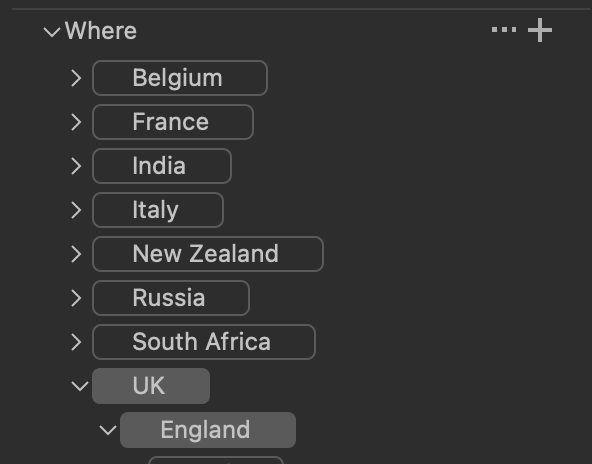
... but in the Filters tool, they are separated by other things that have nothing to do with locations.
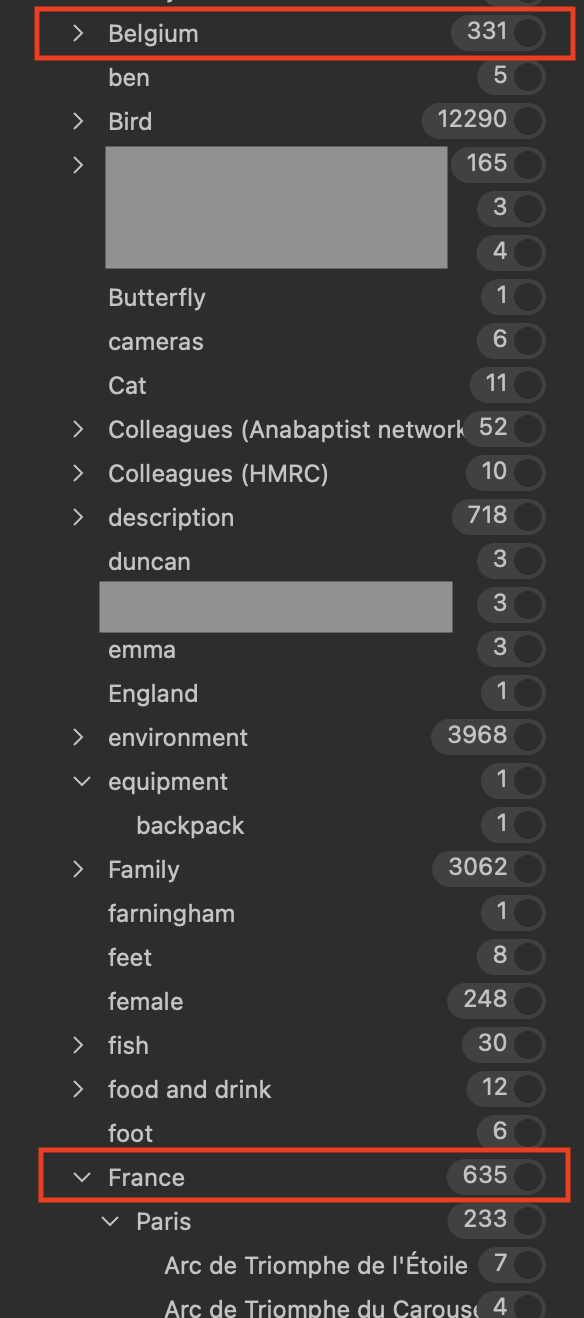
I really think that this needs an overhaul. I feel as if the DAM capabilities are very much less useful than they were in Media Pro. I had been using Sessions only in Capture One in conjunction with Media Pro. But when they ditched Media Pro, I felt I had no option but to go for a master catalog in Capture one instead. That works for me in some ways, but aspects like this are very disappointing.
Ian
0 -
That is strange. The keywords between Belgium and France in the Filters tool, where do they belong? Are they sub-keywords in the Keyword Library?
0 -

Yes, this section is extremely poor. I addressed this problem by using more structured keywords (e.g. “scientific name:Felix catus") and mapping to multiple smart albums (e.g. both a hierarchic taxonomy tree and a common name such as "cat"). This requires scripting for managing all the stuff.
BTW: a few years ago C1 had the habit of "flattening" hierarchies of tags when writing to XMP, so I had to prevent C1 from writing XMP and exclusively rely upon another application for managing keywords. Has this changed?
0 -
Thomas Kyhn Rovsing Hjørnet - they are from different keyword libraries. So I have a Living Things keyword library, a Where keyword library (which includes Belgium, France etc), a Who keyword library (including Duncan and Emma for example), and so on. The main reason for that (rather than having everything in one keyword library) is that I don't want something like "Who" to appear as a keyword.
Ian
0 -
@Ian Wilson
Oh, of course, now I understand.
How do you think keywords should be sorted in the Filters tool?
0 -
@Fabrizio Giudici
As far as I can see, xmp files created by Capture One 23 contain both flat and hierarchical keyword sections:
There's a flat <dc:subject> section and a hierarchical <lightroom:hierarchicalSubject> section.
0 -
Hi Ian Wilson
Searching can be a nightmare - if you search for images with the keyword "cat" you also get images with the keyword "cathedral" or "caterpillar" for example.
I would like to distinguish here. If one uses the Filter tool with distinct keywords eg.. (cat) or (cathedral), then clicking on the keyword (cat) should only show the images tagged with cat, not cathedral.
But, if I use the search text box I would like to have a partial match function, i.e. see all images which have "cat" in one or their keywords, all cats, all cat, all cathedral, all cathedrals, all caterpillars, all caterpillar and all caterpillrs.
For the problem if partial match finds too many images one can always find good way to cope with it, e.g. search for cat AND aninmals, or use plural cats as your keyword for your pussies, etc.
Same in the Search dialog.
Or, partial matching / exact matching should be an option, but a search which only works with exact matching is not what I would want.
Cheers,
BeO0 -
The problem is not related to the presence of both 'flat' dc:subject and 'hierarchic' lr:hierarchicalSubject, which is fine, but to the data inside. Here is my original complaint:
https://support.captureone.com/hc/en-us/community/posts/360009390018-Keyword-hierarchy
For instance PhotoSupreme also uses both kinds of metadata, but it doesn't do the mess I described in that old post.
0 -
I see. I had a similar issue when attempting to apply keywords using Photo Mechanic. Using both Capture One and Photo Mechanic I ended up with the same sort of mess. I gave up on solving it and just went back to using Capture One only for keywords. Though it's far from ideal.
I liked Lightroom's handling of keywords much better as it gives you more control, e.g. synonyms and the option not to include certain keywords when exporting images.
0 -
I tried Photo Mechanic 6 Plus with C1 v22 just recently and encountered the same incompatibility between both apps for hierarchical keywords. My plan was to use the PM Plus catalog instead of C1 catalog to work with a C1 session hor editing but with keywording in both systems. I ended up not purchasing PM but using C1 catalog for searching with C1 dummy session for editing.
I do miss that image edits and metadata can be syncronized between a C1 catalog and the .cos and .comask files in the subfolder CaptureOne/Settingsxxx for the catalog referenced images.
0 -
I bought Photo Mechanic Plus last year, but apart from my attempt with keywords I've so far only used it for importing and renaming files from memory cards, editing GPS metadata and a few other metadata elements. As long as it doesn't show variants, nor adjustments, I find it's of limited use as a supplement to Capture One. Though it isn't capable of editing metadata yet, Peakto works much better as a supplementary catalogue as it shows both variants and adjustments, and the interface is a lot less clunky than that of Photo Mechanic.
0 -

Metadata is indeed the weakest point of Capture One. I have complained many times, but it seems the developers are only interested in pixel editing (which they do very well).
I have never been able to fit the metadata I need in CO. Of course you can define hierarchical keywords for a lot of things, but the user interface for keywords is poor, especially the filtering as many have pointed out.
I have been using other applications for metadata. While I was on Windows I used IMatch (the best for metadata), but having recently moved to Mac I am now exploring Photo Supreme. But the big drawback is that Capture One can not store additional metadata. I was using catalogs of JPG for a while, but that is also not ideal, as it involves an extra workflow step.
What we need in my opinion in Capture One:
1. Configurable metadata tags. Not everyone uses the same sets of tags. The ones in CO today seem a bit out-of-date to me ?? They should add a possibility to add a number of tags of interest for the user. In my case it would be a few of the Darwin Core tags, Event tag, PersonInImage tag. Other users will have different interests. Of course that would require some modification of the database. Not difficult, but some choices would need to be made. e.g. unlimited number of tags, or a maximum number (25 would be fine for me).
2. Along with that we would need a "configurable" GUI, Should show only tags of user interest. Both IMatch and PSU have that.
3. In a Catalog I would expect to get a dropdown list of already available tag values. I have about a thousand values for City in my catalog. Place names are not always unambiguously spelled. Dropdown lists with on the fly filtering are standard user interface components. It would be nice if these reference lists could be used in Session as well. The current list of "used values" remembers every misspelled word and the list disappears when you move to a new platform. This should be made more flexible and smarter.
4. Filters: the filters should also have the list of available values if we are filtering for equal or non equal. Filter values should also be case independent (or at least as an option).
5. For hierarchical keywords maybe we should have patterned searches, e.g. if I have a five level keyword for location like: Thailand|Phrae|Den Chai District|Mae Chua|Suan Saithong|, then I would like to filter with something like: Thailand|*|*|Mae Chua|*| to get all the locations in Mae Chua, Thailand, in case I did not remember the district name. Right now searching for Mae Chua in the filter gives me 2005 matches most of which have nothing to do with what I need (there should be 14). I guess many of the complaints in this post touch on the same issue.
Partial matches should only be made when using wild card, or, maybe more user friendly, with an option like in Visual Studio Code (Match Case - Match Whole Word)
6. CO only stores hierarchical keywords (lightroom:HierarchicalSubject), no dc:subject (flat keywords). But it looks like the filter acts like it is using flat values calculated on the fly, including partial matches. I think there is benefit in have both options, hierarchical and flat, but obviously clearly separated. Be specific about what type of keyword is used and what type of matching.
I think there is so much wrong with metadata in Capture One that a thorough overhaul is needed, hopefully with users being consulted. I have plenty of ideas and experimental code.
2 -
@Jozef Dassen
Thanks for the additions. I've added further points to the initial post.
0 -
Thomas, can you please add
Metadata and adjustments synchronization between catalog and sidecar files (.cos and .comask)
0 -
@BeO
Sure. As I remember, you have made a separate post about this. If you can post the link here, I'll add that too.
0 -
Unfortunately, there are no plans to improve Capture One's performance when it comes to handling of catalogues. At least that's what the support department says (in a reply from two days ago).
Which is something of a disappointment, as it currently takes 1 minute and 11 seconds for Capture One to recover when I change the rating of one image.
0 -
I assume that even if you were on a subscription plan you could fund them forever and still suffer from bad performance.
Did support explain why the don't want to improve performance?
0 -
What they wrote was this:
After some investigation and communications with our engineers, it seems that we reach a point where Capture One will not be performing as well as it should be with big Catalogs with many folders structure, images, and keywords... as yours.
I have to say that sadly we are not aiming in getting that better for now.Though this does not explain why only some users with larger catalogues have issues with unresponsiveness. But then it's also possible that they just wanted to be done with this support request, and this was the easiest way out.
In any case, it seems the catalogue function remains more of an afterthought and not a part of the application that has any priority.
As it is, I'm very reluctant to switch to a subscription.
0 -
They admit C1 does not work "as it should" but at the same time they are not aiming at making C1 working as it should, so they don't take those customers serious. And if I remember right you are not the only one, and the performance problem (for some) exists for years.
Subscription is not an option for now and the foreseeable future, for me.
0 -

I fully agree with your remarks, as I was using Aperture from Apple, which was a great DAS.
One thing which Aperture differs from C1: checking for double existing files. Aperture did that in a second, C1, even with very small catalogues like 2000 photos, takes a lot of time. I think they have to check each time the whole database as Aperture seem to keep a file system to check
This should be a very easy solution adding a reference file.
Herwig
Thank you for getting envolved. I used to have big files in Aperture, the biggest with 250.000 photos, still doing well. It still works today and I also converted it with Caputer One (which was not succesful) and also with Avalanche, which works fine.
1 -

I had to give up with C1 in the end (3 years ago now). As much I loved the editing tool itself, the asset management piece is so dire that it made it almost impossible for me to work with it after LR. I too was originally an Aperture user, and I loved their asset management. It became apparent to me that C1 don't really have any desire to expend much effort on that part of the Ux.
1 -

I am in the same position as Lloyd Roseblade in that I found the DAM aspects lacking so much so that I moved on some three years ago.
Before I gave up I took a look at the design of the database and was not impressed. Simply, it showed signs of many hands having made edits over the years with many of those edits being quick and dirty. I suspect that the reason that C1 have no plans to improve the DAM is that it requires a complete rewrite from the ground up.
Another unfortunate feature of C1 is that it does not play well with external DAM software. If it did I would probably be still using it.
Good luck.
1 -
Thanks for your comments!
@...
Regarding checking for double existing files – is this when importing files/synchronizing folders?
Another unfortunate feature of C1 is that it does not play well with external DAM software. If it did I would probably be still using it.
Agreed. I'm hoping that Peakto will at some point come to work well with Capture One. It is as far as I know the only such application that will display Capture One variants.
0 -
I make as living working with databases. Capture One is best known for its extreme management of pixels. And probably the best, bar none.
Keywords, and metadata in general, are based on database functionality. The design, the architecture, the search tools are key elements leading to a better system. Developing and maintaining such database is not trivial. Selecting the database engine that fit the requirements in respect to the price point expected is a major challenge. These engines are 'free' when somewhat crippled and not as fast as their 'paid' counterpart.Adding indices, changing the schemas are introducing updates costs and potential issues.
One of the possible approaches could be an add-in, where users could select the level of functionality they need and pay accordingly. Not a disjointed tool, like iMatch that is not working well with sessions.
Pushing back C1 to become database experts is probably not an avenue that will improve the situation. I do suspect that many C1 users have simply given up in this area and are using other tools for the DAM functionality.
It looks like C1 is also pushing Sessions. Thus, external DAM better integration becomes an issue that C1 should address. (This does not solve the nightmare of where to keep these data: side car? Other combination -- we wish RAW or JPG could have 'annotations' that could be added to their storage.)
Knowing the universe of C1 users and how they deal with metadata and DAM would be interesting. Time for a poll?
0 -
While the company has acknowledged Capture One's performance issues with larger catalogues, there's been no indication that they intend to anything about it. So better integration with other applications is probably all we can hope for at the moment, even if this doesn't solve Capture One's performance issues. As I remember, integration was also mentioned by CEO Rafael Orta in his conversation with Paul Reiffer on YouTube (I'll leave out the link in order not to have this comment automatically blocked).
For an external DAM application to supplement Capture One properly it will need to handle variants. To my knowledge, the only application that does is Peakto, though the company appears to have some amount of trouble getting around Capture One's limitations.
Photo Mechanic is mentioned regularly in this forum, and while it's useful for some things, I don't find it useful as a DAM supplement: its interface is clunky, synchronizing metadata is extremely slow, and it shows neither adjustments nor variants.
1 -
Jerome,
We are looking at an sqlite application database, not a multiuser transaction database. I find the database performance by itself quite acceptable (60.000 images). I am doing sql based filter queries on images without any problem or noticeable delays. The problem is not in the database......
So in fact I am building such an external DAM as mentioned (for personal use, working prototype stage). Apart from the missing metadata it is my opinion that any catalog viewer should be html based. So I am building a sveltekit application on top of a copy of CO catalog database. Performance is not an issue (and I don't use variants regularly). But still I would prefer to use Capture One directly. All the basics building blocks are there. Web Contact sheets could be used better for instance.
I do my editing in Sessions (the best feature of Capture One). Then I import finalized session into Catalog. Works well, kind of.... Just no option to refresh/synchronize. I have to delete and reload if I update a session. I will always update in a session, editing data in a catalog is a big no-no for me.
A problem for my external DAM is that I have to generate and store finalized JPG from the sessions since the CO previews are not displayable (or at least I do not know how to display them, seem to be encrypted).
But the biggest problem for my DAM is to decide where to put additional metadata that I require. It does not fit in the catalog database. Sidecar files would be a flexible, but ugly option. Storing tag data in the JPG works for most tags, but not for some (still working on that).
Still a work in progress ( and a playground for new ideas).
Good integration between applications is always good to have. Often better than making do-it-all monster applications (I speak here from experience in another domain). This could certainly solve the filter/search and display issues. But I do not see how it could solve the Metadata issue.
[ I was not aware of Peakto. I will look at that. But I cringe when I see that they claim to be AI powered. Marketing hype........ ]
0 -
I do my editing in Sessions (the best feature of Capture One). Then I import finalized session into Catalog. Works well, kind of.... Just no option to refresh/synchronize. I have to delete and reload if I update a session. I will always update in a session, editing data in a catalog is a big no-no for me.
I do the same thing. The good thing is that you can search in the catalog and drag&drop them to a session album, even if the images are stored across many sessions (folders) in the file system. In order to remember which ones I need to delete and reload in the catalog I temporarily put them in a catalog album too. I wonder if this still works with version 23 (they introduced the variant to album assignment)
jozef, I kindly ask you to upvote
or even better to submit a feature request to C1
https://support.captureone.com/hc/en-us/requests/new
0 -
I find the database performance by itself quite acceptable (60.000 images). I am doing sql based filter queries on images without any problem or noticeable delays. The problem is not in the database......
I see considerable delays when searching/filtering.
After opening Capture One, it takes nearly three minutes before any data appears in the Filters tool (ratings, colour tags, etc.). If I filter by, say, a colour tag or a keyword, by clicking on it, Capture One becomes unresponsive for 1 minute and 12 seconds; this also happens when I clear the filter. When using the search field in the Filters tool, Capture One becomes unresponsive for 17-18 seconds, then recovers, then sometimes becomes unresponsive again for even longer. And the same thing one more time when I clear the search term.
I haven't seen anything remotely like this with any other application.
(This is with a catalogue containing about 56,000 images; Capture One 16.0.2.21; MacBook Pro M1 Max 64GB.)
1 -
Thomas,
Sorry to hear you have trouble with loading speed.
There are a few points we can extract from this thread, though.a) Is it worth pushing C1 to 'improve' its metadata and overall database capabilities?b) Is there a real market for an external DAM that can communicate with C1?c) can C1 use a third party-add on? Communication between app issues, storage area etc.d) we do not know well how most C1 users cope with the current issues - speed, flakey retrieval and sorting for example.e) are these issues enough to push people off C1, totally? C1 is now one of few very good (excellent) RAW converters.f) are the professional users of C1 more interested in the Live functionally, or better culling?The overall issue, in my perspective, relates to the fact that newer developing technologies, including AI tools, are based on 'recipes' applied to an original image. Creating a DAM for REAL images is complex but feasible (Getty images, for example). A DAM that includes the various recipes, including third party, becomes more challenging. Especially, when the DAM expects to render some images based on these recipes. And the question remains: is there a market for such complex DAM? If it were, why is it that we see little to no action on that front.In my work, I am exposed to the challenge of rendering PDF files stored in our databases, into image objects (PNG) with close to 100% 'accuracy'. One would be surprised at the number of tools on the market that can do that. But only a few can do it fast and accurately. And they cost a lot. I am not comparing, but a DAM that will render images from a RAW + recipe might end up being especially challenging to design and maintain (i.e, costly). And a full fledged DAM that only works with C1 Catalog may be utopia.0


Post is closed for comments.
Comments
31 comments